





MulletBoy
Members
-
Joined
-
Last visited
-
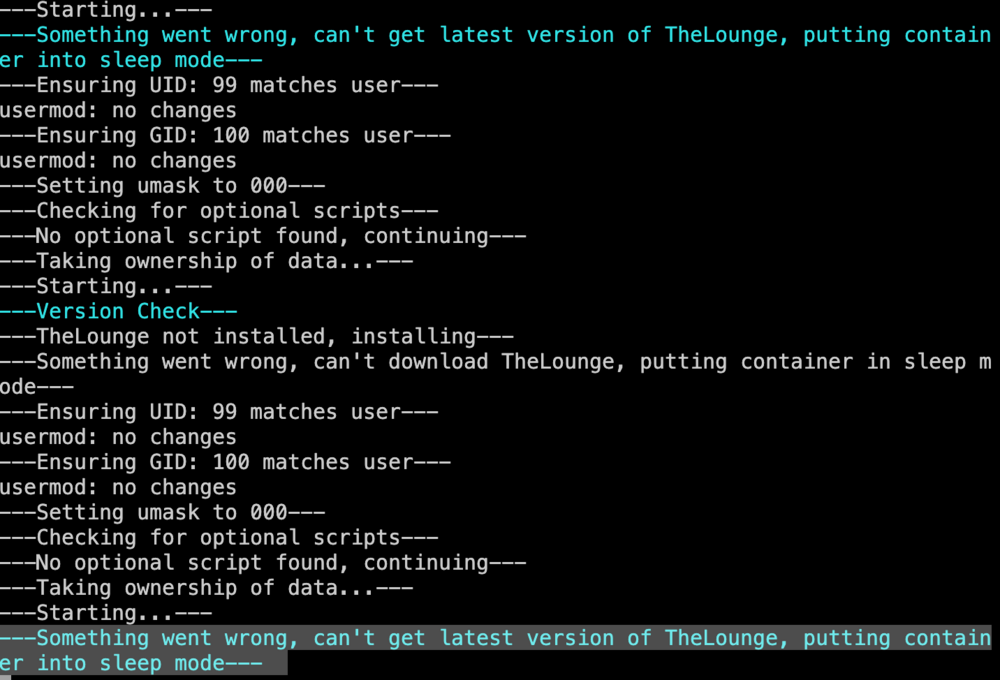
I fixed my issue, in appdata/thelounge there was a 0 byte file that appeared to be the (attempted) download of the latest version of TheLounge. I deleted that and restarted the container, fixed my issue.
-
I am having an issue for the last few days with TheLounge docker. Its run perfectly for months but recently its not starting up correctly and the log is throwing an error ---Something went wrong, can't get latest version of TheLounge, putting container into sleep mode---
-
I am having a similar issue to the person above me, I have the quassel-core docker running and can access it fine from the desktop client, but when using the quessel-web docker i input the login credentials and it just spins at "connecting" forever. In the quassel-core logs I can see the following 2024-03-30 18:47:14 [Info ] Client connected from 172.18.0.1 If I connect from my desktop client the logs show 2024-03-30 18:47:58 [Info ] Client connected from 192.168.1.10 2024-03-30 18:47:58 [Info ] Client 192.168.1.10 initialized and authenticated successfully as "username" (UserId: 1). im using identical credentials for both, but the web client never triggers the second authentication line in the logs (sucess or fail...) its like it just isnt pushing the full request through? any support on this would be appreciated, i suspect this is a pretty rarely used docker given how quiet this thread is...
-
Im seeing similar symptoms, extremely high CPU usage in the UNRAID dashboard, by very normal cpu usage when i run 'top' or 'htop' in terminal. Restarts didnt fix it for me, and upgrading the latest unraid did not fix it either. ( I went from 6.6.3 to 6.6.6). I am running standard stuff, plex, sonarr, couch potato, sabnzbd, letsencrypt (with some wordpress sites), mysql, mariadb, nextcloud, rutorrent, unifi, muximux. I have found the culprit in my case to be couchpotato, it is running the mover on my completed torrents folder on repeat erroneously.. as in copy completed torrent xyz to the library location leaving a copy in the completed folder (as it should for seeding), however then not remembering that its processed that file already, and just doing it again and again, cycling through all the files in the folder.... I havent figured out what is wrong with couchpotato or how to fix it yet, but at least i know what the issue is and disabling couchpotato docker for now has stopped the super high CPU usage.
-
In the last week or so, this docker has stopped connecting to all my trackers that require HTTPS for the tracker announce URL's I have tried blowing it away entirely and rebuilding with no luck, the same torrents added to Linuxserver transmission or deluge dockers work perfectly, Any ideas?
-
Hey All So i successfully configured this docker to run reverse proxies for about 8 other dockers, they are all exposed (with a .htpasswd for access) over https on my duckdns domain pointing to my server. Super happy with it, thanks to many within this thread for various code snippets that helped me, and my working code is pasted below What I want to do now is host a public wordpress blog, can anyone give me some insight as to how to do this? So far I have installed apache docker (linuxservers.io) copied (unzipped) wordpress into a folder in the www folder installed the mysql docker (linuxserver.io) hit wordpress config page, configured it to use the mysql db wordpress is kinda locally now at 192.168.1.100:89 (via apache) so now i started some random config in the NGINX site-confs/default file that I have pasted below edit: solved my problem, here is how I did it unzipped wordpress into a folder called insertmydomain2.com the www folder of ngynx installed the mysql docker (linuxserver.io) used the mysql workbench tool to configure a 'wordpress' schema, and create a user that can access it configured my nginx default config file as per below pointed A record of the the domain i am using for this wordpress to my ip address hit my domain and boom, wordpress config page, easy mode from there i really have no idea what i am doing i figured this shit out with brute force, some copy paste and lots of reading through this forum # wordpress server running without https server { listen 80; server_name insertmydomain2.com; root /config/www/insertmydomain2.com; index index.html index.htm index.php; location ~ \.php$ { fastcgi_split_path_info ^(.+\.php)(/.+)$; # With php5-cgi alone: fastcgi_pass 127.0.0.1:9000; # With php5-fpm: #fastcgi_pass unix:/var/run/php5-fpm.sock; fastcgi_index index.php; include /etc/nginx/fastcgi_params; } location / { try_files $uri $uri/ /index.php?$args; } location ~ \.php$ { fastcgi_split_path_info ^(/)(/.*)$; } } # main server with most of my dockers running on https server { listen 443 ssl; root /config/www; index index.html index.htm index.php; server_name mydomain1.com; ssl_certificate /config/keys/letsencrypt/fullchain.pem; ssl_certificate_key /config/keys/letsencrypt/privkey.pem; ssl_dhparam /config/nginx/dhparams.pem; ssl_ciphers 'ECDHE-RSA-AES128-GCM-SHA256:ECDHE-ECDSA-AES128-GCM-SHA256:ECDHE-RSA-AES256-GCM-SHA384:ECDHE-ECDSA-AES256-GCM-SHA384:DHE-RSA-AES128-GCM-SHA256:DHE-DSS-AES128-GCM-SHA256:kEDH+AESGCM:ECDHE-RSA-AES128-SHA256:ECDHE-ECDSA-AES128-SHA256:ECDHE-RSA-AES128-SHA:ECDHE-ECDSA-AES128-SHA:ECDHE-RSA-AES256-SHA384:ECDHE-ECDSA-AES256-SHA384:ECDHE-RSA-AES256-SHA:ECDHE-ECDSA-AES256-SHA:DHE-RSA-AES128-SHA256:DHE-RSA-AES128-SHA:DHE-DSS-AES128-SHA256:DHE-RSA-AES256-SHA256:DHE-DSS-AES256-SHA:DHE-RSA-AES256-SHA:AES128-GCM-SHA256:AES256-GCM-SHA384:AES128-SHA256:AES256-SHA256:AES128-SHA:AES256-SHA:AES:CAMELLIA:DES-CBC3-SHA:!aNULL:!eNULL:!EXPORT:!DES:!RC4:!MD5:!PSK:!aECDH:!EDH-DSS-DES-CBC3-SHA:!EDH-RSA-DES-CBC3-SHA:!KRB5-DES-CBC3-SHA'; ssl_prefer_server_ciphers on; client_max_body_size 0; #muximux location / { auth_basic "Restricted"; auth_basic_user_file /config/nginx/.htpasswd; include /config/nginx/proxy.conf; proxy_pass http://192.168.1.100:99; } #sonarr location ^~ /sonarr { auth_basic "Restricted"; auth_basic_user_file /config/nginx/.htpasswd; include /config/nginx/proxy.conf; proxy_pass http://192.168.1.100:8989/sonarr; } #couchpotato location ^~ /couch { auth_basic "Restricted"; auth_basic_user_file /config/nginx/.htpasswd; include /config/nginx/proxy.conf; proxy_pass http://192.168.1.100:5050/couch; } #transmission location ^~ /transmission { auth_basic "Restricted"; auth_basic_user_file /config/nginx/.htpasswd; include /config/nginx/proxy.conf; proxy_pass http://192.168.1.100:9091/transmission; } #sabnzbd location ^~ /sabnzbd { auth_basic "Restricted"; auth_basic_user_file /config/nginx/.htpasswd; include /config/nginx/proxy.conf; proxy_pass https://192.168.1.100:9090/sabnzbd; } #plexpy location ^~ /plexpy { auth_basic "Restricted"; auth_basic_user_file /config/nginx/.htpasswd; include /config/nginx/proxy.conf; proxy_pass http://192.168.1.100:8181/plexpy; proxy_bind $server_addr; proxy_set_header X-Forwarded-Host $server_name; proxy_set_header X-Forwarded-Ssl on; } #rutorrent location ^~ /rutorrent { auth_basic "Restricted"; auth_basic_user_file /config/nginx/.htpasswd; include /config/nginx/proxy.conf; proxy_pass http://192.168.1.100:82/; } #ombi - non-restricted access location ^~ /ombi { include /config/nginx/proxy.conf; proxy_pass http://192.168.1.100:86/ombi; } #pi-hole location ^~ /pihole { auth_basic "Restricted"; auth_basic_user_file /config/nginx/.htpasswd; include /config/nginx/proxy.conf; proxy_pass http://192.168.1.4/admin/; } } TODO any help would be appreciated: Figure out how to host the wordpress site on port 443 https on its unique domain, without breaking everything else currently running in the 443 server block on their seperate duckdns.org domain
-
Same with me, i cant manually add torrents anymore, also couchpotato and sonar cant add torrents either.... seems to be after the last update, I haven't changed anything else
-
I want to use ruTorrent to create torrent files based on files I have moved out of the downloads directory and into another share location As such i have exposed more directories as per screenshot below However in ruTorrent when navigating to any location other than the /downloads/... it errors "Incorrect directory ()" It is like it is hardcoded to only allow me to access the folder mapped to /downloads/ Any ideas?
-
I got it working My problem was that I was an idiot.... i was entering a username and password when i had not configured a username and password in ruTorrent duuuur herp durp For anyone else's reference host: IP of unraid server (192.168.1.100 for me) port: 8080 is default, (i remapped mine to 82) urlpath: RPC2 category: TV everything else default
-
Has anyone got this Sonar working with Linuxserver.io's ruTorrent docker? http://lime-technology.com/forum/index.php?topic=47299.0 I for the life of me cant figure out what config is required on this screen to make it work? If someone could post a screenshot of their working Sonar config for ruTorrent i would really appreciate it
-
Mulletboy, you don't need to change anything in rtorrent add this to your Apache default.conf RewriteRule ^/rtorrent$ /rtorrent/ [R] <Location /rtorrent> ProxyPass http://192.168.0.100:82/ ProxyPassReverse http://192.168.0.100:82/ </Location> This worked perfectly for me! (once i found my typo in the IP address lol) Thanks
-
How do I change the URL Base for RUTorrent? Currently I access the webgui through http://192.168.1.100:82/ I need to be able to access it from http://192.168.1.100:82/rutorrent/ I have already done this for sonar, couchpotato, plexpy, transmission and other things... but cant for the life of me find out how to do it for the RUTorrents webgui... This is so I can easily configure it with reverse proxy under apache and then have it exposed through muximux My apache sites config currently has the following settings
