





Fresh
Members
-
Joined
-
Last visited
-
been a few days, haven't had an issue again but based on previous timeframes it only happened once or twice a year, so I'll post again in a few or when it crashes again after the suggested changes above 🤘
-
Makes sense, I think I've fixed this issue by fixing the gameserver ulimits, it's not spamming the logs right now but will see tomorrow. Otherwise I'll need another solution for those two games (Eco and Valheim) to avoid this error.
-
Yeah running compose for some bits, these containers are from the pterodactyl gameserver panel, I found two of them relying on dotnet to seemingly cause these vnets to pop, but that can't be a server wide OOM error, right?
-
Looked into this and I see no containers in docker ps having issues, further pterodactyl0 is not a docker network name or similar, looks like a linux vnet created for the docker network to me, any clues why it's doing what it's doing? All available docker networks: ~# docker network list NETWORK ID NAME DRIVER SCOPE 7dc8a6494188 bridge bridge local ffa2173072b7 eth0 macvlan local 3d39d4cdeb52 fluxer_fluxer bridge local 1a466f061c07 host host local 5b55eb2260f2 immich_nw bridge local 202f0104166c nextcloud-aio bridge local 5495af718f63 none null local 458aad03c36c odroid-containers_default bridge local b6d18703a7b1 pterodactyl_nw bridge local dfe166a89b57 wings0 bridge localThe pterodactyl_nw network seems to reference that pterodactyl0 vnet: ~# docker network inspect pterodactyl_nw
-
Oh that doesn't sound right. I'm gonna check that out, thanks!
-
As the help docs outline, I am seeking assistance on debugging the OOM error. Have been a Unraid user for quite a while but really just a user though. Could I get some professional eyes on this pretty please? unraid-diagnostics-20260827-2126.zip a side effect of the OOM is that the unraid webUI is unreachable and the nginx service seems down, starting it back up with /etc/rc.d/nginx start gets things running again and as far as I can tell that's the only result of the OOM. A reboot of course also solves it Thank you very much!
-
I'm also interested in a guide on how to upgrade from 6 to 7 with a migration path from btrfs to zfs
-
ah, Well not sure why but now it works so I'm happy. Thanks a lot for your time and help!
-
I did add the -debug as it asked for that It's set to "Only" and starting over resolved the issue. I guess some file permission issue on the existing folder
-
It works after starting over. I'm legitimately very confused now. Docker *magic*
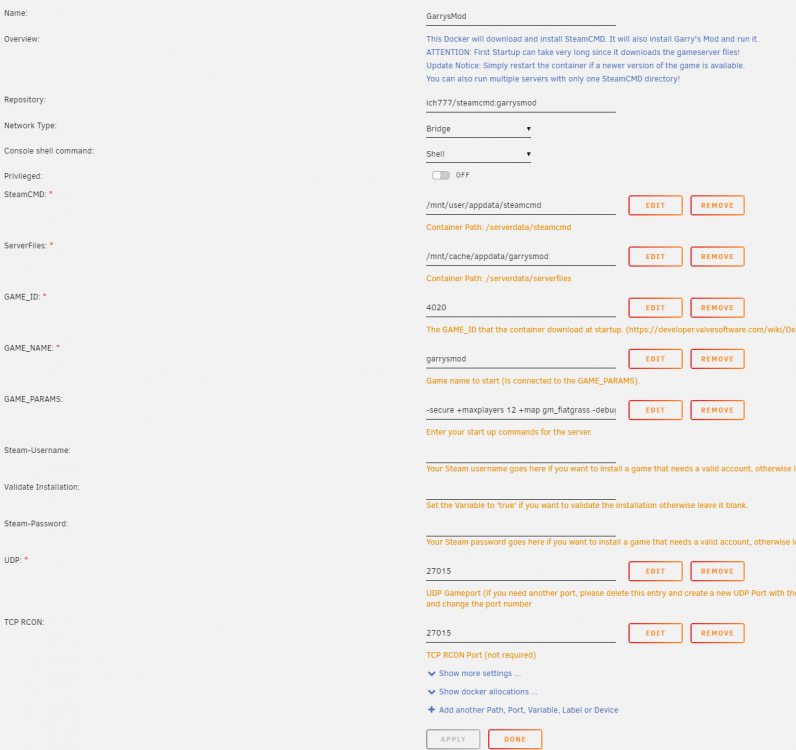
-
yes, using the /mnt/cache default path will try I did, yes
-
Funny enough, I've re-installed your docker image just now to remove some workshop files that I didn't need anymore and now I run into the same error the image through pterodactyl gets. I'm super confused now ---Checking if UID: 99 matches user--- ---Checking if GID: 100 matches user--- ---Setting umask to 000--- ---Checking for optional scripts--- ---No optional script found, continuing--- ---Starting...--- ---Update SteamCMD--- Redirecting stderr to '/serverdata/Steam/logs/stderr.txt' [ 0%] Checking for available updates... [----] Verifying installation... Steam Console Client (c) Valve Corporation -- type 'quit' to exit -- Loading Steam API...OK. Connecting anonymously to Steam Public...Logged in OK Waiting for user info...OK ---Update Server--- Redirecting stderr to '/serverdata/Steam/logs/stderr.txt' [ 0%] Checking for available updates... [----] Verifying installation... Steam Console Client (c) Valve Corporation -- type 'quit' to exit -- Loading Steam API...OK. Connecting anonymously to Steam Public...Logged in OK Waiting for user info...'---Checking if UID: 99 matches user--- usermod: no changes ---Checking if GID: 100 matches user--- usermod: no changes ---Setting umask to 000--- ---Checking for optional scripts--- ---No optional script found, continuing--- ---Starting...--- ---Update SteamCMD--- Redirecting stderr to '/serverdata/Steam/logs/stderr.txt' Looks like steam didn't shutdown cleanly, scheduling immediate update check [ 0%] Checking for available updates... [----] Verifying installation... Steam Console Client (c) Valve Corporation -- type 'quit' to exit -- Loading Steam API...OK. Connecting anonymously to Steam Public...Logged in OK Waiting for user info...OK ---Update Server--- Redirecting stderr to '/serverdata/Steam/logs/stderr.txt' [ 0%] Checking for available updates... [----] Verifying installation... Steam Console Client (c) Valve Corporation -- type 'quit' to exit -- Loading Steam API...OK. Connecting anonymously to Steam Public...Logged in OK Waiting for user info...OK Update state (0x3) reconfiguring, progress: 0.00 (0 / 0) Update state (0x1) running, progress: 64.55 (1415847920 / 2193353936) Update state (0x1) running, progress: 64.55 (1415847920 / 2193353936) Update state (0x61) downloading, progress: 59.52 (2369301572 / 3981009071) Warning: failed to init SDL thread priority manager: SDL not found Update state (0x61) downloading, progress: 61.34 (2442121541 / 3981009071) Update state (0x61) downloading, progress: 65.59 (2610963175 / 3981009071) Update state (0x61) downloading, progress: 70.40 (2802783602 / 3981009071) Update state (0x61) downloading, progress: 75.30 (2997872503 / 3981009071) Update state (0x61) downloading, progress: 79.51 (3165329443 / 3981009071) Update state (0x61) downloading, progress: 87.96 (3501656081 / 3981009071) Update state (0x61) downloading, progress: 91.13 (3627911152 / 3981009071) Update state (0x61) downloading, progress: 92.71 (3690664312 / 3981009071) Update state (0x61) downloading, progress: 93.02 (3703162899 / 3981009071) Update state (0x61) downloading, progress: 93.35 (3716318398 / 3981009071) Update state (0x61) downloading, progress: 96.28 (3832985924 / 3981009071) Update state (0x61) downloading, progress: 100.00 (2193353936 / 2193353936) Update state (0x101) committing, progress: 0.85 (33928798 / 3981009071) Update state (0x101) committing, progress: 21.77 (866687766 / 3981009071) Update state (0x101) committing, progress: 23.12 (920437572 / 3981009071) Update state (0x101) committing, progress: 92.87 (3697194812 / 3981009071) Success! App '4020' fully installed. ---Prepare Server--- ---Server ready--- ---Start Server--- Auto detecting CPU Using default binary: ./srcds_linux Server will auto-restart if there is a crash. tcmalloc: large alloc 4294754304 bytes == (nil) @ tcmalloc: large alloc 4294754304 bytes == (nil) @ Setting breakpad minidump AppID = 4000 tcmalloc: large alloc 4294754304 bytes == (nil) @ Segmentation fault Add "-debug" to the /serverdata/serverfiles/srcds_run command line to generate a debug.log to help with solving this problem Mon 01 Feb 2021 11:17:55 AM PST: Server restart in 10 seconds tcmalloc: large alloc 4289560576 bytes == (nil) @ tcmalloc: large alloc 4289560576 bytes == (nil) @ Setting breakpad minidump AppID = 4000 tcmalloc: large alloc 4289560576 bytes == (nil) @ Segmentation fault Add "-debug" to the /serverdata/serverfiles/srcds_run command line to generate a debug.log to help with solving this problem Mon 01 Feb 2021 11:18:08 AM PST: Server restart in 10 seconds tcmalloc: large alloc 4288176128 bytes == (nil) @ tcmalloc: large alloc 4288184320 bytes == (nil) @ Setting breakpad minidump AppID = 4000 tcmalloc: large alloc 4288184320 bytes == (nil) @ Segmentation fault Add "-debug" to the /serverdata/serverfiles/srcds_run command line to generate a debug.log to help with solving this problem Mon 01 Feb 2021 11:18:20 AM PST: Server restart in 10 seconds tcmalloc: large alloc 4290936832 bytes == (nil) @ tcmalloc: large alloc 4290936832 bytes == (nil) @ Setting breakpad minidump AppID = 4000 tcmalloc: large alloc 4290936832 bytes == (nil) @ Segmentation fault Add "-debug" to the /serverdata/serverfiles/srcds_run command line to generate a debug.log to help with solving this problem Mon 01 Feb 2021 11:18:33 AM PST: Server restart in 10 seconds tcmalloc: large alloc 4287037440 bytes == (nil) @ tcmalloc: large alloc 4287037440 bytes == (nil) @ Setting breakpad minidump AppID = 4000 tcmalloc: large alloc 4287037440 bytes == (nil) @ Segmentation fault Add "-debug" to the /serverdata/serverfiles/srcds_run command line to generate a debug.log to help with solving this problem Mon 01 Feb 2021 11:18:46 AM PST: Server restart in 10 seconds tcmalloc: large alloc 4287037440 bytes == (nil) @ Setting breakpad minidump AppID = 4000 tcmalloc: large alloc 4287037440 bytes == (nil) @ Segmentation fault Add "-debug" to the /serverdata/serverfiles/srcds_run command line to generate a debug.log to help with solving this problem Mon 01 Feb 2021 11:18:46 AM PST: Server restart in 10 seconds
-
Yes, but that one also doesn't work. I thought perhaps their docker image is just broken so I created my own egg with your image in it.
-
Hehe, no they can just start the machine up, nothing more It runs without the panel I have a security gateway inbetween that disables the port forwarding if the gameserver isn't booted up
-
Yes but I want my firends to be able to start it as well. Unraid does not have such fine-grained permission systems to allow access only to specific docker containers The server is booted up through IPMI which they can access and then boot up which ever gameserver they need at the moment. Edit: seems like it works without pterodactyl it's just docker so that should work regardless of how the container is started, shouldn't it?

