brgor
Members
-
Joined
-
Last visited
Everything posted by brgor
-
Unfortunately I think you're right. I should have known better; It has a VGA port and Nvidia hasn't done analog video since Maxwell. That's what I get for not paying close attention to the listing. Thanks for the help!
-
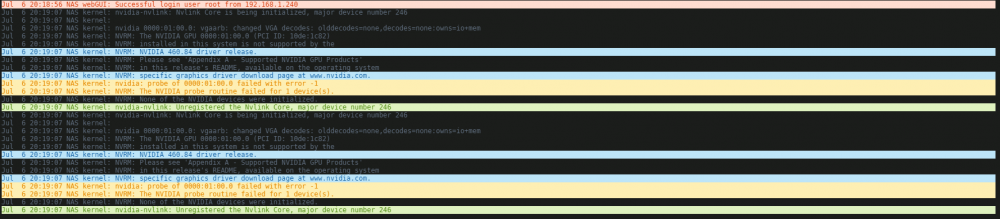
Here is the diagnostics .zip. What do you mean "a picture from the card itself?" Like boot unraid to UI mode and a take a picture? nas-diagnostics-20210707-1630.zip EDIT: Booting to GUI mode gives the same error I see in the syslog. I just get left on a black screen. If I change console sessions (Ctrl+Alt+F1) I get the usual console login prompt. startx does nothing. It seems like the system recognizes the card, but the driver doesn't. The device ID(?): '0000:01:00.0' doesn't seem right to me.
-
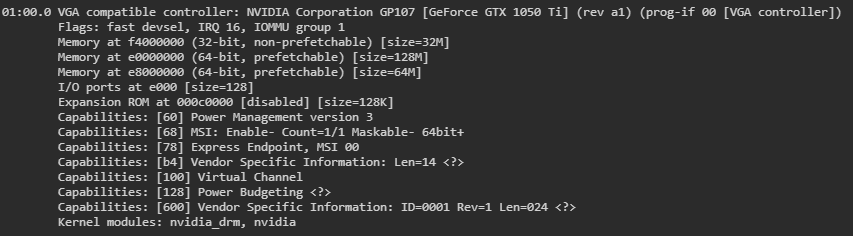
I just picked up a GTX 1050ti to use for Plex transcoding and I'm getting the error message: NVIDIA-SMI has failed because it couldn't communicate with the NVIDIA driver. Make sure that the latest NVIDIA driver is installed and running. It shows up in lspci -v and I've made sure it's not checked under Tools>System Devices (VMs are disabled.) I see this in the syslog: kernel: nvidia: probe of 0000:01:00.0 failed with error -1 kernel: NVRM: The NVIDIA probe routine failed for 1 device(s). Google doesn't give me any results except that it may be a bug in the nvidia drivers. Is there anything I can do?