





Mylo75
Members
-
Joined
-
Last visited
-
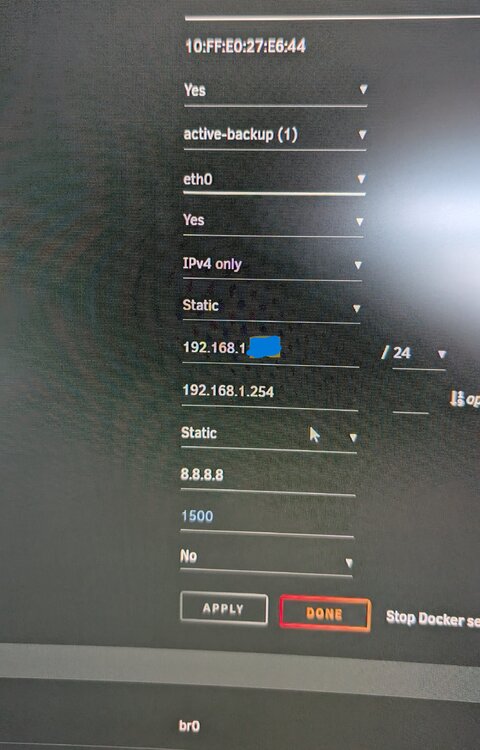
I changed IPv4 DNS server: to 8.8.8.8 and now its working, is that a safe setting to use?
-
Yes I can access via keyboard/monitor and login via command line. That's why theres only a 2 minute log as when I can't access from web browser I shutdown or reboot from command line. I've read somewhere it could be a problem with a realtek ethernet driver?New syslog attached after enabling syslog server. syslogI only get to access the gui for a very short time and was very lucky to get the syslog downloaded at all, I wouldn't have enough time to do anymore. I can boot to unraid OS GUI Mode without loosing access or getting booted out if that is any help?I tried downgrading but that hasn't worked either.Hey guys could someone please take a look at my diagnostics file as I'm useless at this sort of thing. Unraid boots and I can access unraid GUI from my web browser as normal, but after a few minutes I loose connection. Unraid is still running I think but I cant access which is bad as I'm totally lost without a GUI. tower-diagnostics-20250109-2049.zipCPU Intel Core i5-12400 2.5 GHz 6-Core Processor CPU Cooler Noctua NH-D15S chromax black Motherboard Gigabyte Z790 AORUS ELITE AX ATX LGA1700 Motherboard Memory Kingston FURY Renegade 32 GB (2 x 16 GB) DDR5-6000 CL32 Memory Power supply ASUS ROG Thor 1000W Plat II PS Fractal Design Meshify 2 ATX Mid Tower Case Just getting back to looking at this now. Would this be a good fit? Whats the reason to avoid intels 13 & 14 gen cpusUnraid Server M/B: Supermicro - X8DTL CPU: Intel® Xeon® CPU L5520 @ 2.27GHz HVM: Enabled IOMMU: Enabled Cache: 256 kB, 1024 kB, 8192 kB Memory: 12 GB Network: bond0: fault-tolerance (active-backup), mtu 1500 eth0: 1000 Mb/s, full duplex, mtu 1500 600 watt Power supply 4 8tb drives and 2 6tb drives What would be a decent energy efficient upgrade from this old server hardware I'm currently running. I'm running 12 or so dockers, 1 or 2 plex streams and 1 or 2 non gaming vms also leaving some room for extra future usage. Thanks in advance.Component Costs: Processor: Intel Xeon E-2288G: Approximately £400 AMD Ryzen 7 5700G: Approximately £300 Motherboard: ASRock Rack E3C246D4I-2T: Approximately £250 ASUS Pro WS X570-ACE: Approximately £200 Memory: 32GB ECC RAM: Approximately £150 Power Supply: 80 PLUS Platinum PSU: Approximately £100 Cooling: Noctua NH-L9i: Approximately £40 P.S I already have storage and case. Any thoughts on this for an energy efficient home server. Should be fit to run 2 vms, 2 plex streams and 12 dockers. Thanks in advance.Proxmox ce? Does this run as VM in unraid or replace unraid as the os.So I have been using unraid for a few years now and mostly use it to manage my media library. Last year I built a new server which now runs windows as a VM, this replaced an old pc. The problem is my son does a bit of pc gaming and more games seem to be blocking VM machines, even Roblox will not run on windows VM anymore. What are my options. Can I boot to windows and run unraid as a VM? Or will windows 11 do all the things docker wise that unraid does for me. Thanks in advance.Think I figured it out. I think for some reason Radarr decided to write these folders to disk which then created all the new shares. Lets hope that fixes the freexing issue somehow too. Thanks for the help anyhow.No i had it all setup and working perfect for weeks when this all of a sudden happened.


