





Everything posted by Taddeusz
-
@3dee I'm not entirely sure but at this time it looks like your only option may be to disable NLA on your Windows 7 machine.
-
@3dee Also, if you add the environment variable GUACD_LOG_LEVEL and set the value to "debug" without the quotes the output will be more detailed.
-
@3dee Sorry, I missed that. I wonder if since Windows 7 is end-of-life that means it won't also have its CA certificates updated? Meaning any certificates will forever be untrusted. Can you connect to that machine from another Windows machine? You might also look in the Windows logs to see if it shines any light on why it's not connecting.
-
@3dee In the RDP connection settings there's an option, "Ignore server certificate", make sure it's checked.
-
Looks like it's going to be fixed in 1.5.1. In their JIRA it's reported in GUACAMOLE-1741. It appears it's an incompatibility with the OpenSSL library so I hope the fix won't affect SSH.
-
@Urbanpixels @FabienN @Kamvas I installed TightVNC server on my Windows 11 VM. I was able to connect to it through the Real VNC Viewer just fine so I know it was working. I started the VNC server with no password required. In Guacamole if I created the connection with NO port specified (blank port input box) it will not connect. It doesn't seem to assume port 5900 if no port is specified. If I specify port 5900 in the connection settings it successfully connects. I also did this test on 1.4.0 but have the same problem. If I don't specify a port it won't connect. I'm not sure if this was able to reproduce your problem. I think the only thing I can say is to make sure both the IP and port are specified in the connection settings. I've been able to connect to any VNC server if I specify the port.
-
What OS’s are these connections to?
-
@Urbanpixels Is this a newly created connection or one that was created before upgrading and stopped working? Make sure the connection information is in the correct box, that it’s not in the Guacamole Proxy Parameters section.
-
@nik82 I've just pushed a small update. There was a guacd dependency I missed. I've not had any problems with VNC connections. The ones I've tried are to Docker containers.
-
@nik82 Are there any errors in the log?
-
@Zeroeth I've tested with their guacd container and get the same error. In fact, it's actually worse because once GhostScript fails once it apparently never closes the print job and I end up with an error in my remote Windows which I wasn't getting from my own guacd. I'll put in a bug report if there isn't one already.
-
@Zeroeth I've reproduced the problem. I'll have to do some testing to see if it's a bug with guacd or with my implementation.
-
Ok, I have promoted 1.5.0 to be "latest". Please be aware of the big red message at the top. You MUST have upgraded to 1.4.0-3 before upgrading to 1.5.0.
-
@codyrat I would suggest making a comment and asking if they could push the change to 1.5.1.
-
@codyrat I'm sorry, I take the guacamole server (guacd) binary as it is. It would take a lot of work to make a custom build to back port that one fix. I know that report says that the fix version will be 1.6.0 but it appears that they are going to do a 1.5.1 release. The change was merged 2 hours ago.
-
Let me also say that I'm a little excited about 1.5.0. Due to switching from a Debian base to an Alpine base the containers are about half the size.
-
I have an update. I'm not quite ready to push 1.5.0 out due to a problem I've found with the 1.4.0 container. Apparently using mysqld_safe does not shut the process down cleanly so the database was being left in a dirty state. I discovered this when I ran the newer MariaDB in Alpine it was complaining that the database needed to be opened and closed in an earlier version of MariaDB. So, I've pushed out a new version of 1.4.0 that works as it should, starting mysqld directly so that it shuts the database down correctly. Honestly, this might explain some of the database problems some of you have reported. I'll give it a day or two and then push out 1.5.0 when I feel it's ready.
-
Sorry, it's been a busy few weeks and my brain just hasn't been able to focus. I'm going to put in effort this weekend to try and get it out.
-
There's a link to copy the URL. You can insert that URL into the TOTP field when you're editing your unraid.net login information.
-
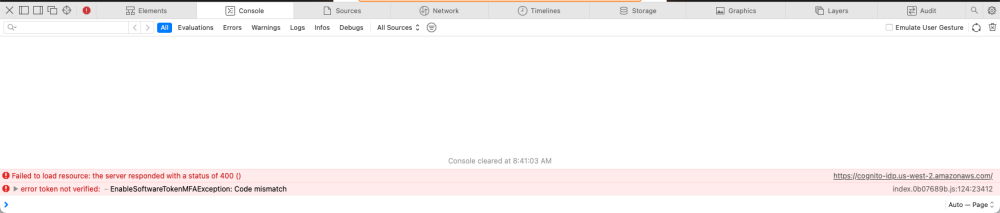
I think there’s something in the JavaScript that’s incompatible with Safari. In the console I was seeing code mismatch errors. Disappointing that there’s no user feedback to indicate an error let alone any indicator that anything at all actually happened. Hopefully there will be some follow up update that will provide user feedback and wider browser compatibility.
-
I've setup Mylar to use Newznab and NZBGet but when I search for stuff it never finds anything. I've even manually searched in my indexers and I see them. I'm not sure what's going on.
-
There are definitely some compatibility issues with Safari on macOS. I first signed out in Safari. I used Chrome, signed in successfully, enabled MFA using Bitwarden. Then switched back to Safari and signed back in. I was prompted for the code and signed in successfully. On Safari when I go to manage my Unraid.net account it shows that MFA is disabled while Chrome shows it's enabled. Safari is my primary browser on my Mac since I use iDevices and it's just easier so that I have the same bookmarks on all my devices. Most things work fine on Safari. I only have Chrome on my Mac just in case something isn't working correctly.
-
This is the output from the console when I hit the final "Enable MFA" button.
-
This still isn't working for me with Safari and Bitwarden.
-
I've successfully logged back in but in Safari the MFA stuff doesn't appear to work. In fact, I switched to Chrome and successfully enabled MFA but when I go back to Safari it doesn't even seem aware that MFA has been enabled. The status still says disabled. I should specify, when I say it doesn't work I go to enable it, add it to my Bitwarden, try and put in the code but the final "Enable MFA" button doesn't do anything when it's clicked. I see several errors in the console, most notably "code mismatch" no matter how many times I put in a code.


