





arkan
Members
-
Joined
-
Last visited
Everything posted by arkan
-
Hello guys, I wanted to give a quick update about all the questions i've been asking previously. About the Docker issue, I've not been able to fix it, so I created a Linux VM with only Docker in it, and it works perfectly Regarding the sound issue, I was using a USB sound card, and I wasn't passing an entire USB controller. I did it and it solved all the glitches. Thanks again for all your help
-
Thanks! I missed the video. I'll check this out
-
Hello, I tried to run the VM by changing the CPU type in the XML from Penryn to host, and newer types, but OSX refused to load in all the scenarios. Any clue?
-
Hey guys, In the OSX VM running on top on unRAID, I'm trying to install Docker. It refuses to install with the following error: "Incompatible CPU detected" Apparently the CPU appears to lack some instructions or capabilities. Any idea?
-
Thanks @Thingi On my side I have sound, but it's choppy with some pauses every few seconds. This is really annoying and the microphone is barely usable because of this .... I'm wondering if this is not related to the Qemu bug which fails to properly detect the frequency. What do you think @gridrunner?
-
@elmn8r : I think I already got this issue which was caused by an invalid CPU. I had to tweak the XML to make it works. <vcpu placement='static'>4</vcpu> <cputune> <vcpupin vcpu='0' cpuset='2'/> <vcpupin vcpu='1' cpuset='3'/> <vcpupin vcpu='2' cpuset='6'/> <vcpupin vcpu='3' cpuset='7'/> </cputune> <resource> [...] <cpu mode='host-passthrough'> <topology sockets='1' cores='4' threads='1'/> </cpu> [...] <qemu:commandline> <qemu:arg value='-device'/> <qemu:arg value='usb-kbd'/> <qemu:arg value='-device'/> <qemu:arg value='usb-mouse'/> <qemu:arg value='-smbios'/> <qemu:arg value='type=2'/> <qemu:arg value='-cpu'/> <qemu:arg value='Penryn,vendor=GenuineIntel'/> </qemu:commandline>
-
Hey Gridrunner, Thanks for the reply. I solved the issue by upgrading the nVidia driver to the latest available one: https://images.nvidia.com/mac/pkg/378/WebDriver-378.05.05.05f01.pkg So now "almost" everything is working properly. The last issue is the sound. I have tested 3 different ways to have sound which where: - USB SoundCard - Bluetooth headset - Splashtop sound driver All of these solutions suffered from noice crackling/stops for a few milliseconds. I also noticed having the similar issue(less noticeable though) on my Windows Gaming Rig also running on unRaid. I haven't configured anything on unRaid regarding the CPUs with `isolcpus` for example. Should I? Is there any other things that I should be taking care of? Thanks
-
Hey, Thanks for the video, and this new method which is really really faster than the old one. However I got an issue at some point: OSX was running 10x the normal speed. I browsed the thread, and found out the solution was to use older UFI files. I took those from your video from september. It did the trick. However I'm curious to know the reason of this failure for some of us But I got other issues too ... I've been able to boot, and also been able to attach the GPU (a MSI 1070 Gaming X). However the Graphic card is not recognized on OSX, and appears incorrectly. I've attached several pictures and the VM XML + Clover config plist + devices informations are available here https://gist.github.com/arkan/0aabf5243d5fe3af82eaeb6aaf8539cc Anyone has an idea? Thanks
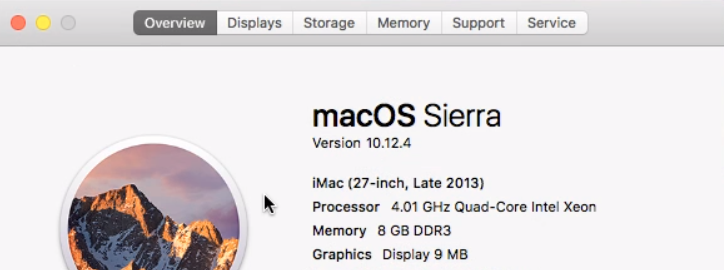
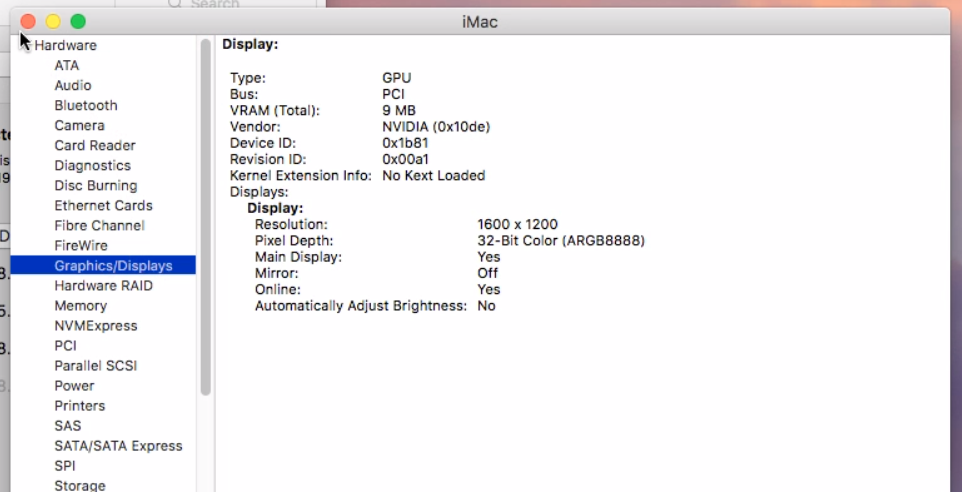
-
I'm getting the following error while trying to update the Plex image: root@ark:~# docker pull limetech/plex Using default tag: latest latest: Pulling from limetech/plex 6ffe5d2d6a97: Already exists f4e00f994fd4: Already exists e99f3d1fc87b: Already exists a3ed95caeb02: Already exists ededd75b6753: Already exists 1ddde157dd31: Already exists 0a487611efb0: Pull complete 8bfd8127b8cc: Pull complete ea61e8c14bd4: Pull complete layers from manifest don't match image configuration root@ark:~# docker version Client: Version: 1.10.3 API version: 1.22 Go version: go1.5.3 Git commit: ceb0ccd-unsupported Built: Sun Mar 13 18:56:59 2016 OS/Arch: linux/amd64 Server: Version: 1.10.3 API version: 1.22 Go version: go1.5.3 Git commit: ceb0ccd-unsupported Built: Sun Mar 13 18:56:59 2016 OS/Arch: linux/amd64 root@ark:~# Any idea?
