Liwiu
Members
-
Joined
-
Last visited
-
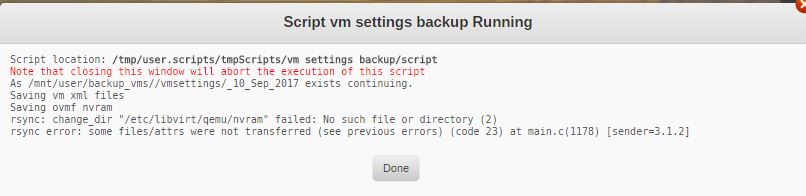
Hi guys, I'm trying to make a backup of my VM's but I don' know for sure if it's working or not. I used the script backup VM and I get a error. How can I resolve his one?
-
Thanks raidserver, it's working. Regards, Liviu
-
Hi raidserver, I was reading all day at work about this, and probably this is the issue. I will try it when I'm getting home. The VM is working with VNC. Thank you for your time. Regards, Liviu
-
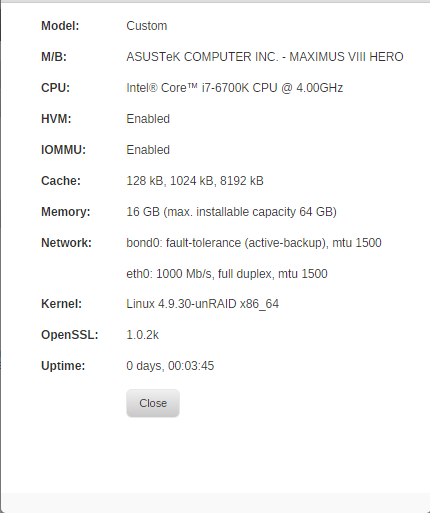
Hi all, I'm new with unRaid, so I have quite a big problem passthrough my video card (gtx 1080). When I want to start my virtual machine, I have black screen. Looking on the forum, I found out that my GPU is in the same group with something else ( please find attached pictures / text). The next info it is with the card in the first slot (pcie) with ACS override on. IOMMU group 0 [8086:191f] 00:00.0 Host bridge: Intel Corporation Skylake Host Bridge/DRAM Registers (rev 07) IOMMU group 1 [8086:1901] 00:01.0 PCI bridge: Intel Corporation Skylake PCIe Controller (x16) (rev 07) [8086:1905] 00:01.1 PCI bridge: Intel Corporation Skylake PCIe Controller (x8) (rev 07) [10de:1b80] 02:00.0 VGA compatible controller: NVIDIA Corporation GP104 [GeForce GTX 1080] (rev a1) [10de:10f0] 02:00.1 Audio device: NVIDIA Corporation GP104 High Definition Audio Controller (rev a1) IOMMU group 2 [8086:a12f] 00:14.0 USB controller: Intel Corporation Sunrise Point-H USB 3.0 xHCI Controller (rev 31) IOMMU group 3 [8086:a13a] 00:16.0 Communication controller: Intel Corporation Sunrise Point-H CSME HECI #1 (rev 31) IOMMU group 4 [8086:a102] 00:17.0 SATA controller: Intel Corporation Sunrise Point-H SATA controller [AHCI mode] (rev 31) IOMMU group 5 [8086:a167] 00:1b.0 PCI bridge: Intel Corporation Sunrise Point-H PCI Root Port #17 (rev f1) IOMMU group 6 [8086:a16a] 00:1b.3 PCI bridge: Intel Corporation Sunrise Point-H PCI Root Port #20 (rev f1) IOMMU group 7 [8086:a110] 00:1c.0 PCI bridge: Intel Corporation Sunrise Point-H PCI Express Root Port #1 (rev f1) IOMMU group 8 [8086:a118] 00:1d.0 PCI bridge: Intel Corporation Sunrise Point-H PCI Express Root Port #9 (rev f1) IOMMU group 9 [8086:a145] 00:1f.0 ISA bridge: Intel Corporation Sunrise Point-H LPC Controller (rev 31) [8086:a121] 00:1f.2 Memory controller: Intel Corporation Sunrise Point-H PMC (rev 31) [8086:a170] 00:1f.3 Audio device: Intel Corporation Sunrise Point-H HD Audio (rev 31) [8086:a123] 00:1f.4 SMBus: Intel Corporation Sunrise Point-H SMBus (rev 31) IOMMU group 10 [8086:15b8] 00:1f.6 Ethernet controller: Intel Corporation Ethernet Connection (2) I219-V (rev 31) IOMMU group 11 [1b21:0612] 04:00.0 SATA controller: ASMedia Technology Inc. ASM1062 Serial ATA Controller (rev 02) IOMMU group 12 [1b21:1242] 05:00.0 USB controller: ASMedia Technology Inc. ASM1142 USB 3.1 Host Controller IOMMU group 13 [144d:a804] 06:00.0 Non-Volatile memory controller: Samsung Electronics Co Ltd NVMe SSD Controller SM961/PM961 The next info it is with the card in the second slot (pcie) with ACS override on. IOMMU group 0 [8086:191f] 00:00.0 Host bridge: Intel Corporation Skylake Host Bridge/DRAM Registers (rev 07) IOMMU group 1 [8086:1901] 00:01.0 PCI bridge: Intel Corporation Skylake PCIe Controller (x16) (rev 07) IOMMU group 2 [8086:1905] 00:01.1 PCI bridge: Intel Corporation Skylake PCIe Controller (x8) (rev 07) IOMMU group 3 [8086:a12f] 00:14.0 USB controller: Intel Corporation Sunrise Point-H USB 3.0 xHCI Controller (rev 31) IOMMU group 4 [8086:a13a] 00:16.0 Communication controller: Intel Corporation Sunrise Point-H CSME HECI #1 (rev 31) IOMMU group 5 [8086:a102] 00:17.0 SATA controller: Intel Corporation Sunrise Point-H SATA controller [AHCI mode] (rev 31) IOMMU group 6 [8086:a167] 00:1b.0 PCI bridge: Intel Corporation Sunrise Point-H PCI Root Port #17 (rev f1) IOMMU group 7 [8086:a16a] 00:1b.3 PCI bridge: Intel Corporation Sunrise Point-H PCI Root Port #20 (rev f1) IOMMU group 8 [8086:a110] 00:1c.0 PCI bridge: Intel Corporation Sunrise Point-H PCI Express Root Port #1 (rev f1) IOMMU group 9 [8086:a118] 00:1d.0 PCI bridge: Intel Corporation Sunrise Point-H PCI Express Root Port #9 (rev f1) IOMMU group 10 [8086:a145] 00:1f.0 ISA bridge: Intel Corporation Sunrise Point-H LPC Controller (rev 31) [8086:a121] 00:1f.2 Memory controller: Intel Corporation Sunrise Point-H PMC (rev 31) [8086:a170] 00:1f.3 Audio device: Intel Corporation Sunrise Point-H HD Audio (rev 31) [8086:a123] 00:1f.4 SMBus: Intel Corporation Sunrise Point-H SMBus (rev 31) IOMMU group 11 [8086:15b8] 00:1f.6 Ethernet controller: Intel Corporation Ethernet Connection (2) I219-V (rev 31) IOMMU group 12 [10de:1b80] 02:00.0 VGA compatible controller: NVIDIA Corporation GP104 [GeForce GTX 1080] (rev a1) [10de:10f0] 02:00.1 Audio device: NVIDIA Corporation GP104 High Definition Audio Controller (rev a1) IOMMU group 13 [1b21:0612] 04:00.0 SATA controller: ASMedia Technology Inc. ASM1062 Serial ATA Controller (rev 02) IOMMU group 14 [1b21:1242] 05:00.0 USB controller: ASMedia Technology Inc. ASM1142 USB 3.1 Host Controller IOMMU group 15 [144d:a804] 06:00.0 Non-Volatile memory controller: Samsung Electronics Co Ltd NVMe SSD Controller SM961/PM961 It is a way how to "fix" this problem ? Do you need more info ? I really want to buy unRaid because it will make my life easier. Regards, Liviu