





Enver
Members
-
Joined
-
Last visited
Everything posted by Enver
-
I am not exactly sure; my machine has been offline for about four weeks as I had a CPU die and had to RMA it. At the time I was on unRAID 6.3.5, so perhaps its related to 6.4 RC8q?
-
I can see why it won't auto mount, as there is no valid file system on the first partition. I do not need or have ever wanted the first partition to mount as its something created by the RAID card. What I do not now is why its doing this now? The partition information on this RAID 5 array has not changed, so I can only think its something in UD that has? What I used to be able to do is automatically mount the /mnt/disks/Media share. ep 19 20:49:49 Adding disk '/dev/sdb1'... Sep 19 20:49:49 No filesystem detected, aborting. Sep 19 20:49:49 Partition 'Areca ARC 1883 VOL#000-part1' could not be mounted, aborting... Sep 19 20:57:44 Adding disk '/dev/sdb1'... Sep 19 20:57:44 No filesystem detected, aborting. Sep 19 20:57:44 Partition 'Areca ARC 1883 VOL#000-part1' could not be mounted, aborting... Sep 19 20:58:28 Adding disk '/dev/sdb1'... Sep 19 20:58:28 No filesystem detected, aborting. Sep 19 20:58:28 Partition 'Areca ARC 1883 VOL#000-part1' could not be mounted, aborting...
-
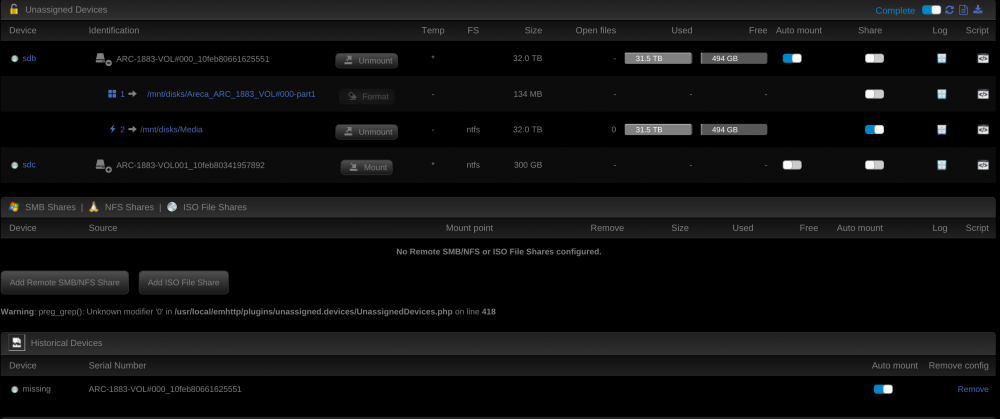
The issue is the /mnt/disks/Media share no longer auto mounts. I have to manually click no mount. I realise what the logs say.....my Dockers point to this share....and when it does not auto mount with UD.....the Dockers aren't able to access the media. The screen capture below is the share manually mounted.
-
Hi Guys, I am running the latest version of UD 2017.09.17 and for a few versions now I have been unable to get my UD RAID array to automount. I have been using UD for a long time, in particular to automount this volume so am unsure why it has stopped. I am running 6.4 RC8; the logs seem to suggest that is automounting the share successfully???!!! The share is /mnt/disks/Media Sep 18 21:32:40 Adding disk '/dev/sdb1'... Sep 18 21:32:40 No filesystem detected, aborting. Sep 18 21:32:40 Partition 'Areca ARC 1883 VOL#000-part1' could not be mounted, aborting... Sep 18 21:36:02 Adding disk '/dev/sdb1'... Sep 18 21:36:02 No filesystem detected, aborting. Sep 18 21:36:02 Partition 'Areca ARC 1883 VOL#000-part1' could not be mounted, aborting... Sep 18 21:36:21 Adding disk '/dev/sdb2'... Sep 18 21:36:21 Mount drive command: /sbin/mount -t ntfs -o auto,async,noatime,nodiratime,nodev,nosuid,umask=000 '/dev/sdb2' '/mnt/disks/Media' Sep 18 21:36:21 Successfully mounted '/dev/sdb2' on '/mnt/disks/Media'. Sep 18 21:36:21 Defining share 'Media' on file '/etc/samba/unassigned-shares/Media.conf' Sep 18 21:36:21 Reloading Samba configuration... Sep 18 21:36:21 Directory '/mnt/disks/Media' shared successfully. Sep 18 21:36:21 Device '/dev/sdb2' script file not found. 'ADD' script not executed. Sep 18 22:00:24 Disk with serial 'ARC-1883-VOL001_10feb80341957892' is not set to auto mount and will not be mounted... Sep 19 06:45:36 Running command '/boot/config/plugins/unassigned.devices/Media.sh' with action 'ADD'.
-
WINNER!!! thanks @wgstarks you are a legend!!
-
Yes I am.
-
Yes. As a sanity check I just changed the docker network from host to bridge and can now see the admin login page. ????
-
thanks @wgstarks I just tried that with no luck. Doing a netstat on the host shows the that TCP:943 is not even open. The docker logs shows no errors so not sure where to go from there.
-
Hi Guys, Fresh installed the docker... I cannot reach the admin page when using privileged mode, in host mode. This is the default install from the Linux|Server IO docker container. I have tried deleting the docker container and img and starting again with no luck. I have tried Chrome, Edge, IE and Safari on different machines on the network. There are no conflicting ports on the host or other dockers.....what am I missing?
