





drogg
Members
-
Joined
-
Last visited
-
Is there a way I could modify this exact setup to upload to another unraid server on my network using SMB? I would love to just point the folders at a new remote and not modify a thing
-
I’m downloading my data more selectively but just wanted to thank you for years of flawless updates and work @DZMM. I had no idea about how any of this worked until I found this thread and you (and others) were so helpful and patient. I’m bummed to be losing the unlimited drive but I’m also oddly excited to be owning my data outright again. Silver linings and all that!
-
root@Scout:~# id root uid=0(root) gid=0(root) groups=0(root),1(bin),2(daemon),3(sys),4(adm),6(disk),10(wheel),17(audio),281(docker)
-
Noted! As for what I'm moving, it's anything between folders. So if I want to move a download from my downloads to its MergerFS home on a local mount, I get permission denied. If I use Krusader to try to move the files between downloads and , I get a permission denied. If I try to modify content on my laptop via file sharing, I get permission denied. This is all I get in Sonarr: Access to the path "<file>" is denied. EDIT: This issue is resolved (for the time being) because of the fixes here.
-
I could hug you. This solved my issues. Looks like 6.10.x has issues with rclone mounts and this had me completely stumped. A couple of containers won't actually let me run it as a root user so I'll patiently wait for a fix on those.
-
Noted! As for what I'm moving, it's anything between folders. So if I want to move a download from my downloads to its MergerFS home on a local mount, I get permission denied. If I use Krusader to try to move the files between downloads and , I get a permission denied. If I try to modify content on my laptop via file sharing, I get permission denied. This is all I get in Sonarr: Access to the path "<file>" is denied.
-
Any other ideas? I’m at a complete loss and can’t really use my server. I’m not technical enough to understand half of this so should I just try to downgrade?
-
I tried the steps outlined here as well to no avail. I'm not sure why upgrading to 6.10.x has suddenly broken these containers. When I run the suggested command ls -la /mnt/user/appdata/<container> I get the following: But that doesn't seem to change anything on the Sonarr side.
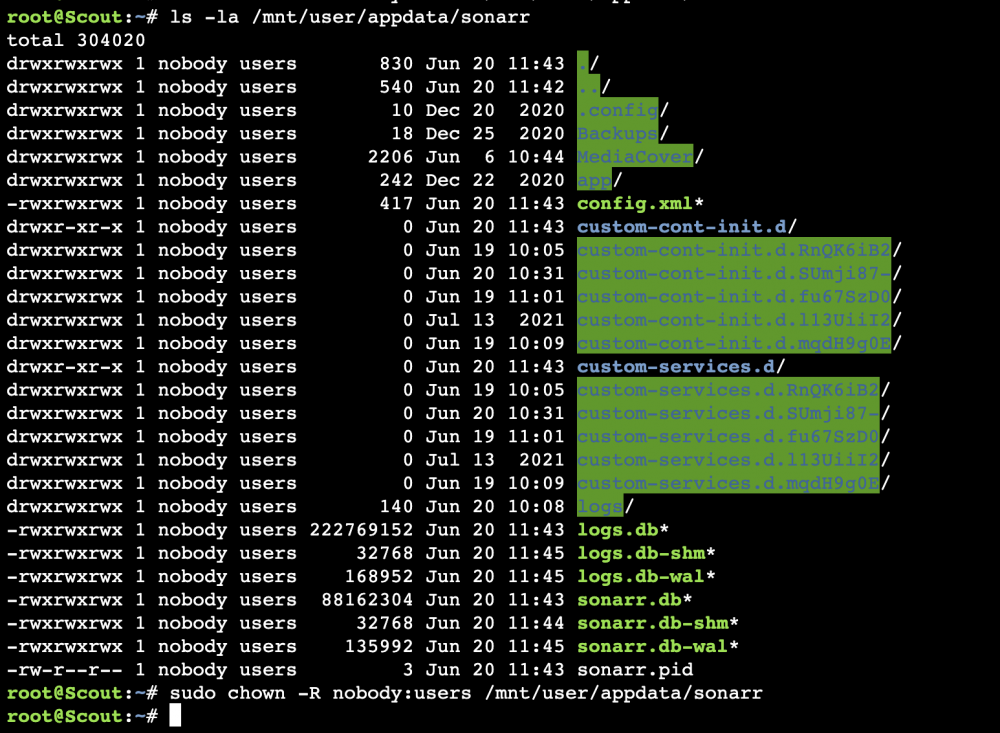
-
Hi all, noob here running into my first issue in ages on Unraid after upgrading to 6.10.x. I've run through the forums and tried everything I could find on the issue, but I'm at a complete loss as to how to proceed. Sonarr/Krusader are showing me "access denied" errors when I try to copy files between folders. Plex plays media just fine, but nothing can be copied because access to the relevant paths are all denied. I'm running MergerFS/rclone. I've run the Docker Safe New Permissions and New Permissions on the appdata folders to no avail. Any idea how to proceed? Logs attached. scout-diagnostics-20220619-1105.zip
-
I'm having issues with docker and file permissions after upgrading to 6.10.3. Has anyone found a fix?
-
I'm unfortunately also experiencing permissions issues after upgrading to one of the latest stable releases after years(!) of no issues and I'm not sure how to proceed. Sonarr/Radarr are both reporting "Access to the path is denied". Any idea how to fix it?
-
I'd love to know how you set up the radarr/sonarr bot!
-
@mgutt I followed this guide to a T and I'm shocked at how well my Plex is running. Performance is already 100x better, and that's on a Celeron 4900 - so who knows what would happen if I upgraded to a better CPU. Most videos, even 4k rips, load within 1-2 seconds - and those are coming from an rclone remote. The cache trick especially helped the speed on an NVMe - but 8GB RAM transcoding has improved the experience for my other users as well. Thank you for this guide - it has transformed my Plex experience!
-
First off, I want to say the setup for this is super easy and I appreciate your hard work, DZMM. I started from scratch on a smaller server this weekend and I was able to have this up and running in no time. I'm seeing that my cache drive is being eaten up by the "mount_rclone" share, even after reset. My cache size is set to 400GB, which I copied from the scripts. Is this normal/expected? Is there a need for it to be so large? What exactly is cache doing here?

-
So we don't need to run your script anymore (which worked wonders btw) and can instead just follow the new docker image?


