





drogg
Members
-
Joined
-
Last visited
Everything posted by drogg
-
Is there a way I could modify this exact setup to upload to another unraid server on my network using SMB? I would love to just point the folders at a new remote and not modify a thing
-
I’m downloading my data more selectively but just wanted to thank you for years of flawless updates and work @DZMM. I had no idea about how any of this worked until I found this thread and you (and others) were so helpful and patient. I’m bummed to be losing the unlimited drive but I’m also oddly excited to be owning my data outright again. Silver linings and all that!
-
root@Scout:~# id root uid=0(root) gid=0(root) groups=0(root),1(bin),2(daemon),3(sys),4(adm),6(disk),10(wheel),17(audio),281(docker)
-
Noted! As for what I'm moving, it's anything between folders. So if I want to move a download from my downloads to its MergerFS home on a local mount, I get permission denied. If I use Krusader to try to move the files between downloads and , I get a permission denied. If I try to modify content on my laptop via file sharing, I get permission denied. This is all I get in Sonarr: Access to the path "<file>" is denied. EDIT: This issue is resolved (for the time being) because of the fixes here.
-
I could hug you. This solved my issues. Looks like 6.10.x has issues with rclone mounts and this had me completely stumped. A couple of containers won't actually let me run it as a root user so I'll patiently wait for a fix on those.
-
Noted! As for what I'm moving, it's anything between folders. So if I want to move a download from my downloads to its MergerFS home on a local mount, I get permission denied. If I use Krusader to try to move the files between downloads and , I get a permission denied. If I try to modify content on my laptop via file sharing, I get permission denied. This is all I get in Sonarr: Access to the path "<file>" is denied.
-
Any other ideas? I’m at a complete loss and can’t really use my server. I’m not technical enough to understand half of this so should I just try to downgrade?
-
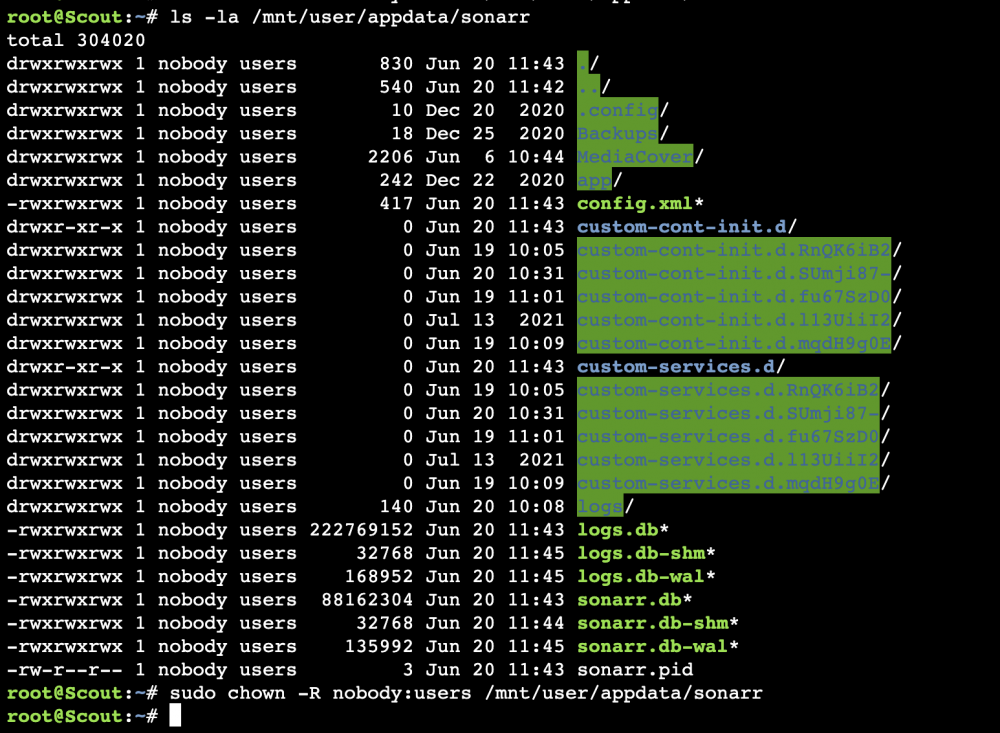
I tried the steps outlined here as well to no avail. I'm not sure why upgrading to 6.10.x has suddenly broken these containers. When I run the suggested command ls -la /mnt/user/appdata/<container> I get the following: But that doesn't seem to change anything on the Sonarr side.
-
Hi all, noob here running into my first issue in ages on Unraid after upgrading to 6.10.x. I've run through the forums and tried everything I could find on the issue, but I'm at a complete loss as to how to proceed. Sonarr/Krusader are showing me "access denied" errors when I try to copy files between folders. Plex plays media just fine, but nothing can be copied because access to the relevant paths are all denied. I'm running MergerFS/rclone. I've run the Docker Safe New Permissions and New Permissions on the appdata folders to no avail. Any idea how to proceed? Logs attached. scout-diagnostics-20220619-1105.zip
-
I'm having issues with docker and file permissions after upgrading to 6.10.3. Has anyone found a fix?
-
I'm unfortunately also experiencing permissions issues after upgrading to one of the latest stable releases after years(!) of no issues and I'm not sure how to proceed. Sonarr/Radarr are both reporting "Access to the path is denied". Any idea how to fix it?
-
I'd love to know how you set up the radarr/sonarr bot!
-
@mgutt I followed this guide to a T and I'm shocked at how well my Plex is running. Performance is already 100x better, and that's on a Celeron 4900 - so who knows what would happen if I upgraded to a better CPU. Most videos, even 4k rips, load within 1-2 seconds - and those are coming from an rclone remote. The cache trick especially helped the speed on an NVMe - but 8GB RAM transcoding has improved the experience for my other users as well. Thank you for this guide - it has transformed my Plex experience!
-
First off, I want to say the setup for this is super easy and I appreciate your hard work, DZMM. I started from scratch on a smaller server this weekend and I was able to have this up and running in no time. I'm seeing that my cache drive is being eaten up by the "mount_rclone" share, even after reset. My cache size is set to 400GB, which I copied from the scripts. Is this normal/expected? Is there a need for it to be so large? What exactly is cache doing here?

-
So we don't need to run your script anymore (which worked wonders btw) and can instead just follow the new docker image?
-
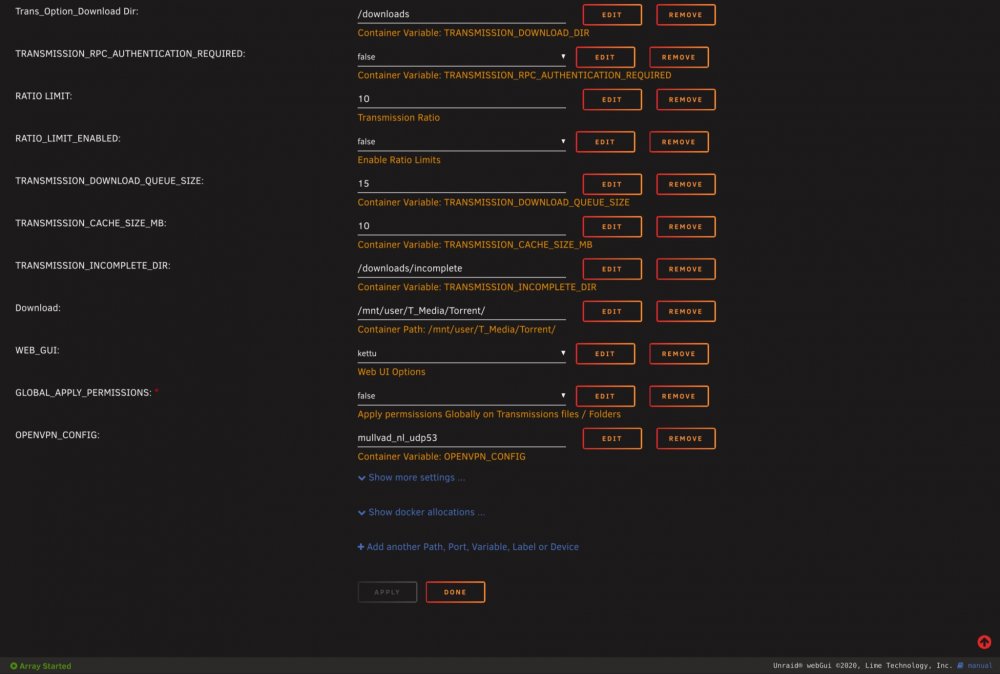
I actually got it figured out after adding --sysctl net.ipv6.conf.all.disable_ipv6=0 to the extra parameters (thank you @materka!) . This appears to be needed for all VPN containers using Mullvad - or at least the few I've tried since.
-
Can you give me the command to run? Sorry, not super advanced in the terminal side yet. EDIT: adding --sysctl net.ipv6.conf.all.disable_ipv6=0 as mentioned above fixed it!
-
I removed the first OpenVPN variable and added this. Then went to Mullvad and ensured I grabbed the .ovpn from NL, UDP 53. Is this what I’m supposed to do? Using OpenVPN provider: MULLVAD Starting OpenVPN using config mullvad_nl_udp53.ovpn Setting OPENVPN credentials... adding route to local network 192.168.1.0/24 via 172.17.0.1 dev eth0 Wed Jul 8 22:18:18 2020 Note: option tun-ipv6 is ignored because modern operating systems do not need special IPv6 tun handling anymore. Wed Jul 8 22:18:18 2020 OpenVPN 2.4.7 x86_64-pc-linux-gnu [SSL (OpenSSL)] [LZO] [LZ4] [EPOLL] [PKCS11] [MH/PKTINFO] [AEAD] built on Sep 5 2019 Wed Jul 8 22:18:18 2020 library versions: OpenSSL 1.1.1c 28 May 2019, LZO 2.10 Wed Jul 8 22:18:18 2020 NOTE: the current --script-security setting may allow this configuration to call user-defined scripts Wed Jul 8 22:18:18 2020 TCP/UDP: Preserving recently used remote address: [AF_INET]185.65.134.140:53 Wed Jul 8 22:18:18 2020 Socket Buffers: R=[212992->1048576] S=[212992->1048576] Wed Jul 8 22:18:18 2020 UDP link local: (not bound) Wed Jul 8 22:18:18 2020 UDP link remote: [AF_INET]185.65.134.140:53 Wed Jul 8 22:18:18 2020 TLS: Initial packet from [AF_INET]185.65.134.140:53, sid=551c02a7 5c360811 Wed Jul 8 22:18:18 2020 WARNING: this configuration may cache passwords in memory -- use the auth-nocache option to prevent this Wed Jul 8 22:18:18 2020 VERIFY OK: depth=2, C=SE, ST=Gotaland, L=Gothenburg, O=Amagicom AB, OU=Mullvad, CN=Mullvad Root CA v2, [email protected] Wed Jul 8 22:18:18 2020 VERIFY OK: depth=1, C=SE, ST=Gotaland, O=Amagicom AB, OU=Mullvad, CN=Mullvad Intermediate CA v2, [email protected] Wed Jul 8 22:18:18 2020 VERIFY KU OK Wed Jul 8 22:18:18 2020 Validating certificate extended key usage Wed Jul 8 22:18:18 2020 ++ Certificate has EKU (str) TLS Web Server Authentication, expects TLS Web Server Authentication Wed Jul 8 22:18:18 2020 VERIFY EKU OK Wed Jul 8 22:18:18 2020 VERIFY OK: depth=0, C=SE, ST=Gotaland, O=Amagicom AB, OU=Mullvad, CN=nl-ams-010.mullvad.net, [email protected] Wed Jul 8 22:18:19 2020 WARNING: 'link-mtu' is used inconsistently, local='link-mtu 1557', remote='link-mtu 1558' Wed Jul 8 22:18:19 2020 WARNING: 'comp-lzo' is present in remote config but missing in local config, remote='comp-lzo' Wed Jul 8 22:18:19 2020 Control Channel: TLSv1.3, cipher TLSv1.3 TLS_CHACHA20_POLY1305_SHA256, 4096 bit RSA Wed Jul 8 22:18:19 2020 [nl-ams-010.mullvad.net] Peer Connection Initiated with [AF_INET]185.65.134.140:53 Wed Jul 8 22:18:20 2020 SENT CONTROL [nl-ams-010.mullvad.net]: 'PUSH_REQUEST' (status=1) Wed Jul 8 22:18:20 2020 PUSH: Received control message: 'PUSH_REPLY,dhcp-option DNS 10.7.0.1,redirect-gateway def1 bypass-dhcp,route-ipv6 0000::/2,route-ipv6 4000::/2,route-ipv6 8000::/2,route-ipv6 C000::/2,comp-lzo no,route-gateway 10.7.0.1,topology subnet,socket-flags TCP_NODELAY,ifconfig-ipv6 fdda:d0d0:cafe:53::1000/64 fdda:d0d0:cafe:53::,ifconfig 10.7.0.2 255.255.0.0,peer-id 1,cipher AES-256-GCM' Wed Jul 8 22:18:20 2020 OPTIONS IMPORT: compression parms modified Wed Jul 8 22:18:20 2020 OPTIONS IMPORT: --socket-flags option modified Wed Jul 8 22:18:20 2020 NOTE: setsockopt TCP_NODELAY=1 failed Wed Jul 8 22:18:20 2020 OPTIONS IMPORT: --ifconfig/up options modified Wed Jul 8 22:18:20 2020 OPTIONS IMPORT: route options modified Wed Jul 8 22:18:20 2020 OPTIONS IMPORT: route-related options modified Wed Jul 8 22:18:20 2020 OPTIONS IMPORT: --ip-win32 and/or --dhcp-option options modified Wed Jul 8 22:18:20 2020 OPTIONS IMPORT: peer-id set Wed Jul 8 22:18:20 2020 OPTIONS IMPORT: adjusting link_mtu to 1624 Wed Jul 8 22:18:20 2020 OPTIONS IMPORT: data channel crypto options modified Wed Jul 8 22:18:20 2020 Data Channel: using negotiated cipher 'AES-256-GCM' Wed Jul 8 22:18:20 2020 Outgoing Data Channel: Cipher 'AES-256-GCM' initialized with 256 bit key Wed Jul 8 22:18:20 2020 Incoming Data Channel: Cipher 'AES-256-GCM' initialized with 256 bit key Wed Jul 8 22:18:20 2020 ROUTE_GATEWAY 172.17.0.1/255.255.0.0 IFACE=eth0 HWADDR=02:42:ac:11:00:06 Wed Jul 8 22:18:20 2020 GDG6: remote_host_ipv6=n/a Wed Jul 8 22:18:20 2020 ROUTE6: default_gateway=UNDEF Wed Jul 8 22:18:20 2020 TUN/TAP device tun0 opened Wed Jul 8 22:18:20 2020 TUN/TAP TX queue length set to 100 Wed Jul 8 22:18:20 2020 /sbin/ip link set dev tun0 up mtu 1500 Wed Jul 8 22:18:20 2020 /sbin/ip addr add dev tun0 10.7.0.2/16 broadcast 10.7.255.255 Wed Jul 8 22:18:20 2020 /sbin/ip -6 addr add fdda:d0d0:cafe:53::1000/64 dev tun0 RTNETLINK answers: Permission denied Wed Jul 8 22:18:20 2020 Linux ip -6 addr add failed: external program exited with error status: 2 Wed Jul 8 22:18:20 2020 Exiting due to fatal error Wed Jul 8 22:18:20 2020 SENT CONTROL [nl-ams-010.mullvad.net]: 'PUSH_REQUEST' (status=1) Wed Jul 8 22:18:20 2020 PUSH: Received control message: 'PUSH_REPLY,dhcp-option DNS 10.7.0.1,redirect-gateway def1 bypass-dhcp,route-ipv6 0000::/2,route-ipv6 4000::/2,route-ipv6 8000::/2,route-ipv6 C000::/2,comp-lzo no,route-gateway 10.7.0.1,topology subnet,socket-flags TCP_NODELAY,ifconfig-ipv6 fdda:d0d0:cafe:53::1000/64 fdda:d0d0:cafe:53::,ifconfig 10.7.0.2 255.255.0.0,peer-id 1,cipher AES-256-GCM' Wed Jul 8 22:18:20 2020 OPTIONS IMPORT: compression parms modified Wed Jul 8 22:18:20 2020 OPTIONS IMPORT: --socket-flags option modified Wed Jul 8 22:18:20 2020 NOTE: setsockopt TCP_NODELAY=1 failed Wed Jul 8 22:18:20 2020 OPTIONS IMPORT: --ifconfig/up options modified Wed Jul 8 22:18:20 2020 OPTIONS IMPORT: route options modified Wed Jul 8 22:18:20 2020 OPTIONS IMPORT: route-related options modified Wed Jul 8 22:18:20 2020 OPTIONS IMPORT: --ip-win32 and/or --dhcp-option options modified Wed Jul 8 22:18:20 2020 OPTIONS IMPORT: peer-id set Wed Jul 8 22:18:20 2020 OPTIONS IMPORT: adjusting link_mtu to 1624 Wed Jul 8 22:18:20 2020 OPTIONS IMPORT: data channel crypto options modified Wed Jul 8 22:18:20 2020 Data Channel: using negotiated cipher 'AES-256-GCM' Wed Jul 8 22:18:20 2020 Outgoing Data Channel: Cipher 'AES-256-GCM' initialized with 256 bit key Wed Jul 8 22:18:20 2020 Incoming Data Channel: Cipher 'AES-256-GCM' initialized with 256 bit key Wed Jul 8 22:18:20 2020 ROUTE_GATEWAY 172.17.0.1/255.255.0.0 IFACE=eth0 HWADDR=02:42:ac:11:00:06 Wed Jul 8 22:18:20 2020 GDG6: remote_host_ipv6=n/a Wed Jul 8 22:18:20 2020 ROUTE6: default_gateway=UNDEF Wed Jul 8 22:18:20 2020 TUN/TAP device tun0 opened Wed Jul 8 22:18:20 2020 TUN/TAP TX queue length set to 100 Wed Jul 8 22:18:20 2020 /sbin/ip link set dev tun0 up mtu 1500 Wed Jul 8 22:18:20 2020 /sbin/ip addr add dev tun0 10.7.0.2/16 broadcast 10.7.255.255 Wed Jul 8 22:18:20 2020 /sbin/ip -6 addr add fdda:d0d0:cafe:53::1000/64 dev tun0 RTNETLINK answers: Permission denied Wed Jul 8 22:18:20 2020 Linux ip -6 addr add failed: external program exited with error status: 2 Wed Jul 8 22:18:20 2020 Exiting due to fatal error
-
I cannot figure the Transmission_VPN out for the life of me. I'm trying to use it with Mullvad. I've tried renaming the ovpn file "mullvad_nl_ams.ovpn", I've tried "Netherlands.ovpn", as well as just default.ovpn and always make sure it matches up. Every time I get "Wed Jul 8 17:56:42 2020 Linux ip -6 addr add failed: external program exited with error status: 2". Any help? I can provide full logs if needed.
-
Hi, changed port in rtorrent.rc to 13438 per my Airvpn settings, but still not getting a green check in rutorrent (and it doesn't appear to be working on any other open port checker). Does rtorrent itself need to be restarted or can I just restart the Docker? Is there a deeper issue? Update: All clear on the Airvpn side, but still have the issue locally with the alert. Seems like maybe my changes to rtorrent.rc aren't saved and submitted to rutorrent?
-
Yeah, plays perfectly fine locally but streaming on Plex from the mount is giving me some issues. Could be Plex, could be my download speed (though luckily I'm switching to fiber this weekend). Just didn't know if there was anything I needed to change to avoid buffering!
-
In your initial post, you mention: Dumb question: is that because of your download speeds or have you modified some settings in Plex? I ask because I'm having a lot of buffering on 200mbps down and decent (but not spectacular) hardware. I'm definitely not seeing 4K with no issues and would like to remedy if at all possible! Thanks for your work on this.
-
This appears to be working for me. I'll update in a couple hours to see, but it's giving me an actual log of uploads which is not something I was getting on the previous script!
-
I think I've found my issue but I'm not sure how to fix. I get this error on Line 3 in the debug. 15.04.2020 10:46:03 INFO: *** Rclone move selected. Files will be moved from /mnt/user/local/gdrive_media_vfs for gdrive_media_vfs *** 15.04.2020 10:46:03 INFO: *** Starting rclone_upload script for gdrive_media_vfs *** 15.04.2020 10:46:03 INFO: Script not running - proceeding. 15.04.2020 10:46:03 INFO: Checking if rclone installed successfully. 15.04.2020 10:46:03 INFO: rclone installed successfully - proceeding with upload. 15.04.2020 10:46:03 INFO: Uploading using upload remote gdrive_media_vfs 15.04.2020 10:46:03 INFO: *** Using rclone move - will add --delete-empty-src-dirs to upload. ====== RCLONE DEBUG ====== /usr/sbin/rclone: line 3: 28517 Killed rcloneorig --config $config "$@" ========================== 15.04.2020 10:47:42 INFO: Not utilising service accounts. 15.04.2020 10:47:42 INFO: Log files scrubbed 15.04.2020 10:47:42 INFO: Script complete Script Finished Wed, 15 Apr 2020 10:47:42 -0400 Full logs for this script are available at /tmp/user.scripts/tmpScripts/Upload Mount/log.txt
-
I modified the script to read “upload_running_daily_upload”. The upload script is “running” according to userscripts but I’m not sure if anything is actually being uploaded.



