





rbronco21
Members
-
Joined
-
Last visited
Everything posted by rbronco21
-
Maxed the MB at 4GB.
-
Filesystem Size Used Avail Use% Mounted on rootfs 1.9G 737M 1.2G 39% / devtmpfs 1.9G 0 1.9G 0% /dev tmpfs 2.0G 0 2.0G 0% /dev/shm cgroup_root 8.0M 0 8.0M 0% /sys/fs/cgroup tmpfs 128M 784K 128M 1% /var/log /dev/sda1 7.5G 559M 7.0G 8% /boot overlay 1.9G 737M 1.2G 39% /lib/modules overlay 1.9G 737M 1.2G 39% /lib/firmware tmpfs 1.0M 0 1.0M 0% /mnt/disks tmpfs 1.0M 0 1.0M 0% /mnt/remotes /dev/mapper/md1 13T 6.6T 6.2T 52% /mnt/disk1 /dev/mapper/md2 7.3T 6.2T 1.2T 85% /mnt/disk2 /dev/mapper/md3 7.3T 6.0T 1.4T 82% /mnt/disk3 /dev/mapper/md4 3.7T 1.9T 1.8T 51% /mnt/disk4 /dev/mapper/md5 7.3T 5.6T 1.8T 77% /mnt/disk5 /dev/mapper/sdc1 224G 18G 207G 8% /mnt/cache shfs 39T 27T 13T 69% /mnt/user0 shfs 39T 27T 13T 69% /mnt/user /dev/loop2 5.0G 2.1G 2.6G 44% /var/lib/docker
-
Does DIagnostics take a long time? I let it run for a few minutes and gave up so I could run df. Filesystem 1K-blocks Used Available Use% Mounted on rootfs 1943920 754408 1189512 39% / devtmpfs 1943928 0 1943928 0% /dev tmpfs 2018624 0 2018624 0% /dev/shm cgroup_root 8192 0 8192 0% /sys/fs/cgroup tmpfs 131072 760 130312 1% /var/log /dev/sda1 7815232 572192 7243040 8% /boot overlay 1943920 754408 1189512 39% /lib/modules overlay 1943920 754408 1189512 39% /lib/firmware tmpfs 1024 0 1024 0% /mnt/disks tmpfs 1024 0 1024 0% /mnt/remotes /dev/mapper/md1 13670472644 7053217548 6617255096 52% /mnt/disk1 /dev/mapper/md2 7811923236 6566030588 1245892648 85% /mnt/disk2 /dev/mapper/md3 7811923236 6343424060 1468499176 82% /mnt/disk3 /dev/mapper/md4 3905094436 1982907988 1922186448 51% /mnt/disk4 /dev/mapper/md5 7811923236 5983880092 1828043144 77% /mnt/disk5 /dev/mapper/sdc1 234300188 18081632 216218556 8% /mnt/cache shfs 41011336788 27929460276 13081876512 69% /mnt/user0 shfs 41011336788 27929460276 13081876512 69% /mnt/user /dev/loop2 5242880 2112988 2724788 44% /var/lib/docker
-
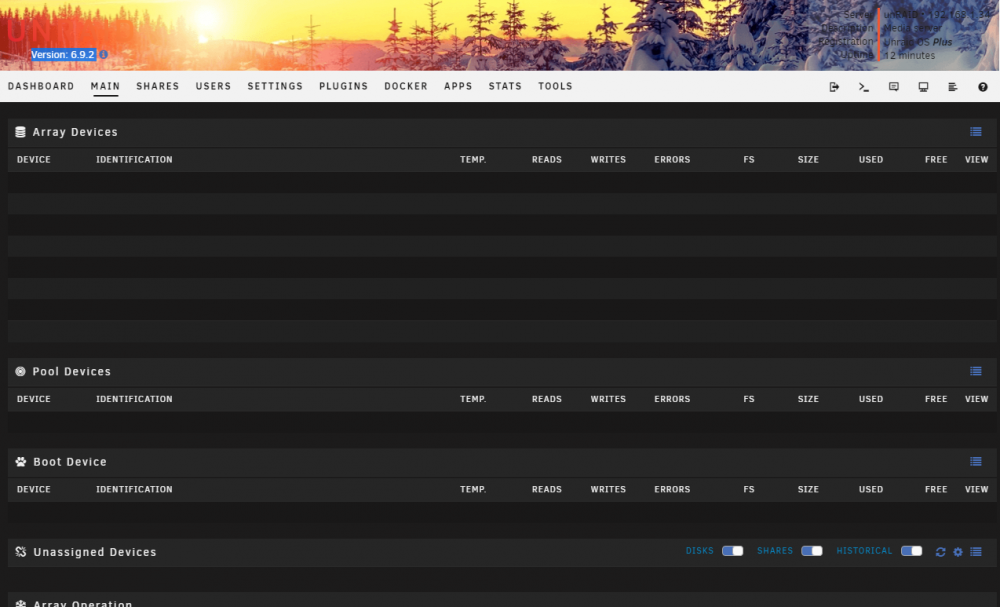
This picture says it all. I noticed other GUI elements don't work. For example, I tried to mirror my syslog to flash and Apply would be active, but it didn't save the setting. Stopping my array and reboot didn't work either. I'm guessing there are lots of GUI elements that aren't working correctly. Rebooted from command line didn't help. Syslog is from that reboot after I started the array and verified that shares are still sharing. V6.9.2 syslog.txt
-
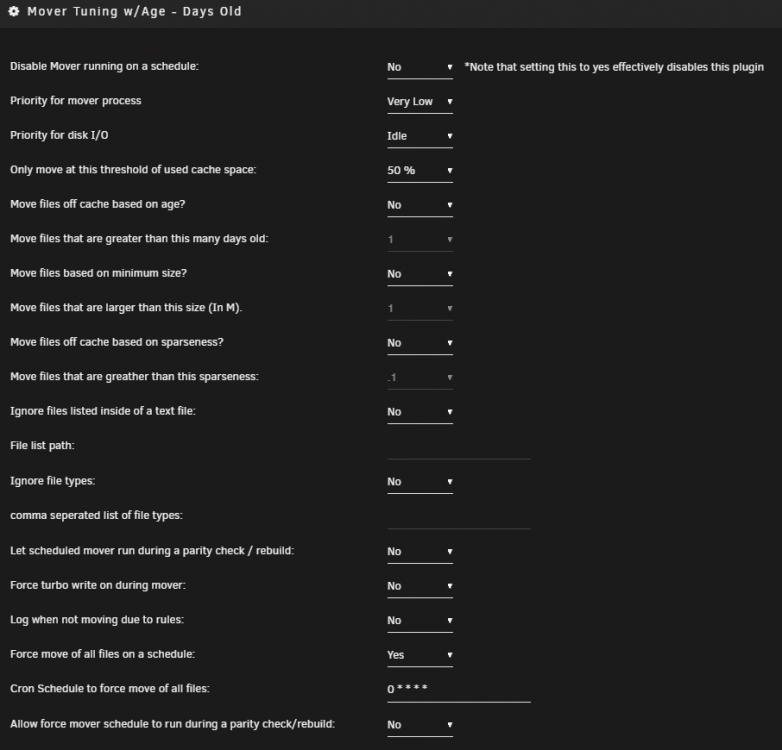
So that means that the Mover Settings section is now ignored if Mover Tuning is enabled? If so, is adding mover.old to cron easy enough that you could show me how to do it? Then I can dig into it and learn more about cron on my own.
-
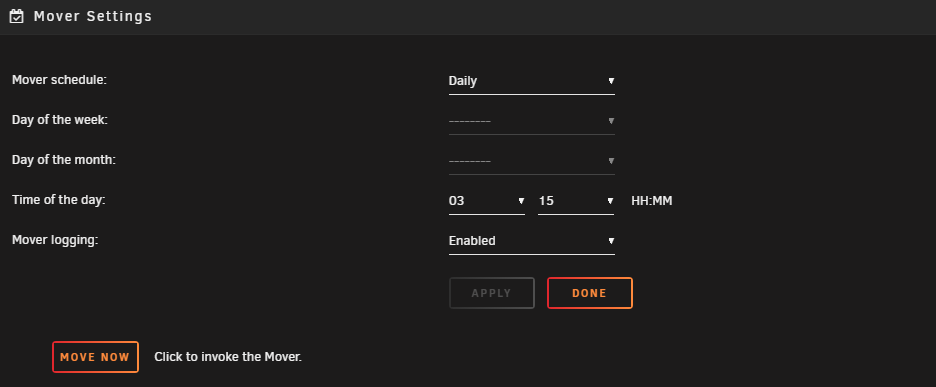
Love the plugin and I'm fine with the emails if it helps out debugging. Got a couple questions. 1. Using tuning, I have mine check for a threshold of 50% each hour on the hour for when I copy large files to the server or download a lot to make sure I don't fill up the cache. Then using the original Mover Settings, I have it move everything every night to make sure everything is protected within 24 hours. Does this sound like a reasonable strategy? Any suggestions or issues? 2. I believe it worked this way last time I messed with the settings months ago. Now I don't think the daily full move from Mover Settings is working, so I only get files moved when I hit 50%, which may not happen for days or weeks of normal use, leaving files unprotected. Here are the settings I settled on when I got it running a while ago using this topic. Do I need to make any adjustments to get it working like I stated in #1, specifically the daily move?
-
After a recent update of Mover Tuning, mover (or something else) is emailing me an hourly mover log. I have been receiving emails from my server for big things like parity checks and errors. Is there a mover setting causing this?
-
So I can move everything off the drive, then reformat it? That will definitely save some time.
-
I moved everything off the drive and am clearing it so I can reformat and encrypt it while maintaining parity. I read a bunch of methods to shrink arrays and encrypt discs and this is the hybrid method I came up with. I wouldn't be surprised if I am doing extra steps, but this seemed to be the safest way I could put together. Thanks for the interest and sorry for not including more details. Is there a better way to do this?
-
I'm using "Clear an unRAID array data drive" to clear disks for encryption. The script stopped at 40GB on my 8TB disk and I am not sure what state I am in now. Can I try it again? Do I need to rebuild it before anything else?
-
I think this is your answer.
-
Yup, I'm on 6.7.0. I'll get an update done and get my Dockers squared away so it'll be ready for a new drive in a week or 2. Thanks for the help.
-
2 questions: 1. Can I set /downloads to /mnt/cache/docker/appdata/resilio-sync/downloads so the temp data goes to the cache drive instead of a user share? 2. Why does my container always say apply update? I just installed this using CA and only have https://github.com/MediaBrowser/Emby.Build/tree/master/unraid-templates/emby in repositories.
-
Hmm, no more room on the MB or case for a drive. I'll have to look into combining 2 drives if I can find an 8TB for a good price.
-
That was impossibly fast! Any other options if I don't have a cache drive? USB drive that hosts unRAID? Does it keep the drive spinning?
-
Is this setting keeping disk1 spun up? If so, where else can I put it? Any other options? AppData Config Path: /mnt/disk1/docker/appdata/EmbyServer
-
I'm trying to run Cache Directories from the GUI using "-a" but it looks like the GUI can't handle quotation marks. Here is the line I am trying to add: -a '-noleaf \( -name "Folder 1" -prune -o -name "Folder 2" -prune -o -name "Folder 3" -prune \) -o -print' Can this be addressed, or is there a better way to run this?
-
Works for me now. Thanks for the help.
-
argumentDescription if present this will bring up a pop up asking the user for the argument list for the script. Note that currently arguments do not accept spaces contained within one argument (ie: quoting and escaping spaces does NOT work) argumentDefault this is the default arguments for the above These options don't seem to be working after I upgraded to 6.3.3. Can anyone confirm or tell me if I did something wrong? Here's the start of my script: #!/bin/bash #description=description #arrayStarted=true #argumentDescription=Enter arguments #argumentDefault=p1 p2 echo
-
Any examples with these? Specifically how to safely use a password. I'm not a linux guy, but I do have programming experience so I usually brute force and test this stuff out, but I'm not happy with that method if passwords and security are on the line. This is what I am trying to do: #!/bin/bash #description=Mounts EncFS encrypted filesystems #arrayStarted=true #argumentDescription=Enter password #argumentDefault=password echo $1 | enfcs -S /encrypted /decrypted/ I've seen other examples that write the password into a file, mount the decrypted dir, then delete the file. Is that a better method?


