





rickholman
Members
-
Joined
-
Last visited
-
Problem solved. Plugged drive into my server. Detected the error by itself. Ran the scan. Asked to zero log. Said yes. Fixed repair, drive mounted. All data intact. Learned something new. Thanks again. Everything safe.
-
Back home. Picked up server from customer. Going to install the rest of the new drives and pull data from backup. Hoping the drive that "failed" can still be plugged in and data accessed. There is a database I want to see if recoverable. Can I still plug in that old drive and access it somehow, not part of the array but as an extra drive? My thought was to plug it in, run the repair and copy data off it. EDIT--i see this was already suggested above. Thank you, really appreciate the feedback and advice here.
-
So I had a rookie mistake and my laptop fell out of my backpack on the side of the road here in Germany. Once I get back to the states I will follow up and see if we can make any progress. I do appreciate the help this far thank you for the responses.
-
XFS scan was started from terminal, black box with dots going across. Been going for couple hours now.
-
3am this morning with no error. The XFS scan on the new drive is still running when i just logged into the remote PC. Not possible to put the old smaller drive back in and run the scan?
-
Started the scan, letting it run.
-
I should have researched first before attempting to fix. Client called, missing lots of documents. Server would not reboot, locked up somewhere. Came in, pulled plug. Reboot. System up. Missing most of data. Realize I have drive showing unmountable-no file system. Thought I had a bad drive. Changed out 1tb with new 3tb. Reboot and sync. Still missing data. Came to forums, found answer for this message. Too late now that I swapped the drive and did a rebuild? Tried to put 1tb drive back in, got error about size cant be smaller. Still a way to put the old 1tb drive back in and do the XFS repair in maint mode to recover the data? Was surprised a rebuild from parity didnt solve the issue. Of course this would have happen the night before a 5 day trip to germany. Trying to get resolved from airport via remote. Its a lawyer..so their billing database is gone, etc. Working on offsite backup downloads at the moment. Tried to keep this short and to the point. Should note I am missing about 250gig of data. Drives showing about 25gig used.
-
I was having random lockup/hard resets as well. Ended up switching Settings-Docker-Docker custom network type to ipvlan to fix a bug or something. Found the solution in google search. Might not be releated to your issue, but its a solution i tried and all my lockups went away.
-
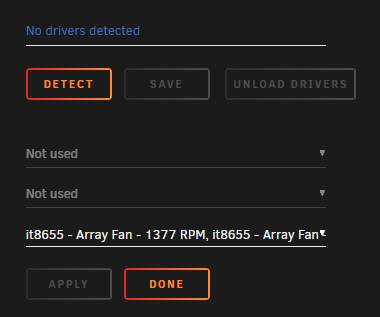
Is there a place to request support for a chipset? Did a new upgrade and lost my system temps. Man is it fun playing with new hardware. The 15 year old in me had a fun day. PRIME B450M-A II
-
observium copied from the log file worked for me
-
Thanks for the info..worked great once I do it the right way. Now I can monitor all my unraid servers...love it.
