





eric.frederich
Members
-
Joined
-
Last visited
Everything posted by eric.frederich
-
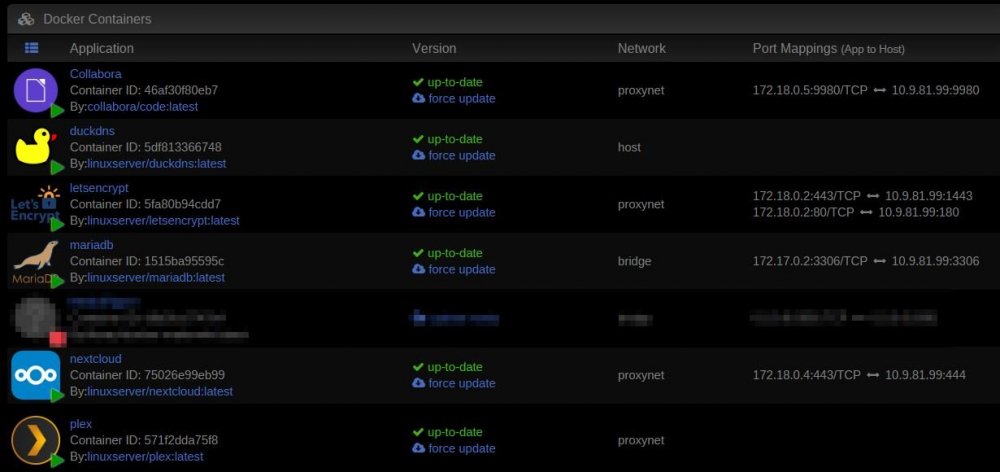
No, the webui doesn't work for Plex but it does for Nextcloud. The act of switching Nextcloud to "Custom : proxynet" does not affect my ability to connect locally. The act of switching Plex to "Custom : proxynet" DOES affect my ability. In the screenshot you see there are no Port Mappings listed for Plex but they still exist for letsencrypt, Collabora, and nextcloud. I'm saying there is something different about this Plex template. Is it possible to edit this template somewhere? I looked at all of these and noticed that Plex doesn't have any Publish->Port section while the other templates do. Perhaps this is the issue? Could this be added? I have to believe this is what is currently preventing me from connecting directly via local network and having to traverse the internet. https://github.com/linuxserver/docker-templates/blob/master/linuxserver.io/letsencrypt.xml https://github.com/linuxserver/docker-templates/blob/master/linuxserver.io/nextcloud.xml https://github.com/linuxserver/docker-templates/blob/master/linuxserver.io/plex.xml
-
Let's Encrypt is setup. I didn't do any configuration on the Plex side other than switching my network. I have it set up exactly how the video described.... Ok my router/firewall I have WAN port 80 and 443 mapped to 180 and 1443 on my unRAID server. I have letsencrypt running on proxynet network using ports 180 and 1443. Then I have config files for nginx which pass plex.* subdomain onto plex:32400 Everything seems to work when I access it through internet (https://plex.whatever.com) but I can no longer access it using http://<ip of unraid>:32400 Curious why port mappings disappear on Plex when switching to proxynet but other dockers like Nextcloud or even the letsencrypt still list them.
-
Hi, I just followed this guide "How to Setup and Configure a Reverse Proxy on unRAID with LetsEncrypt & NGINX" (linked below). When he did this and set his "Network Type" to "Custom : proxynet" it still showed "Port Mappings (App to Host)" When I switch to "Custom : proxynet" on my linuxserver Plex docker the port mappings disappear. How I can get to my Plex server via https://plex.mydomain.com which goes over the internet, through a reverse proxy, doing SSL, etc... but now it seems impossible to to get to Plex locally. How can I do this? Why did those "Port Mappings" dissappear on this Plex docker?
-
I get this error when running rclone after sshing into my unRAID box. # rclone /usr/sbin/rclone: line 21: rcloneorig: command not found Is there a way to uninstall/reinstall or force reinstall?
-
Yeah, I haven't had a lot of time to play around with it. I had it somewhat working but could never get it to load on my Apple TV. So last night I decided to start over from scratch and wanted to know which one I should use.
-
When I search for Plex under apps I get 19 hits... half of which seem to be Plex Media Server. Ones from linuxserver, plexinc, and limetech seem to have a lot of downloads. For someone new to this it is very unclear what the differences are between them.
-
I have this installed... how do I log in? Are there instructions somewhere? I tried using my unRAID usernames/passwords... didn't work. Also, I feel like there should be some information on the front page describing how this is different from the LimeTech plex server.
