





PTRFRLL
Members
-
Joined
Everything posted by PTRFRLL
-
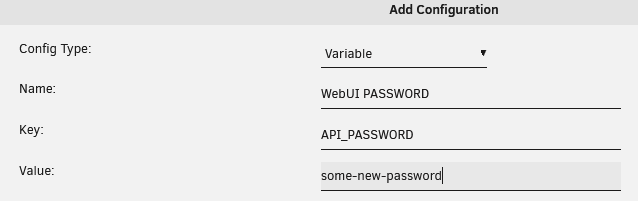
Ok. Latest image reverts T-Rex to 0.24.2, the last known working version without the NVML warnings. I also added support for the API Key. By default the password for the webUI is Password1 You can (and should) override this by adding the API_PASSWORD environment variable to the container in the Unraid UI:
-
I need to add the --api-key flag when the executable is started, so it's on my end. I'll try to get that added here soon. https://github.com/trexminer/T-Rex/wiki/WebUI#security
-
The only thing I can think is the extra params on the container didn't get copied over. Make sure your extra params (enable advanced view) on the container contains: --runtime=nvidia
-
The password should change, Pulseway hashes it for you so it's not stored in plaintext. As for the username, that shouldn't change. I suppose the simplest way to troubleshoot is: Disable the Pulseway service: /etc/rc.d/rc.pulseway stop Edit the config.xml located here: /etc/pulseway/config.xml Re-enable service: /etc/rc.d/rc.pulseway start Check if config.xml is still "intact" with your edits/Unraid machine is showing in Pulseway
-
That all looks good to me. The contents of /boot/pulseway/config.xml are what you'd expect? With your info, etc?
-
Are you sure your config.xml file is being copied to the correct location on boot? What's in your /boot/config/go file?
-
How long has it been running? Most sites calculate your hashrate by averaging over a 24 hr period
-
It should be listed under the Nvidia Driver section in Settings or you can run nvidia-smi -q in your console
-
Add the NVIDIA_VISIBLE_DEVICES variable to the docker container and specify the GUID of the GPU you want to use (see the Specify GPU section in the first post)
-
I haven't had much time to dedicate to this but it is still on my list. I hesitate to add it directly to this docker as the current method requires a specific version of nVidia drivers to be installed and I prefer to not force that decision on people (it also makes support a nightmare). My current plan is to create a separate docker that contains the over/under-clocking options which will persist those settings across all dockers. That way you could use that docker in conjunction with the T-rex one or any others.
-
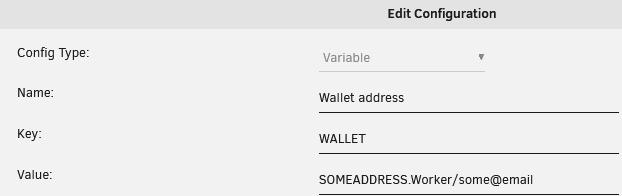
The WALLET variable on the docker is passed to the -u flag of T-Rex, so just enter everything in that field:
-
Yes, you should be able to run two instances, just expose one GPU to each.
-
Thanks for the link for NSFMiner, I hadn't seen that container before. I'll see if I can integrate the OC capabilities into this image as well.
-
you could always route the Trex container through a VPN container:
-
I see your server is set to raven.f2pool.com:3636 but does it have the stratum+tcp part at the beginning like so: stratum+tcp://raven.f2pool.com:3636
-
You should be able to mine Raven using the kawpow algorithm. Did it throw a specific error message?
-
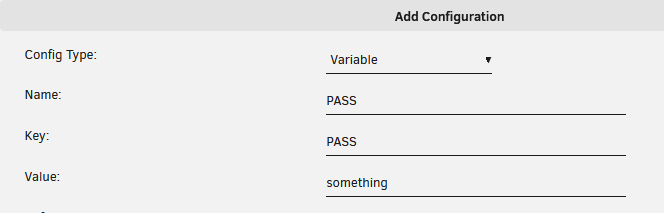
I updated the Docker to include a PASS env variable, so you can now override the default
-
I'll add a PASS variable that you can set for the container.
-
Not that I'm aware of, I would love to do this too. You might try setting the --low-load flag in T-rex but I'm not sure if it will work:
-
What's your config.json look like? I'm guessing the URL prop is missing. { "pools" : [ { "pass" : "x", "url" : "stratum+tcp://us2.ethermine.org:4444", "user" : "WALLET_ADDRESS", "worker" : "Rig" } ], "api-bind-http" : "0.0.0.0:4067" }
-
Try adding the devices flag to your config.json with a comma-separated list like so: { ... "devices": "0,1" }
-
Shoot. I updated the CUDA base image (to CUDA 11.2) in the latest update. The "easy" answer is to update your nvidia drivers. That said, I know that's not an acceptable answer for everyone. I guess I'll downgrade the base image back to 11.1 which should be compatible for all/most nvidia drivers.
-
I believe current hashrate is based of a 24hr period. More here
-
I have not seen that before. You might try raising an issue on the T-Rex Github: https://github.com/trexminer/T-Rex
-
Thanks for the heads up. I think that's an issue with the CA templates, they assume all Dockers are hosted on docker hub but in this case it's hosted on Github's Container registry


