





rsutter
Members
-
Joined
-
Last visited
Everything posted by rsutter
-
I just added another movie to my NAS and Plex is now offline. I rebooted the NAS Unraid and it now back online. I updated Plex and when I try to connect, I get a refused to connect. I tried on another computer on my network but I get the same thing. I have included the latest Diagnostics to help with this troubleshoot. On another question, I noticed on the Unraid dashboard that my Movie container is set to private but other containers are public. I will check this as well. I appreciate someone taking a look and give me suggestions to get my Plex back running! Thanks! sutterstuff-diagnostics-20220618-0628.zip
-
This is what was detected: I am not sure what issues my NAS UnRaid detected and would appreciate opinion and comments! Mar 26 08:43:11 MediaServer kernel: smpboot: CPU0: Intel(R) Core(TM) i7-10700 CPU @ 2.90GHz (family: 0x6, model: 0xa5, stepping: 0x5) Mar 26 08:43:11 MediaServer kernel: mce: [Hardware Error]: Machine check events logged Mar 26 08:43:11 MediaServer kernel: mce: [Hardware Error]: CPU 0: Machine Check: 0 Bank 6: ee2000000040110a Mar 26 08:43:11 MediaServer kernel: mce: [Hardware Error]: TSC 0 ADDR fef1e680 MISC 43880004086 Mar 26 08:43:11 MediaServer kernel: mce: [Hardware Error]: PROCESSOR 0:a0655 TIME 1648244554 SOCKET 0 APIC 0 microcode e2 Mar 26 08:43:11 MediaServer kernel: Performance Events: PEBS fmt3+, Skylake events, 32-deep LBR, full-width counters, Intel PMU driver. Mar 26 08:43:11 MediaServer kernel: ... version: 4 Mar 26 08:43:11 MediaServer kernel: ... bit width: 48 Mar 26 08:43:11 MediaServer kernel: ... generic registers: 4 Mar 26 08:43:11 MediaServer kernel: ... value mask: 0000ffffffffffff Mar 26 08:43:11 MediaServer kernel: ... max period: 00007fffffffffff Mar 26 08:43:11 MediaServer kernel: ... fixed-purpose events: 3 Mar 26 08:43:11 MediaServer kernel: ... event mask: 000000070000000f Mar 26 08:43:11 MediaServer kernel: rcu: Hierarchical SRCU implementation. Mar 26 08:43:11 MediaServer kernel: smp: Bringing up secondary CPUs ... Mar 26 08:43:11 MediaServer kernel: x86: Booting SMP configuration: Mar 26 08:43:11 MediaServer kernel: .... node #0, CPUs: #1 #2 #3 #4 #5 #6 #7 #8 #9 #10 #11 #12 #13 #14 #15 Mar 26 08:43:11 MediaServer kernel: smp: Brought up 1 node, 16 CPUs Mar 26 08:43:11 MediaServer kernel: smpboot: Max logical packages: 1 Mar 26 08:43:11 MediaServer kernel: smpboot: Total of 16 processors activated (92796.35 BogoMIPS) sutterstuff-diagnostics-20220427-1233.zip
-
I believe my UNRAID is being spammed: root: error: /plugins/dynamix.system.temp/include/SystemTemp.php: uninitialized csrf_token I received this on another forum post: Is it expected to have connections from the US, the UK, Russia, Kazakstan, Lithuania, ? Unraid is not hardened and is not supposed to face the Internet directly. What can I do to stop this?
-
Interesting! All I can say is that after four days of trying everything to get Plex Media Server to work in UNRAID was a lot of time wasted. I ended up doing something simple that worked in less than 5 minutes: I loaded PMS onto my desktop which is on same network at my UNRAID NAS and linked the assets from UNRAID to the PMS and it works perfectly. I would love to find out why the UNRAID PMS docker would never do that as easy.
-
Here is the log ErrorWarningSystemArrayLogin [s6-init] making user provided files available at /var/run/s6/etc...exited 0. [s6-init] ensuring user provided files have correct perms...exited 0. [fix-attrs.d] applying ownership & permissions fixes... [fix-attrs.d] done. [cont-init.d] executing container initialization scripts... [cont-init.d] 01-envfile: executing... [cont-init.d] 01-envfile: exited 0. [cont-init.d] 10-adduser: executing... ------------------------------------- _ () | | ___ _ __ | | / __| | | / \ | | \__ \ | | | () | |_| |___/ |_| \__/ Brought to you by linuxserver.io We gratefully accept donations at: https://www.linuxserver.io/donate/ ------------------------------------- GID/UID ------------------------------------- User uid: 99 User gid: 100 ------------------------------------- [cont-init.d] 10-adduser: exited 0. [cont-init.d] 40-chown-files: executing... [cont-init.d] 40-chown-files: exited 0. [cont-init.d] 45-plex-claim: executing... [cont-init.d] 45-plex-claim: exited 0. [cont-init.d] 50-gid-video: executing... [cont-init.d] 50-gid-video: exited 0. [cont-init.d] 60-plex-update: executing... Docker is used for versioning skip update check [cont-init.d] 60-plex-update: exited 0. [cont-init.d] 99-custom-scripts: executing... [custom-init] no custom files found exiting... [cont-init.d] 99-custom-scripts: exited 0. [cont-init.d] done. [services.d] starting services Starting Plex Media Server. [services.d] done. Starting Plex Media Server. Starting Plex Media Server. Starting Plex Media Server. Starting Plex Media Server.
-
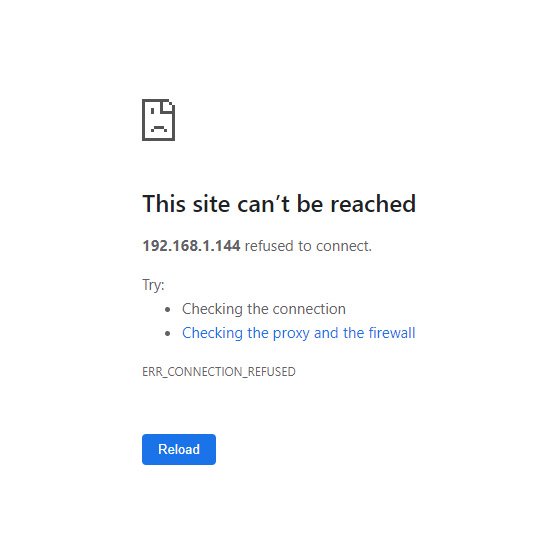
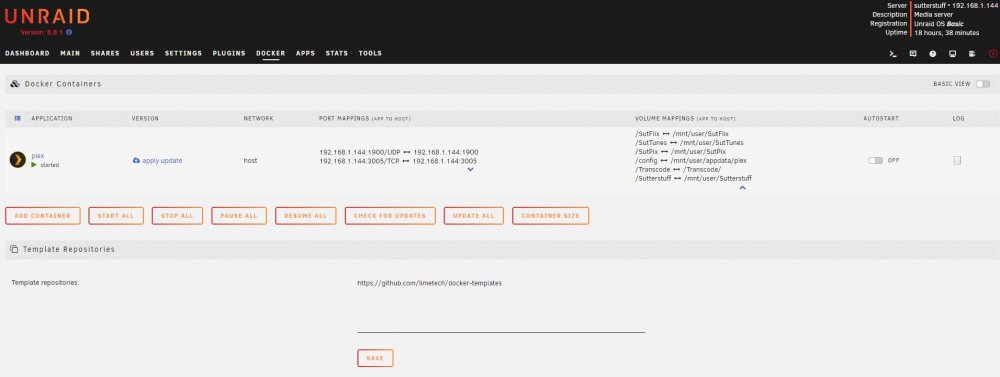
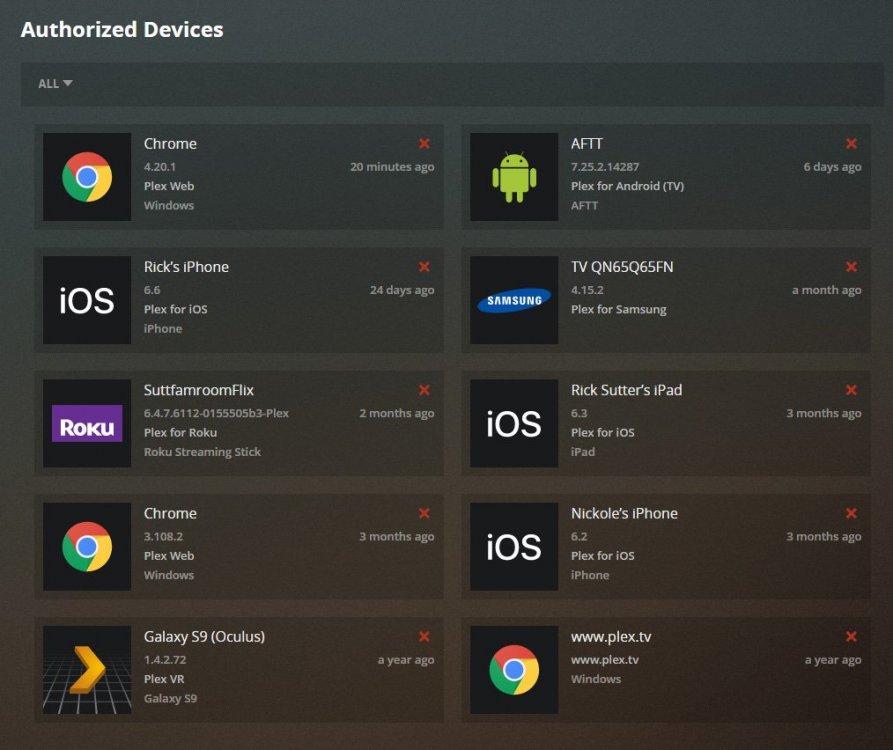
The NAS is running UNRAID. This is where all of my movie, music, photo assets are held. The NAS assets are on my home network and are accessible through my desktop. The authorized devices in Plex.tv does not recognize SutterStuff which is the name of the NAS. I have included a screen shot of the authorized devices that Plex shows. If I click on LOG, all I get is this: ErrorWarningSystemArrayLogin Starting Plex Media Server. Starting Plex Media Server. Starting Plex Media Server. Starting Plex Media Server. Starting Plex Media Server. Starting Plex Media Server. Starting Plex Media Server. Because I can't connect my assets (movies, music, etc) in plex, this is why this doesnt work I believe. I updated the docker and it was successful Command:root@localhost:# /usr/local/emhttp/plugins/dynamix.docker.manager/scripts/docker run -d --name='plex' --net='host' -e TZ="America/Los_Angeles" -e HOST_OS="Unraid" -e 'VERSION'='docker' -e 'NVIDIA_VISIBLE_DEVICES'='' -e 'TCP_PORT_32400'='32400' -e 'TCP_PORT_3005'='3005' -e 'TCP_PORT_8324'='8324' -e 'TCP_PORT_32469'='32469' -e 'UDP_PORT_1900'='1900' -e 'UDP_PORT_32410'='32410' -e 'UDP_PORT_32412'='32412' -e 'UDP_PORT_32413'='32413' -e 'UDP_PORT_32414'='32414' -e 'PUID'='99' -e 'PGID'='100' -v '/mnt/user/SutFlix':'/SutFlix':'rw' -v '/mnt/user/SutTunes':'/SutTunes':'rw' -v '/Transcode/':'/Transcode':'rw' -v '/mnt/user/SutPix':'/SutPix':'rw' -v '/mnt/user/Sutterstuff':'/Sutterstuff':'rw' -v '':'/movies':'rw' -v '':'/tv':'rw' -v '':'/music':'rw' -v '':'/transcode':'rw' -v '/mnt/user/appdata/plex':'/config':'rw' 'linuxserver/plex' bf785d28399a3bbd44ded9cddd7bed02a27f1fd9586bbaaf971975ece2097ef2 The command finished successfully! If I try to load the WebUI in the docker I get can't be reached. I have read if I delete an authorized device and log back in, devices will reconnect and be accessible but this is not the case.
-
I changed the paths per your response. Here is the Docker run command which loaded 'successfully' Command:root@localhost:# /usr/local/emhttp/plugins/dynamix.docker.manager/scripts/docker run -d --name='plex' --net='host' --log-opt max-size='50m' --log-opt max-file='1' -e TZ="America/Los_Angeles" -e HOST_OS="Unraid" -e 'VERSION'='docker' -e 'TCP_PORT_32400'='32400' -e 'TCP_PORT_3005'='3005' -e 'TCP_PORT_8324'='8324' -e 'TCP_PORT_32469'='32469' -e 'UDP_PORT_1900'='1900' -e 'UDP_PORT_32410'='32410' -e 'UDP_PORT_32412'='32412' -e 'UDP_PORT_32413'='32413' -e 'UDP_PORT_32414'='32414' -e 'PUID'='99' -e 'PGID'='100' -v '/mnt/user/SutFlix':'/SutFlix':'rw' -v '/mnt/user/SutTunes':'/SutTunes':'rw' -v '/Transcode/':'/Transcode':'rw' -v '/mnt/user/SutPix':'/SutPix':'rw' -v '/mnt/user/Sutterstuff':'/Sutterstuff':'rw' -v '/mnt/user/appdata/plex':'/config':'rw' 'linuxserver/plex' 2e9326e325327b66a41fae41fbb68b8b0e51d964479cb139dbcaf7fc5135a5df The command finished successfully! The same thing occurs when I launch the WebUI -- no connection - refused! Within Plex.tv, the NAS that stores all of my assets is not an authorized device so the server can't connect which is the bigger issue. Any suggestions?
-
I changed the mapping to be: /Sutterstuff//mnt/user/Sutterstuff /config/mnt/user/appdata/plex /SutFlix/mnt/user/SutFlix /music/mnt/user/SutTunes /SutPix//mnt/user/SutPix The container loaded successfully but when I try to launch the Plex Webui I get the screen that site can't be reached
-
I deleted the appdata and restarted docker. I then tried to reinstall Plex and the container install failed root@localhost:# /usr/local/emhttp/plugins/dynamix.docker.manager/scripts/docker run -d --name='plex' --net='host' --log-opt max-size='50m' --log-opt max-file='1' -e TZ="America/Los_Angeles" -e HOST_OS="Unraid" -e 'VERSION'='docker' -e 'NVIDIA_VISIBLE_DEVICES'='' -e 'TCP_PORT_32400'='32400' -e 'TCP_PORT_3005'='3005' -e 'TCP_PORT_8324'='8324' -e 'TCP_PORT_32469'='32469' -e 'UDP_PORT_1900'='1900' -e 'UDP_PORT_32410'='32410' -e 'UDP_PORT_32412'='32412' -e 'UDP_PORT_32413'='32413' -e 'UDP_PORT_32414'='32414' -e 'PUID'='99' -e 'PGID'='100' -v 'mnt/user/SutFlix/':'/SutFlix':'rw' -v '/mnt/user/SutTunes/':'/music':'rw' -v '':'/transcode':'rw' -v '/mnt/user/SutPix/':'/SutPix/':'rw' -v '/mnt/user/Sutterstuff/':'/Sutterstuff/':'rw' -v '/mnt/user/appdata/plex':'/config':'rw' 'linuxserver/plex' /usr/bin/docker: Error response from daemon: create mnt/user/SutFlix/: "mnt/user/SutFlix/" includes invalid characters for a local volume name, only "[a-zA-Z0-9][a-zA-Z0-9_.-]" are allowed. If you intended to pass a host directory, use absolute path. See '/usr/bin/docker run --help'. The command failed. I will go through each of the volume maps to see where there is the error.
-
I I simply go to my UNRAID settings and disable Docker will this work? Or, should I delete the image file for /mnt/user/system/docker/docker.img
-
Now that I have deleted the app, where would I find the appdata?
-
I have NOT! To be honest, I am not sure if I should do this. If I want to rebuild the docker and reload, will the appdata be put in fresh?
-
I have given up trying to get Plex to work with my UNRAID server. Everything I have tried fails. I guess there must be something corrupted. I just deleted the docker, updated the OS and all of the plugins and wondering what is next to get Plex to recognize my assets
-
I am still having issues connecting my linuxserver Plex docker to my nas assets. Updated container command is successful root@localhost:# /usr/local/emhttp/plugins/dynamix.docker.manager/scripts/docker run -d --name='plex' --net='host' --log-opt max-size='50m' --log-opt max-file='1' -e TZ="America/Los_Angeles" -e HOST_OS="Unraid" -e 'VERSION'='docker' -e 'TCP_PORT_32400'='32400' -e 'TCP_PORT_3005'='3005' -e 'TCP_PORT_8324'='8324' -e 'TCP_PORT_32469'='32469' -e 'UDP_PORT_1900'='1900' -e 'UDP_PORT_32410'='32410' -e 'UDP_PORT_32412'='32412' -e 'UDP_PORT_32413'='32413' -e 'UDP_PORT_32414'='32414' -e 'PUID'='99' -e 'PGID'='100' -v '/mnt/user/SutFlix/':'/SutFlix/':'rw' -v '/mnt/user/SutTunes/':'/SutTunes/':'rw' -v '/Transcode/':'/Transcode':'rw' -v '/mnt/user/SutPix/':'/SutPix/':'rw' -v '/mnt/user/Sutterstuff/':'/Sutterstuff/':'rw' -v '/mnt/user/appdata/plex':'/config':'rw' 'linuxserver/plex' 6ecfac4900f0a7e362898a5786f19879a88d8bbe2503112c7583087e080dffd1 The command finished successfully! When I try to run the Webui - I get refused to connect IP can't be reached. Within PLEX.tv when I log in, the NAS is not one of the authorized devices though I have access to all of the folders on my network. This was working the other day and poof again... I lost connection what can I do to get this working again? Plex Media Server Logs_2020-01-12_07-48-00.zip
-
I am doing my best to get my PLEX docker to connect to my NAS. I have set up the volume mapping I believe correctly but obviously not. When I try to launch the WEBui of Plex docker I receive cant connect - refused.... Any thread of HELP you can direct me to get this connected correctly

