atl-far-east
Members
-
Joined
-
Last visited
-
For me homebrew won't install as GitHub won't resolve. It could be a me issue, but when I was trying the template yesterday I got openrouter working so I know internet connectivity has been working (and I can also connect to it over my lan). Anyone seeing the same thing? Any ideas? 2026-02-01T11:54:42.584Z [gateway] signal SIGTERM received 2026-02-01T11:54:42.586Z [gateway] received SIGTERM; shutting down 2026-02-01T11:54:42.592Z [gmail-watcher] gmail watcher stopped Installing Homebrew... curl: (6) Could not resolve host: raw.githubusercontent.com
-
No major changes aside from going from 7.1.4 to this RC. Going to revert to check it's not an unrelated issue. Diagnostics attached. I twice left the array starting for 20+ minutes.tower-diagnostics-20251018-1311.zip
-
I put this in the site configuration for the Unraid admin site - but it depends on how your Nginx reverse proxy is setup. For my setup, it was /mnt/user/appdata/nginx/nginx/site-confs/default
-
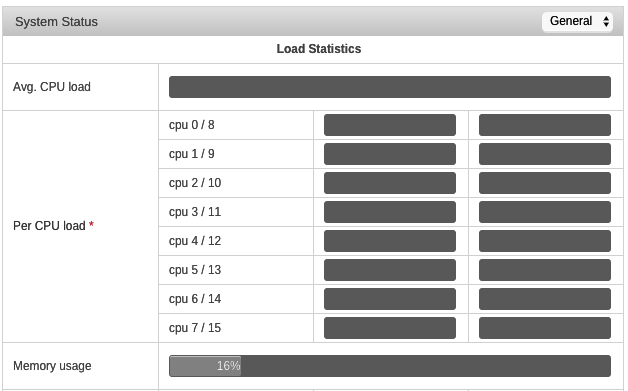
For anyone who cares, I think I fixed this! I think it may be due to nginx not working with Websockets by default. I added these lines to the site config: proxy_set_header Upgrade $http_upgrade; proxy_set_header Connection "Upgrade"; And it worked. E.g., this is the location settings for my unRAID proxy: location / { auth_basic "Restricted"; auth_basic_user_file /config/nginx/.htpasswd; include /config/nginx/proxy.conf; proxy_set_header Host $host; proxy_set_header X-Real-IP $remote_addr; proxy_set_header X-Forwarded-For $proxy_add_x_forwarded_for; proxy_set_header X-Forwarded-Proto $scheme; proxy_pass http://192.168.1.106:8080; proxy_set_header Upgrade $http_upgrade; proxy_set_header Connection "Upgrade"; } And now the CPU stats update in real time! Fingers crossed this is the fix.
-
Thanks FreeMan. In general the WebUI works, so the situation is OK - it's literally just the CPU stats that don't show 'live'.
-
Guessing there may not be a quick solution here... last bump in case. Thanks!
-
Hey all, Odd problem that I can't seem to troubleshoot. I have letsencrypt setup so that outside of my network I can access the unRAID web GUI from admin.domain.tld. When I'm on the network, and I access directly the server IP, the CPU loads update and show the current CPU load. When I'm using the admin.domain.tld address, everything works, except the CPU usage doesn't show/update. See screenshot attached - memory shows (but does not update, obviously) but CPU usage doesn't even load. Here's the relevant bit of my nginx config (with the actual IP). I've added all the proxy_set_header lines from Googling but they're not helping. server { listen 443 ssl; # listen 80; root /config/www; index index.html index.htm index.php; server_name admin.*; ssl_certificate /config/keys/letsencrypt/fullchain.pem; ssl_certificate_key /config/keys/letsencrypt/privkey.pem; ssl_dhparam /config/nginx/dhparams.pem; ssl_ciphers 'ECDHE-RSA-AES128-GCM-SHA256:ECDHE-ECDSA-AES128-GCM-SHA256:ECDHE-RSA-AES256-GCM-SHA384:ECDHE-ECDSA-AES256-GCM-SHA384:DHE-RSA-AES128-GCM-SHA256:DHE-DSS-AES128-GCM-SHA256:kEDH+AESGCM:ECDHE-RSA-AES128-SHA256:ECDHE-ECDSA-AES128-SHA256:ECDHE-RSA-AES128-SHA:ECDHE-ECDSA-AES128-SHA:ECDHE-RSA-AES256-SHA384:ECDHE-ECDSA-AES256-SHA384:ECDHE-RSA-AES256-SHA:ECDHE-ECDSA-AES256-SHA:DHE-RSA-AES128-SHA256:DHE-RSA-AES128-SHA:DHE-DSS-AES128-SHA256:DHE-RSA-AES256-SHA256:DHE-DSS-AES256-SHA:DHE-RSA-AES256-SHA:AES128-GCM-SHA256:AES256-GCM-SHA384:AES128-SHA256:AES256-SHA256:AES128-SHA:AES256-SHA:AES:CAMELLIA:DES-CBC3-SHA:!aNULL:!eNULL:!EXPORT:!DES:!RC4:!MD5:!PSK:!aECDH:!EDH-DSS-DES-CBC3-SHA:!EDH-RSA-DES-CBC3-SHA:!KRB5-DES-CBC3-SHA'; ssl_prefer_server_ciphers on; client_max_body_size 0; location / { auth_basic "Restricted"; auth_basic_user_file /config/nginx/.htpasswd; include /config/nginx/proxy.conf; proxy_set_header Host $host; proxy_set_header X-Real-IP $remote_addr; proxy_set_header X-Forwarded-For $proxy_add_x_forwarded_for; proxy_set_header X-Forwarded-Proto $scheme; proxy_pass http://192.168.1.IP:8080; } } Any ideas? Thanks!