JimJamUrUnraid
Members
-
Joined
-
Last visited
Everything posted by JimJamUrUnraid
-
I was just having an issue with what I thought was my USB stick, and after a long day of re-establishing my Unraid server on a new USB stick, I still seem to have issues. A little bit more digging and come to find out, I have a log at 100% and it is getting blasted with: ngx_slab_alloc() failed: no memory Dec 21 04:36:50 Kioshi nginx: 2020/12/21 04:36:50 [error] 12904#12904: shpool alloc failed Dec 21 04:36:50 Kioshi nginx: 2020/12/21 04:36:50 [error] 12904#12904: nchan: Out of shared memory while allocating channel /disks. Increase nchan_max_reserved_memory. Dec 21 04:36:50 Kioshi nginx: 2020/12/21 04:36:50 [error] 12904#12904: *3142714 nchan: error publishing message (HTTP status code 507), client: unix:, server: , request: "POST /pub/disks?buffer_length=1 HTTP/1.1", host: "localhost" Dec 21 04:36:50 Kioshi nginx: 2020/12/21 04:36:50 [crit] 12904#12904: ngx_slab_alloc() failed: no memory Dec 21 04:36:50 Kioshi nginx: 2020/12/21 04:36:50 [error] 12904#12904: shpool alloc failed Dec 21 04:36:50 Kioshi nginx: 2020/12/21 04:36:50 [error] 12904#12904: nchan: Out of shared memory while allocating channel /cpuload. Increase nchan_max_reserved_memory. Dec 21 04:36:50 Kioshi nginx: 2020/12/21 04:36:50 [error] 12904#12904: *3142715 nchan: error publishing message (HTTP status code 507), client: unix:, server: , request: "POST /pub/cpuload?buffer_length=1 HTTP/1.1", host: "localhost" So you are telling us to update to an RC version of Unraid and this issue will magically go away? Why did this just randomly start happening? I have been on 6.8.3 since it was released and just now I am having these issues? Something isn't adding up. Can you please explain further?
-
Thanks for the quick fix, it seems to be working for me now
-
My install links are also not working... my diagnostics file does not good because there is no trace of unraid even attempting to install something.
-
That’s what I ended up doing. I still don’t like it. Yet another rule I have to manage.
-
I dont want internal probing attacks. Easiest way to find out about someone elses network.
-
This is across a VPN connection.
-
Dang, sounds like a new feature 😛. Thanks for your assistance.
-
Is there anyway around this? I dont want the server to be pingable.
-
There is a share called offsiteBackupDrive. I thought it was very strange that the logs didnt even show an attempt to mount the drive, but it also kinda makes sense because I cant click the mount button because it is greyed out.
-
Having an issue with a new SMB share that is in a remote location. All Windows machines can connect to the share without issue, unassigned devices cannot My old SMB shares seem to be working just fine. I have included my diagnostics files Edit: To add a little more information, the unassigned devices UI does allow me to add the SMB share and reports a success. But the "mount" button is greyed out and the logs don't seem to show any real attempt at making a connection (I have attached a screen shot of what the UI looks like).
-
This is kinda annoying. Somehow the system time got set back to 2013??? Not obvious at all, I don't see anywhere in the GUI that the time is posted except in the settings. This should probably be in the header... The only reason I noticed was because the last time a parity check had been completed was 2754 days ago!!! I knew that wasn't correct, which led me to thinking about the time. NTP must have been broken temporarily or something. Still confused about the docker versions though, they still show not available. Maybe given some time the system will recheck and figure it out.
-
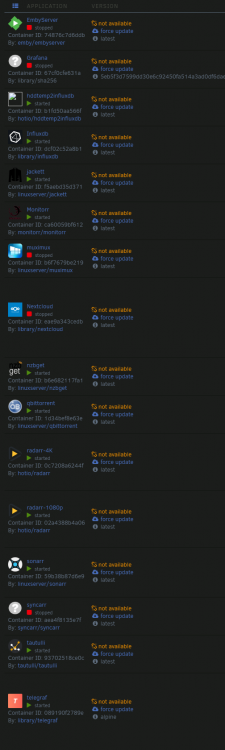
I just got this message, so im doing what was asked... I have also recently been having issues with the "version" column on my docker tab saying "not available" for every docker container that I have. I mention it because I feel like they are related.