





Southweave
Members
-
Joined
-
Last visited
Everything posted by Southweave
-
Follow up on this topic. I changed a lot of settings ~1 month ago and I haven't had any issues since then. Actions I took: Deleted preclear plugin (I don't think this had any effect) Deleted Tips & Tweaks plugin (I don't think this had any effect) Deleted Nerds plugin (I don't think this had any effect, it wasn't suppose to be used anyways) Dynamix File Integrity I set to disabled: "Automatically protect new and modified files:" Allowed incremental (not only full and differential) backups with Macrium Allowed writing backups to cache drive This couldn't be done with Acrium because they file into a single large file, while Macrium creates a new file for every backup I believe the Dynamix File Integrity changes or directing backups to cache drive fixed the issue. But because I decided to go nuclear and try everything once, then I can't be sure.
-
I compared our testparm results and there are only a few differences: You seem to have syslog on Your casesensitive is Yes while mine is Auto You show dot files Your max log size is 5 000 while mine is 10 000 And some naming differences Doesn't seem anything substantial. Must be something else... It does seem like finding a way around the problem would be quicker by now... Thank you for your help!
-
Yes, if the backup fails then you can repeat it by reattempting. I'd guess that the odds of second backup failing is ~50%. Usually the process to reattempt: Check if SMB lock is still active (smbstatus) If yes, then kill the process (kill {PID}) Restart the backup Fails? Start again from #1 No, but that's a good suggestion. But because the odds of second backup also failing are ~50% it would take a while to actually conclude that it works. Because it would take a while to actually validate this I think it would be simpler for me to simply revert Unraid to previous version. However if reverting proves to be okay then I'm still not any closer to the actual solution. EDIT: The backup has failed the whole day and I just attempted to backup to another drive on the PC itself. It was successful. Correct, first full image backup and then differential image backups. Both types fail I'm also going to include "testparm -v" global output, can you please verify this against yours or just check it over? It is entirely possible I've changed something in the bast when attempting to get 10Gb connection between Unraid and other systems
-
While it does seem logical that a local file is blocking the actual backup, I believe that's not the case. If I remember correctly then Acronis logs stated that there was an error locking SMB share file (because it was already locked by the same process) Macrium states "An unexpected network error occured" Today for the first time I also got an error "Backup aborted! - Open file failed - \\SMB_SHARE... - Error - The process cannot access the file because it is being used by another process This probably occured because the 09:00 backup failed and left the SMB locks up I can imagine how the issue could start occurring at the same time I updated Unraid and cause the issue, but I believe it would be a leap - and for two PC's to start having the issue. If the consensus is that it's not my Unraids configuration problem, then I'll just try to revert back to 6.10.3 and run it for a month again. The probability that the issue occurs within a month is high if the cause is not my Unraid's configuration. Also Acronis & Macrium don't seem to care about locked files. I mean you can literally restore your computer from the image. I don't know what black magic is going on there.
-
While I do agree that it's not Unraids fault I do believe it has something to do with my specific configuration. I just don't know what and I don't have any more ideas how to debug this mess, thus why I created this topic. The reasons why I think it's related to my Unraid setup: The issue started occuring on 6.11.5 If I revert to 6.10.3 then the problem does not reoccur (but because it's not consistent I can't be 100% sure) The issue occurs on both Windows 10 and Windows 11 The issue occurs with both Acronis and Macrium Reflect While that doesn't necessarily mean it's my Unraid setup which causes it, it sure does seem like it. But of course it's not the first time that even though everything seems to point at Unraid - it's not actually Unraid's fault.
-
Sadly Macrium Reflect logs don't show the time of exception (or anything useful at all). However the backup start time is 13.02.2023 10:43:56 I guess the backup lasted couple of minutes at best. The temporary file is also gone by now so I can't verify last modified date time.
-
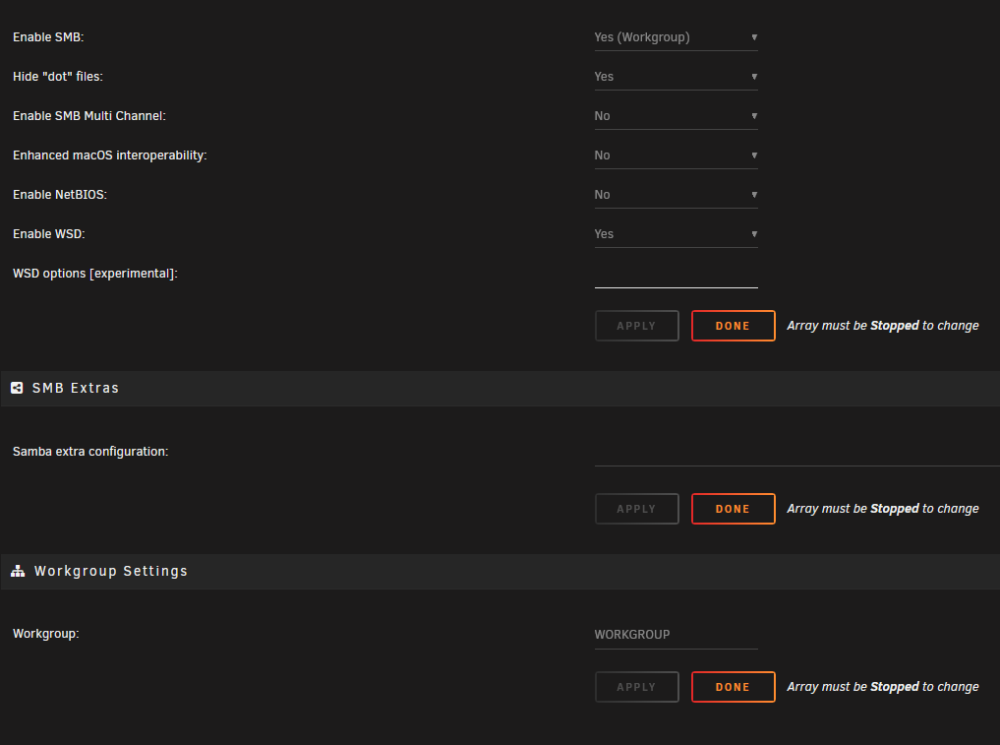
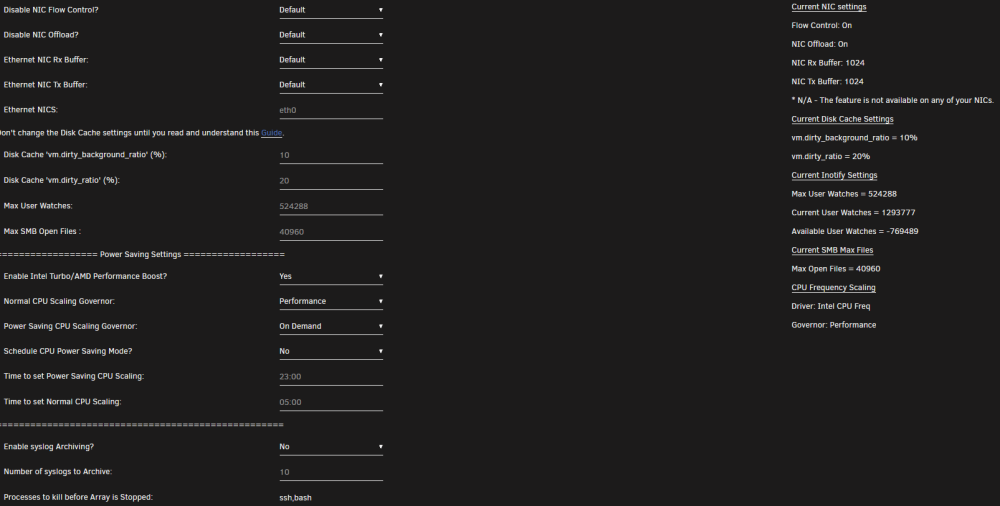
Sadly it is already disabled and has been for over a year. Settings are also visible in pictures, i'll remove them from hidden content to make them more visible
-
Description After updating Unraid from version 6.10.3 to 6.11.5 windows backups occasionally fail, which root cause seems to be that SMB locks are not properly handled. When backing up the required disks are all spun up and transfer works properly. Data is transferred to Unraid and everything is fine until the end, there something goes wrong and the process never finishes. For example today it backed up 17GB of data but the file has suffix .tmp which will probably be deleted the day after tomorrow. I never had the issue on 6.10.3 and if I reverted to 6.10.3 then problem didn't reoccur If I kill the process which locks SMB lock then sometimes backup works sometimes it doesn't. There have been times where the problem didn't occur for a week and then there have been times where the whole week backups failed. Pictures of smbstatus, smb settings and tips & tweaks have been included. smbstatus picture shows the locked file which shouldn't be locked anymore (the process already failed) Also I included server diagnostics. The server was restarted this morning after which I attempted to backup once again. I'll gladly answer any questions, this problem has been driving me nuts Systems Unraid Version 6.11.5 Supermicro X9DR3-F Intel E5-2680 v2 (2x) 40Gib DDR3 ECCS memory 40Gib NIC Windows #1 Windows 10 10Gib NIC Intel system Windows #2 Windows 11 10Gib NIC Intel system Backup software: Acronis Macrium Reflect I initially used Acronis however I thought the issue was Acronis specific and migrated to Macrium Reflect. Macrium reflect has the same issue What I've tried: Enabling & Disabling SMB Multi channel Resetting Tweaks And Tricks plugin settings Removing all custom samba configuration (which included RSS & Multi channel prior to update) Changing backup software Switching backing up to rotational, as in one Windows systems backs up a day so there isn't a possibility of a conflict Creating separate Unraid users for backing up Changing "ulimit -Hn" and "ulimit -Sn" to 80000, it used to be 40960 Turn SMB share to public (not hidden) Googled the same issue over and over within last month with different wording and attempted to find same issue described. I couldn't find anything that would help me Definitely something more Backup schedule Both windows attempt to backup at 09:00, if computer is not on then it is initiated on boot Windows #2 is usually always on at 09:00 so that's when it backs up Windows #1 is usually not on at 09:00 and usually backup occurs later on in the day Both Windows systems have issues This issue has occurred for a while now and if my memory serves me right then it occurred the very day I upgraded to 6.11.5 Unraid now has SMB version which supports Multi Channel and with multi channel there's also a bug: https://bugzilla.samba.org/show_bug.cgi?id=11897 It seems like similar issue but I am not knowledgeable enough to Assert that it has the same root cause How to fix it Why does it occur to me server-diagnostics-20230213-1110.zip

-
I am having a problem with preclear- today I purchased 2 new disks and I can't clear either one of them. On the Script line it says following: "gfjardim - [strings] Please install it and try again. Line 49" The system is Ryzen 5 1600, Gigabyte AB350M gaming 3, 16GB ddr4 ram, WD and Seagate drives. I've tried to reboot and reinstall several times, nothing has worked. OS version is- 6.4.0_rc10b
-
I have the same problem. I reverted back to the previous version and it started working again. Reinstalled FileBot using Docker Hub URL: https://hub.docker.com/r/coppit/filebot/builds/b3qovrz4qankwgbssrzgamm/


