





dojesus
Members
-
Joined
-
Last visited
-
Thanks trurl. I don't come here very often, but I follow him on Youtube. I noticed some of his CA dockers were breaking and I realized he hadn't uploaded anything in quite a while. I was hoping he was okay and someone here would know. Thank you.
-
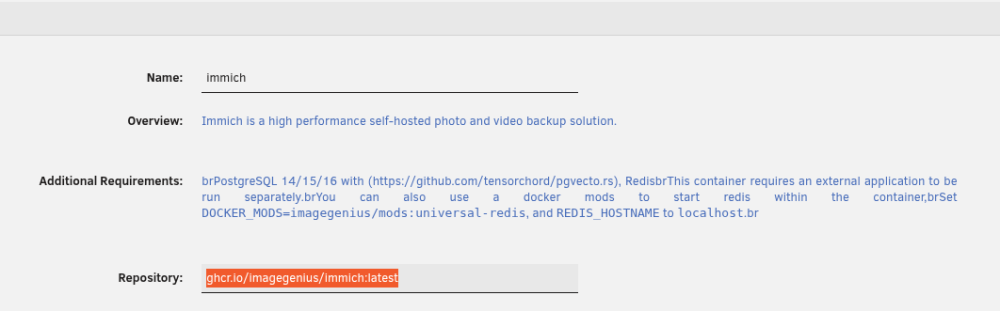
Install Redis official container. Change repository of Immich container to: ghcr.io/imagegenius/immich:latest and force update. Restart (in this order) Redis then Postgresql then Immich container. This worked for me and has been working flawlessly, with additional updates, since I had the same issue about a month ago. This will also put you on official repos going forward. I'm not sure what happened to SpaceInvader One...he's gone missing for months now. I hope he is okay.
-
He's gone missing. Hasn't posted anything in 7 months. Anyone know what became of him??
-
Having same issue. I have already replaced my flash drive, so I'm assuming there is something with my usb controller, as it happens in different slots. Building a new system. Will see if it happen on that, too.
-
This is still an issue. For me, some of my docker containers stop working. When I go to the dashboard, dockers are blank. Go to the docker tab, and it says the docker service isn't running, even though it is enabled and several containers are still running. Disable and re-enable the service changes nothing and if I try to reboot, it gets stuck "retrying unmount" on an endless cycle, forcing a dirty shut down and 4 day parity check. This is an old issue that really needs to be addressed. Mind you, this issue only STARTED for me since updating 7.x. Leads me to believe an old bug got let back into the code.
-
CA-Logging-20250111-2032.zip
-
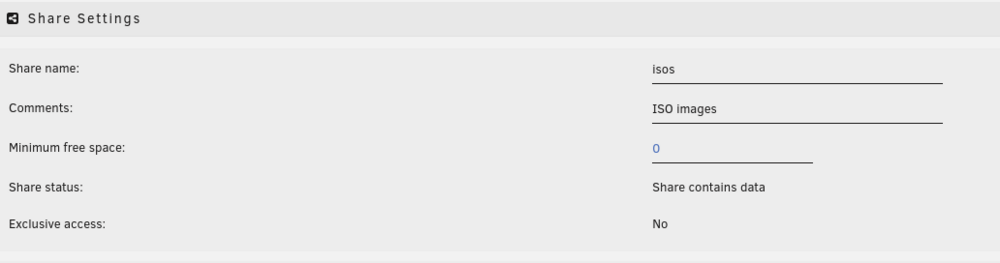
I have many shares like this after a new config parity rebuild. Quickest way to fix this if you have many shares, is to copy the minimum space value that the system creates, paste and apply to all your shares
-
Problem appears to be a blank minimum free space section. Any change to the settings, auto populates the minimum space and removes the warning.
-
Only 1 drive requires a rom swap. Thanks for the heads up.
-
I believe I've tracked down all the replacement circuit boards for all the drives on ebay. Thanks for the advice.
-
Thanks for all the input. Yes, it appears my own idiocy caused this problem.i didn't swap the modular cables believing them to be standardized.
-
Well, I was having random shut downs and heat wasn't an issue. The PSU a little long in the tooth, so I decided to upgrade the Thermaltake with a new 850watt 80 gold Seasonic. I'd hate to believe that I lost 30+ TB of data due to a PSU upgrade.
-
Yes it is modular and I've changed port positions and cables. Even putting old PSU back in didn't change anything.
-
8 mechanical drives, 8 on a backplane and 1 not. Impossible that all failed simultaneously.
-
I recently updated my power supply and now no mechanical drives are showing. I have 8 on a backplane connected to an LSI card and 1 connected to onboard SATA. NONE are showing up in unRAID. I figured there was something wrong with the PSU and swapped back...same issue. I'm thoroughly stumped on this. All NVME drives are there. I have 1 SATA SSD connected to the MB SATA port, and it shows up. None of my spinning drives are showing...or spinning as far as I can tell. Any suggestions are welcome, because I've pulled out what little hair I had on this one.

