





sentein
Members
-
Joined
-
Last visited
-
nothing is working. Thanks for the help. I am going to have to move on i think.
-
Yes i will run that tonight. i have been deleting the container and the the appdata folder completely on every installation. The errors you saw above were from installing the CUDA 12.9 release with the TORCH_LOCK variable enabled as you described in your previous posts. At this point in the servers life i am "comfortable" with whatever. There is no permanent data i am going to lose. This was an attempt to make a "AI" server. LLMs Stable diffusion and ComfyUI as the main use cases. If i can get all of those to work i will be adding Shinobi to the mix. But as of right now i could erase the entire thing and not hesitate about it. Thank you for the help, I really do not understand why this is fighting me so much.
-
I used all of the above info. The below is the last lines in the logterminal for ComfyUI-Nvidia-Docker. fo, av.bitstream, av.device, av.video.codeccontext, av.subtitles.stream, cffibackend (total: 198) /comfyui-nvidia_init.bash: line 935: 445 Illegal instruction ${COMFY_CMDLINE_BASE} ${COMFY_CMDLINE_EXTRA} !! ERROR: ComfyUI failed or exited with an error !! Exiting script (ID: 100) !! ERROR: subscript failed !! Exiting script (ID: 1) Below is the last lines in the log file in the user folder. Not really sure what the heck i am doing wrong. I guess if you have any info as to how i could screw this up so bad, please let me know. [PRE] ComfyUI-Manager [2026-06-03 18:22:01.217] WARNING: You need pytorch with cu130 or higher to use optimized CUDA operations. [2026-06-03 18:22:01.218] Found comfy_kitchen backend triton: {'available': True, 'disabled': True, 'unavailable_reason': None, 'capabilities': ['apply_rope', 'apply_rope1', 'apply_rope_split_half', 'apply_rope_split_half1', 'dequantize_nvfp4', 'dequantize_per_tensor_fp8', 'quantize_mxfp8', 'quantize_nvfp4', 'quantize_per_tensor_fp8']} [2026-06-03 18:22:01.218] Found comfy_kitchen backend cuda: {'available': True, 'disabled': True, 'unavailable_reason': None, 'capabilities': ['apply_rope', 'apply_rope1', 'apply_rope_split_half', 'apply_rope_split_half1', 'dequantize_nvfp4', 'dequantize_per_tensor_fp8', 'gemv_awq_w4a16', 'quantize_mxfp8', 'quantize_nvfp4', 'quantize_per_tensor_fp8', 'quantize_svdquant_w4a4', 'scaled_mm_nvfp4', 'scaled_mm_svdquant_w4a4', 'stochastic_rounding_fp8']} [2026-06-03 18:22:01.218] Found comfy_kitchen backend eager: {'available': True, 'disabled': False, 'unavailable_reason': None, 'capabilities': ['apply_rope', 'apply_rope1', 'apply_rope_split_half', 'apply_rope_split_half1', 'dequantize_mxfp8', 'dequantize_nvfp4', 'dequantize_per_tensor_fp8', 'gemv_awq_w4a16', 'quantize_mxfp8', 'quantize_nvfp4', 'quantize_per_tensor_fp8', 'quantize_svdquant_w4a4', 'scaled_mm_mxfp8', 'scaled_mm_nvfp4', 'scaled_mm_svdquant_w4a4', 'stochastic_rounding_fp8']} [2026-06-03 18:22:01.271] Checkpoint files will always be loaded safely. [2026-06-03 18:22:01.620] Total VRAM 24126 MB, total RAM 257907 MB [2026-06-03 18:22:01.621] pytorch version: 2.11.0+cu129 [2026-06-03 18:22:01.622] Set vram state to: NORMAL_VRAM [2026-06-03 18:22:01.623] Device: cuda:0 NVIDIA GeForce RTX 3090 : cudaMallocAsync [2026-06-03 18:22:01.624] Using async weight offloading with 2 streams [2026-06-03 18:22:01.624] Enabled pinned memory 232116.0 [2026-06-03 18:22:03.800] Using pytorch attention [2026-06-03 18:22:35.846] DynamicVRAM support detected and enabled [2026-06-03 18:22:35.846] Python version: 3.12.3 (main, Mar 23 2026, 19:04:32) [GCC 13.3.0] [2026-06-03 18:22:35.847] ComfyUI version: 0.23.0 [2026-06-03 18:22:35.849] comfy-aimdo version: 0.4.8 [2026-06-03 18:22:35.852] comfy-kitchen version: 0.2.10 [2026-06-03 18:22:35.866] comfyui-frontend-package version: 1.44.19 [2026-06-03 18:22:35.867] comfyui-workflow-templates version: 0.9.92 [2026-06-03 18:22:35.867] comfyui-embedded-docs version: 0.5.2 [2026-06-03 18:22:35.867] comfy-kitchen version: 0.2.10 [2026-06-03 18:22:35.868] comfy-aimdo version: 0.4.8 [2026-06-03 18:22:35.874] [Prompt Server] web root: /comfy/mnt/venv/lib/python3.12/site-packages/comfyui_frontend_package/static [2026-06-03 18:22:35.877] Asset seeder disabled [2026-06-03 18:22:35.877] [START] ComfyUI-Manager [2026-06-03 18:22:36.247] [ComfyUI-Manager] Using GitPython backend [2026-06-03 18:22:36.413] [ComfyUI-Manager] network_mode: personal_cloud
-
I did this and loaded 12.8. it installed 13.0 instead. No idea why or if there is something in the docker base infostructure i need to erase to get the version matching to work properly. Any info on that would be helpful as well.
-
Thats how i thought it might layout. I will give this a try tonight. Thank you for the assistance. I don't want to pay for another unraid license unless i can get this to work. I already have too many.
-
Dockers are not my strong suit. If i am understanding correctly in unraid the environmental variable "Key" would be TORCH_LOCK when adding the variable? If that is the case would the entire "TORCH_LOCK=torch==2.9.1+cu130 torchvision==0.24.1+cu130 torchaudio==2.9.1+cu130" be the variable itself or would i be dropping the TORCH_LOCK as that is already set as the "key" in the templates page? Sorry if this seems like a really dumb question, i just want to try my best at getting this to work.
-
So i installed the same driver set you have, I also happen to have the 3090. My log shows failed and exit when launching. I was trying to load up the cuda 12.8 version of this docker. I get the below in my log as the last line. Not really sure why its registering cuda 13.0 when i ran the 12.8 docker. Either way it did not work. I am going to try some more configs with this driver. If i may ask what version did you install with that driver? "RuntimeError: Detected that PyTorch and TorchAudio were compiled with different CUDA versions. PyTorch has CUDA version 13.0 whereas TorchAudio has CUDA version 12.8. Please install the TorchAudio version that matches your PyTorch version."
-
I had this working a few weeks ago. Worked right out of the gate on the first install. I updated the nvidia plugin and it broke this docker. No ones fault. But i have tried 20+ times with different combinations or nvidia drivers and associated docker cuda versions. None or them work, i either get an error about torchaudio incompatibility, wrong cuda version or an error pops up saying a requirement is not installed(Just depends on the combination i put togeather). The torchaudio seems to be the most prevalent as i can install cuda 13.0 and everything else seems to load but torchaudio is at 12.8 and incompatible. Does anyone have a good way to get this installed? i would like to just go to an older version of the nvidia plugin but i am not smart enough to figure out how to go to an older version of the plugin.
-
I used Gparted on a linux mint system to format the drive to NTFS. Just did it again and it mounts properly into Linux Mint but throws an error for no file system still.
-
I gparted the entire hdd to NTFS in linux mint. I will try it again. Maybe i need to delete the partition table as well and start from scratch. When i formatted the disk in a windows machine the only option i had was to format it into xfs or the other supported file system. Other than the file system does the script look like it should work?
-
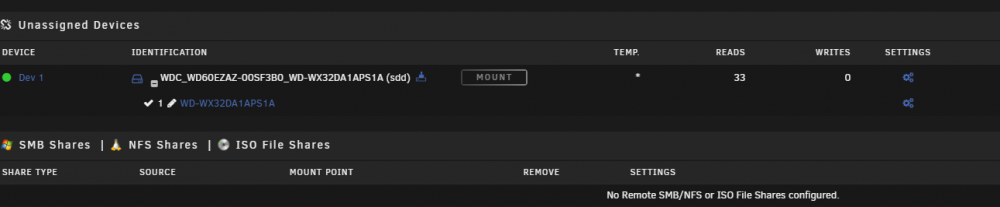
For whatever reason i cannot get the backup script to work not matter how i go about it. The latest format of the drive has left me with the attached. I cannot Mount or unmount at all. I have restarted the server and tossed the drive back in fresh. It does this on a fresh reboot so i have no idea what i messed up. I realize i have been at this for too long but is there anything i can do to get this working. I need to get this over to a friends house tomorrow and i feel like i hit a road block. When i put the HDD in UD sees the drive but nothing from the script actually happens. I have attached the latest script in a TXT file to this. I am using a direct SATA connection through a Hot Swap Bay to the motherboard. What am i missing? anyone at all, i am at my wits end. Backup Script.txt
-
Right now i have a 60TB array with 2 xeon 2650v2 256gb of ram and with a plex docker using an P600 for transcoding. I have a few other dockers running but that is the only one with any real hardware associated with it. I am using the Nvidia plugin on version 6.9.2. With all that out of the way, i am attempting to use either a Tesla M40 or a Tesla K80 passed through to a VM as a second GPU. The main idea behind this is i want all of my rendering horse power on the server so i can design in fusion 360 or use blender from almost any machine i own. I would like to use the original VNC as the base GPU so i can have easy access to the VM anywhere in the house. As of right now i have tried to set the Tesla M40 up as the second GPU in the VM but Windows does not see the hardware at all. I do not have a Vbios for it either. I have also tried to use the card as just a PCIE device but unraid will not let me pass it through that way. I would rather not setup a second machine if i can help it. Is there something i can do to get either of these cards to pass through correctly? I have enough system resources to choke a horse on my server i would rather keep it in one box.
-
Are SSDs really a good option for cache drives? I have 2 positions in my new case that i was thinking about tossing cache drives in. I am split between 2 500GB SSD or 2 1tb SATA drives. I would like the speed of an SSD but i am unsure of how fast they might burn out. Also has the mover improved in the recent years? I ask because i have no cache right now and that was directly related to the problems i was having with the mover.
-
Thank you very much. That helps a lot.
-
Just to pic your brain a bit. Would you know of a write up or similar for this "Fastest way is if you can copy multiple disk to disk sessions with rsync or something similar"? That sounds like exactly what i need. Also i did see in a post a little earlier that active cable limit for 10gb was 33'. Was this limit for, as an example passive copper SFP+ cables or would fiber OM3 & OM5 also be limited to this length? I have a new 30m OM3 cable here and would like to know before i run it.
