





Cornbreadman
Members
-
Joined
-
Last visited
-
Back to issues. Disk 4 is emulated Disk 9 has errors showing matrix-diagnostics-20240518-2326.zip
-
But shouldn't it have rebuilt from parity? edit: nevermind, just realized I formatted it while array was running, making it the new parity. Great. Started array. EVerything green. matrix-diagnostics-20240518-0537.zip
-
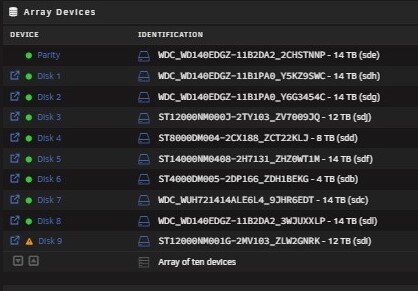
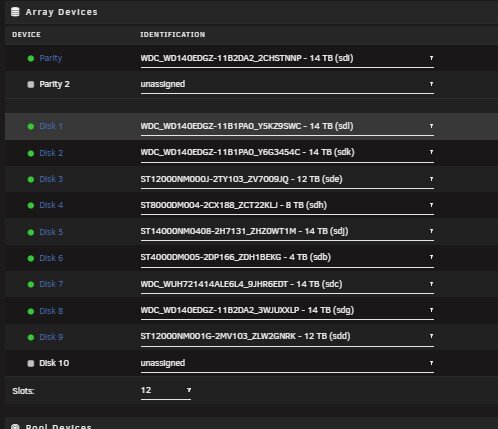
Just finished. And before even restarting seeing that Disk 9 is empty now. So looks like that data is gone from the parity somehow. Before reboot, as rebuild was finishing up. After reboot, all drive assignments are different. Haven't started the array. That is where everything went wrong last time, and the disk came back unmountable. matrix-diagnostics-20240518-0526.zip
-
So once rebuild is done, what would be my best course of action? When I reboot something is causing the drive to be unmountable again. Should I run a filesystem check before rebooting, to make sure everything looks good? Would a new config help anything?
-
I had something happen the other night with one of my 5x3 drive cages. Think one of the ports went bad, and I didnt notice my server was getting read errors on one drive and another drive was listed as missing seemed to be two main issues. Regardless one thing led to another and I rebooted the server. Everytime running into various but different config issues. Eventually I took all the drives (5) out of the cage and powered each up separately and reconnected them. During this whole process Disk 9 keep coming back as either missing or unmountable. I think my partiy might have become corrupt during the problems. Last night I rebuilt the Drive 9 without issue. Everything seemed fine. But then I put all the drive back into the tower and rebooted the system back up, once again, Disk 9 came back unmountable. Do I need to run a "New Config" after the rebuild? Or is the actual parity as is now, screwed up beyond repair and I have to instead find a way to get the data off the drive without rebuilding it. I was about to rebuild again, then run "New config" and reboot, but after 2 days of that happening, my fear is yet again getting "Unmountable" upon restart of server and I am back to square one after wasting multiple days. Wanted to know if anyone could just point me in correct direction so the time to repair/fix the issue isn't wasted on trial and error. matrix-diagnostics-20240517-0820.zip
-
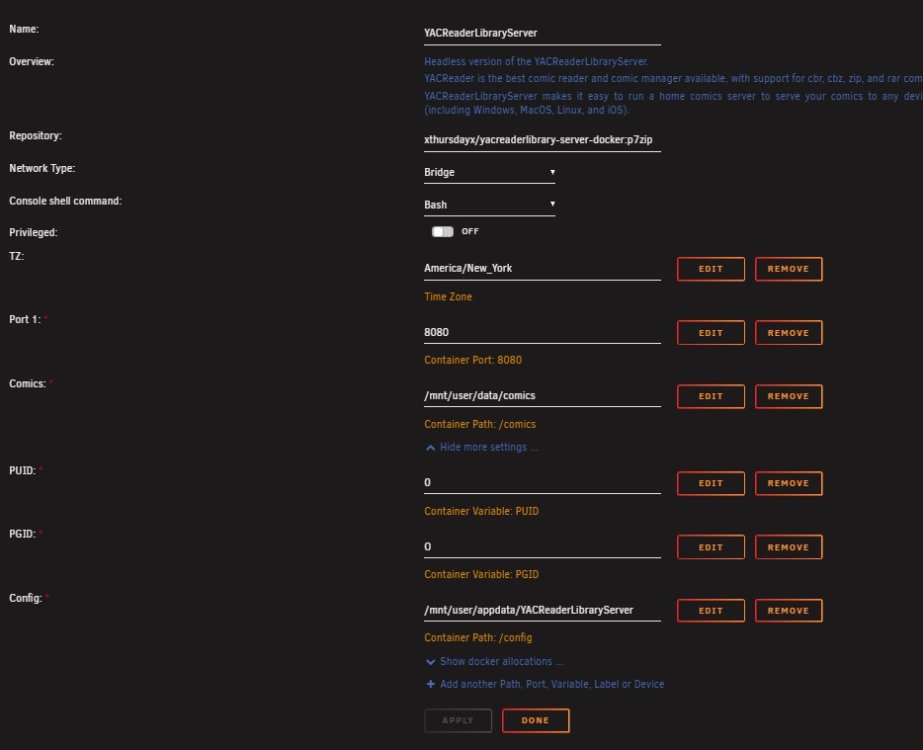
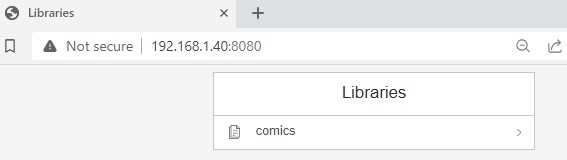
I seem to be having issues getting this program to update my library. I installed the docker from official repo, set it all up and created the library without issue. WebUI shows I have a "comics" library, however when I click on it, it just reloads the page. When I am in CLI and I use the command to update the library it just says processing and quickly changes back to prompt but nothing happens/processes. No comics are added. In the mapped folder I have almost 1TB of comics. I have tried in other sub folders, and just loose in the mapped directory. None are being loaded in. I even went and put full access permissions on the app and folders to try and see if it was a permission issue, but nothing changed. Saw on the forums and reddit the dev preferred Unraid support in this thread. I normally would just move on and chalk it up to user error, but I had already paid to download the iOS app, so wanted to get it up and running if possible.

-
Looking good. Had to rebuild the one drive that had issues and ran into nothing during the 36 hours it took. Rebooted and logs look clear to me. Which means sometime this weekend the tower will burst into glorious flames, because...........why not? Anyway I appreciate the experienced eyes and knowledge in pointing me to the issue. I do think one of my power cables is bad. One of the hard drives I had outside the cages wasn't powering on when using it after putting everything back together. Redid all the cabling and everything working now. matrix-diagnostics-20231016-2307.zip
-
Thank you. I suspected power or some type of connection issue. I use 2 sets of drive cages, and every little thing that has been happening the past couple weeks has been associated with drives in the top cage. I took out all the drives, disconnected all the cabling and then hooked everything up outside the cage. And alot less red in my boot up. If its power or cable issues, I can start playing around and narrowing it down what and where. Just wanted to rule out other things first. matrix-diagnostics-20231015-0909.zip
-
In the last week I have been having some issues with my server. Out of nowhere the system will just hang. All dockers become unresponsive, cannot reach the server though any WebGUI or via Putty. Single power button push appears to not do anything and a forced shutdown is the only option. Now I have done it back to back days. Yesterday when it rebooted I had a file system error, that I was able to recover from via google searches and repair. Today I woke up to the same frozen server. I have rebooted and no obvious drive issues listed on main page, but in the logs I am getting errors. It looks like (sde) drive could have something going on with it. But I am not sure how to read the logs to know exactly the cause, or what to start ruling out. Its running a parity check now, VERY slowly (4.3 mb/sec) which will never finish. But I am hesitant to cancel because I did yesterday and this is obviously something failing/failed that needs to be addressed. Before I start pulling things apart, wanted to see if someone more versed in reading the logs could point me in a direction. Appreciate any help. matrix-diagnostics-20231015-0224.zip
-
Ok I can mount the drive again, and I can see the data on shared windows. Now I need to get it saved somewhere!!!! Holy crap. Fingers crossed here. I hope this works. Thank you so much!
-
root@Matrix:~# xfs_repair /dev/sdk1 Phase 1 - find and verify superblock... bad primary superblock - bad magic number !!! attempting to find secondary superblock... .found candidate secondary superblock... verified secondary superblock... writing modified primary superblock sb realtime bitmap inode value 18446744073709551615 (NULLFSINO) inconsistent with calculated value 129 resetting superblock realtime bitmap inode pointer to 129 sb realtime summary inode value 18446744073709551615 (NULLFSINO) inconsistent with calculated value 130 resetting superblock realtime summary inode pointer to 130 Phase 2 - using internal log - zero log... - scan filesystem freespace and inode maps... sb_icount 0, counted 570016 sb_ifree 0, counted 126 sb_fdblocks 122036997, counted 47513804 - found root inode chunk Phase 3 - for each AG... - scan and clear agi unlinked lists... - process known inodes and perform inode discovery... - agno = 0 - agno = 1 - agno = 2 - agno = 3 - process newly discovered inodes... Phase 4 - check for duplicate blocks... - setting up duplicate extent list... - check for inodes claiming duplicate blocks... - agno = 0 - agno = 3 - agno = 2 - agno = 1 Phase 5 - rebuild AG headers and trees... - reset superblock... Phase 6 - check inode connectivity... - resetting contents of realtime bitmap and summary inodes - traversing filesystem ... - traversal finished ... - moving disconnected inodes to lost+found ... Phase 7 - verify and correct link counts... Note - stripe unit (0) and width (0) were copied from a backup superblock. Please reset with mount -o sunit=<value>,swidth=<value> if necessary done
-
Okay I am trying that now. Sorry for asking questions. As mentioned I am a linux moron. How about XFS? The new cache was installed as that file system and was what I thought screwed something up with the old one, changing the file system. Could it have been changed? Not even sure that is possible. I know atleast enough to know it wouldnt be usable if the FS was changed, but thought maybe data recovery would work. I am just grasping at this point. I feel defeated and dont even know where to start rebuilding docker.
-
No way to get the files anymore. Was thinking maybe some file recovery software out there. Not sure if you would know that answer.
-
No valid Btrfs found on /dev/sdk1 ERROR: open ctree failed
-
WDC_WDS500G2B0A_201681482904 - 500 GB (sdk)

