



Skip to content
View in the app

A better way to browse. Learn more.

Unraid

A full-screen app on your home screen with push notifications, badges and more.

To install this app on iOS and iPadOS
  1. Tap the Share icon in Safari
  2. Scroll the menu and tap Add to Home Screen.
  3. Tap Add in the top-right corner.
To install this app on Android
  1. Tap the 3-dot menu (⋮) in the top-right corner of the browser.
  2. Tap Add to Home screen or Install app.
  3. Confirm by tapping Install.

Vodos

Members
  • Joined

  • Last visited

  1. I am by no means an expert, if anybody could do a quick check of the report that would be helpful. I was also looking for how to re-enable the drive if it seems okay, but old threads link to a page that redirects to the main unraid documentation page WDC_WD80EFAX-68LHPN0_7HKKYK6J-2023-06-20 disk6 (sdh) - DISK_DSBL.txt
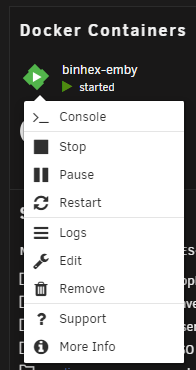
  2. I have a minor, but annoying issue with this update, my links to the docker web UIs are no longer in the context menus (dashboard page or docker page). I haven't changed any ports, and the UIs themselves still work if I put in the ip+port manually into my browser window. It's just the "shortcut" in the context menu that has disappeared for some reason. Any suggestions?
Account

Navigation

Search

Search

Configure browser push notifications

Chrome (Android)
  1. Tap the lock icon next to the address bar.
  2. Tap Permissions → Notifications.
  3. Adjust your preference.
Chrome (Desktop)
  1. Click the padlock icon in the address bar.
  2. Select Site settings.
  3. Find Notifications and adjust your preference.