





lockrob2000
Members
-
Joined
-
Last visited
-
OK, my instance has been running for 18.5 hours with no disconnects. I can surmise that the issue was the C-states settings. I went into BIOS and disabled C-states and that seems to have been the golden ticket. Thanks you for all the help. I was thrashing around blindly until you helped steer me in the right direction. Thank you so much!
-
Just in case you want to see this. It starts in February for some reason, but does include up until tonight. syslog-127.0.0.1.zip
-
It seems to have worked. now I just have to do the tweak the C-state, remove the added PCIE additions, I've added the AMD vendor reset already. Fingers crossed. I really appreciate your help and patience. Thanks-
-
What's a good size to set the maximum file size to?
-
Just took this.
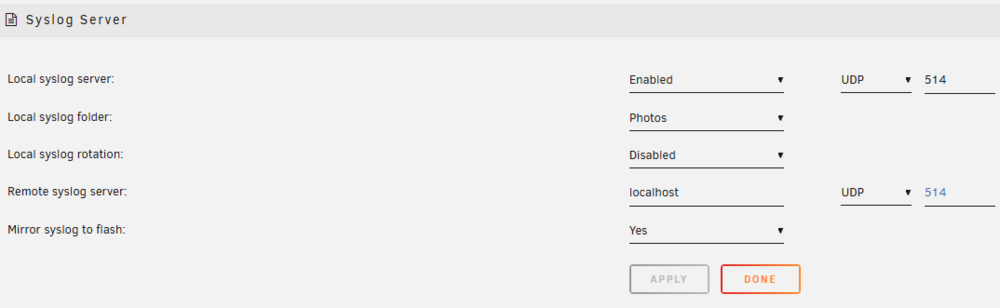
-
Sorry, what I mean by disconnects is that when used to work with media, the server will works for a period of time (generally around an hour)_ and lose connection to my network. I can't tell what it actually does, but I can no longer connect in any way, even though the power light still shows "running" while the network router, shows the server as off. To get it to reconnect, I have to power the server off using the power button, and after a few seconds power it back on. It will then reconnect for another indeterminate period of time. Sometimes as short as fifteen minutes, sometimes hours.
-
I know you probably know this but 1. What does it mean? Successful Hardware Setup: The system has successfully loaded the hardware acceleration capabilities for AMD graphics cards, specifically for video decoding (playing) and encoding (recording/transcoding). AMDGPU Driver: This is a normal log entry for AMD Radeon GPUs (especially Polaris/RX 400/500 series and newer) during boot or when a Virtual Machine/Docker container loads. VCE Initialized: It is frequently followed by "[drm] VCE initialized successfully," which refers to the Video Coding Engine. Unraid +3 2. Is this an error? Generally, No: In most cases, this is an informative message indicating that the hardware is ready to work. If it spams the logs: If this message appears every 10–30 seconds in your syslog, it indicates a "log spam" issue, often related to a known AMD reset bug where the card is not correctly resetting, but it is not necessarily crashing your server. 3. Contextual Usage in Unraid Docker/Transcoding: If you use Plex, Jellyfin, or Frigate with an AMD GPU for hardware transcoding, this message confirms the driver is loaded and ready to process video. VM Passthrough: If you pass through an AMD GPU to a Windows VM, this means Unraid has initialized the card, though it may still suffer from the "AMD Reset Bug" (failing to reset on VM shutdown). Unraid +3 4. What to do if it's spamming logs If this message is filling up your log file (causing the log to reach 100%), it usually means the AMD GPU is being initialized repeatedly. Install the vendor-reset plugin: For AMD GPU passthrough users, this plugin can help address the reset bug that causes these logs. Check for Idle Issues: If the GPU is unused, it may be going into a low-power state and re-initializing. Unraid I have been grasping at straws trying to find out what is causing these issues.
-
Sorry, I don't know what any of that means. Not even sure where to start looking. Besides my GPU, I have a PCIE SATA expander and a PCIE network card. I could remove both of those if it would help. The SATA card is for moving some of the hard drives out of the case because i was worried heat issues might be causing the disconnects, and the network card was just installed because I was worried about the network card perhaps being an issue. What do you think?
-
Yes, it was after starting the rebuild. I will do another diagnostic now. This rebuild has about an hour and a half. Thanks- tower-diagnostics-20260329-2126.zip
-
the parity rebuild completed, but the array still showed the drive as invalid so I'm trying it one more time. tower-diagnostics-20260329-1116.zip
-
it is now rebuilding. Thanks, you saved me a TON of $. Now, if the server disconnects when rebuilding, will a restart pick up where it was interrupted? On the disconnect side...Do you think that disabling the C-states in BIOS will help? (I read about that in the "FAQ for unRaid v.6". What do you think happened to the data? and why on some restarts was the Docker tab no longer enabled? Sorry for so many questions.
-
wow, OK will try that.
-
crap tower-diagnostics-20260328-1757.zip
-
trying again tower-diagnostics-20260328-1751.zip
-
I went to Tools and Diagnostics and downloaded from there. Where are the ones you want? I have not started in Maintenance mode, however since I no longer have a Parity drive, could that be the issue?
