





lockrob2000
Members
-
Joined
-
Last visited
Everything posted by lockrob2000
-
I'm of the opinion that this is a windows11 issue. Most of the times when I lose connection, the server is still chugging merrily alnd when I go into the next room to check on it. Not sure where to go from here. All of the post about similar issues have gone unsolved. Rob
-
I ran a memory test andit said it was OK.
-
Sorry, didn't know. and willl do.
-
I am running the test now, but I called Microcenter, which had the computer for some repairs, and the said that they tested the memory and that it performed "flawlessly". I did only install 32 GB of what was 64DB of RAM. Could that cause an issue? Unfortunately, because of the size of the new CPU cooler, I will have to take it back to them if I want to add the remaining 32GB back. thanks-
-
No, thanks. I will try that.
-
Well cr@p! is there anywhere else that I should look into for an answer? also, can you delete the un-anonymised log files? Thanks-
-
Sorry, yes. I watched something on Plex at about 6-6:30, then didn't look again until10 or so and found it disconnected. I tried to answer this on my phone, but it doesn't appear to have gone through. Again, sorry.
-
Let me know if this is the needed file. (Fingers crossed) syslog-127.0.0.1.log.zip
-
So far it has not failed again. I want to change the syslog to remote server. Will this setup work?
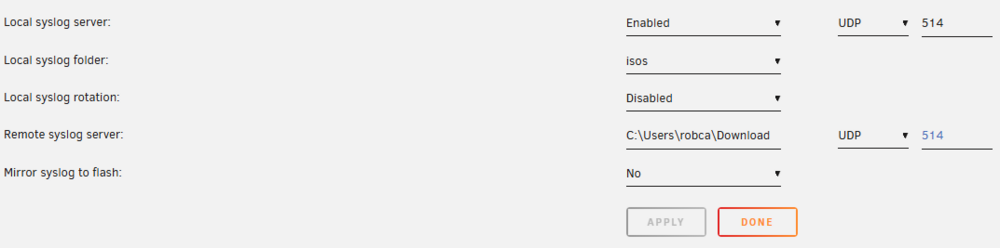
-
After failing 2 (3?) times earlier it has not failed again. So I will have to email the zip tomorrow. Can't believe I was hoping for failure...
-
Should I change it to appdata? or something else?
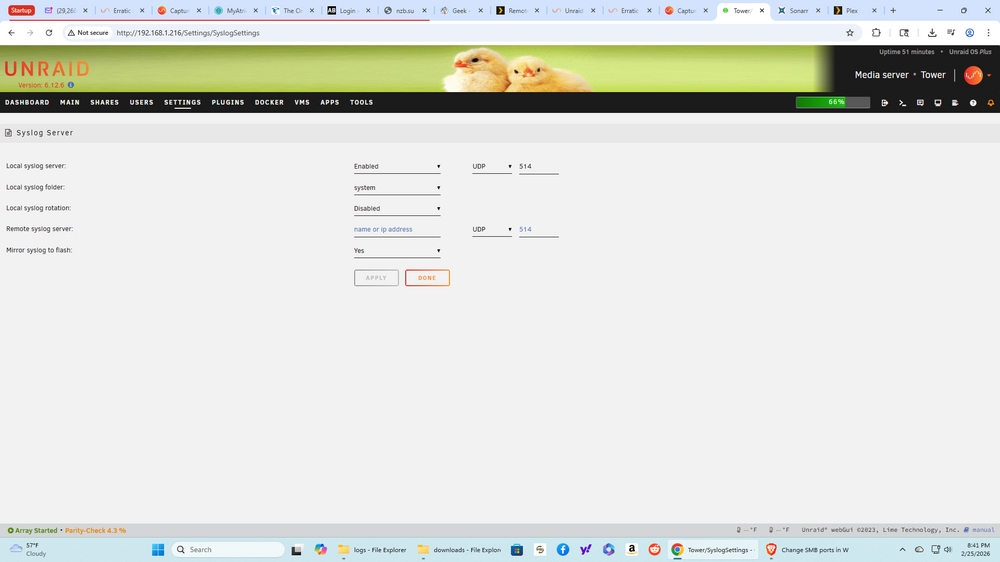
-
Here is the file in the flash. syslog-previous
-
Also to a share. I was under the impression that it would be included in the diagnostic.
-
Please let me kow if the syslog was included in this attachment. Thanks- tower-diagnostics-20260225-2015.zip
-
I set this up and will include after the next reboot. Thanks-
-
While I can initually see the UI of the dockers and can see the UI of unRaid, if I try and access any part of them, they either freeze or go to the windows sreen that says "can't be reached". Then if I go to the server turn it off using the power switch and then back on, I can once again connect. And no during this time my hoime theater connection also is not available. Rob
-
Sorry, I have a windows 11 co,puter talking to a linux unRaid server ver.6.12.6 I run Plex and Sonarr and that is all.
-
To be clear, what I mean is that every so often (anywhere from 20 minutes in to 2 hours in) my windoes 11 computer loses connection to the unRaid server. The server doesn't shut down, but I have to restart it to re-establish connection. I can't tell when it's going to happen, or what is causing it. I thought that I would submit my diagnostic file from the most recent event to see if there is something in there that could let me know what is happening and how to avoid it. Please let me know if you see anything that sticks out. Thanks- Rob tower-diagnostics-20260225-1611.zip
-
Well, I have to say a great big thanks for the post. Adding the SMBUser seems to have done the trick, and your post and the included directions in those posts was the best I have seen. Thank You, thank you, thank U- Rob
-
I have windows 11 on my main computer and unRaid 6.12.6 on my linux based server. I have Plex and Sonarr onmy server. Alfter getting the new main computer I can no longer connect to download files to the server. I have read MANY post conderning how to fix this issue and have duplicated many of the suggestions. However not only does nothing seem to work, many of the posts take you off into new and complicated directions (and many turn out to be from years ago). Is there any new and final/complete solution to this issue? Please HELP! Rob
-
I moved the HHDs from the old server to the newer one, and it couldn't see two of the drives. I did some investigating and found an issue with the power to the affected drives. So I switched out the power cables and the drives appeared. At that point, I started the unRaid instance and opened Plex, and then took a break (to pay some bills). When I came back I had been kicked out and could no longer connect to the dockers. I closed unRaid and reopened several times and the dockers were available. At this point, I am starting to wonder if this is an issue with overheating. I am going to see what the fan profiles are. They do not run all the time, and the case is several years old and all the HDDs are stacked in the front. Anything other than that, that I should look at?
-
It is now running for a half hour or so and then shutting down, and I have to (some times) shut down and restart several times before it "takes". Should I think about re-installing the docker? Or maybe something else. It might be temperature related. Do you have any suggestions for a case that can hold anything over 6 HDD's with good airflow?
-
Here are my diagnostics tower-diagnostics-20260113-1516.zip
-
Well, it just started working and I did nothing? Does unRaid play practical jokes?
-
I just moved my unraid server to a different computer and got it working (after a power issue) went out to mail some bills, and when I can back there was a message on my computer stating that the server does not allow unsecured connections, and now I cannot connect. This after it working well for half an hour or so. I would send a diagnostic file but I cannot get to the server to get one. What is the logical next step? I worked before I had to leave. Thanks- I'm running Linux unRaid 6.12.6 .

