





lockrob2000
Members
-
Joined
-
Last visited
Everything posted by lockrob2000
-
After more reading it appears that there are only certain audio formats that Plex supports. So unless I can add codecs to Plex for the unsupported formats, that may be that. That said, it is odd that this only started very recently. Not sure if it is a Plex update issue, or something else.
-
OK, that didn't work. Is there a way to add codec packs to Plex? thanks-
-
Great! thanks. I'll try that first thing, a similar approach helps when metadata doesn't load.
-
Not sure if this is the correct place for this, but as this is happening in binhex-plexpass, I'll give it a shot. Recently some of my videos have audio that will not play. If the audio is AC3 or EAC3, it plays. But if the audio is AC3 5.1, or HE-AAC STEREO, it does not play. All of these formats played flawlessly just recently. Any suggestions as to where to start troubleshooting? Thank you-
-
Solved- got it fixed. thanks for the help. I had the repository named incorrectly. Once I corrected that it started updating. thanks again-
-
Hello- I have Plex Media server Version 1.14.1.5488 and when I check for updates I am told that Plex is up-to-date. However I see that I can no longer connect to plex.tv because my version is too low. How can I get the update? thanks-
-
Thanks, I updated the unRaid version, and then restored a previous backup of Sonarr and everything is good again. Thank you for guidance-
-
I upgraded and still have the same issue. Do I need to re-install? Or is there another way to take care of this? thanks-
-
I upgraded to unRaid 6.7.2 and sonarr worked great until the last reboot and now it won't launch. (I've been on 6.7.2 for about 2 weeks) What logs would be needed to help me determine my course of action? I get no errors...it just sits on the launch screen. Thanks for your help- Rob Just found this in the log 19-11-19 17:54:10.5|Error|DownloadDecisionMaker|Couldn't process release. [v2.0.0.5338] System.Data.SQLite.SQLiteException (0x80004005): database disk image is malformed database disk image is malformed Should I reinstall? or is there a better fix? I'm afraid that reinstalling won't really solve the issue that caused the database problem. Thanks again-
-
Will try...thanks-
-
I use the sonarr docker and would like to change the "watch" folder in a download client that I have set up, but I don't see the option of watching a folder that is on a computer on my network (but is not the server). Is this a possibility? If I try to type in the address of the folder I am told that it is not a valid address. Can Sonarr only watch folder on the computer the docker is installed on? Thanks - Great docker!
-
"I checked and it is set to Host." I needed the port settings to get the metadata to update, but yesterday it stopped again. I will remove the port settings and see if that fixes it, but what could be happening to my setup that this could be happening? Thanks Plex Media Server Logs_2019-04-12_16-45-07.zip
-
I checked and it is set to Host.
-
Yes I am running the Binhex-PlexPass docker. A great thing! This metadata thing was really bugging me though.
-
Thanks- I will go back and remove the mapping to see if you are right and it was just a coincidence. I was thinking of removing them and putting them back anyway, one at a time to see if they all need to be there. My Plex install is set up in Host mode, but was not pulling metadata until I defined the ports. Would the install have automatically switched to Bridge when I mapped a port? I'll recheck when I get back from work.
-
OK, as per a post I found in Reddit, I got it to start pulling metadata again by mapping these ports to the container. ports mapped to container: 32400/tcp 3005/tcp 8324/tcp 32469/tcp 1900/udp 32410/udp 32412/udp 32413/udp 32414/udp Did I make a big mistake?
-
This is from a Reddit on Plex not pulling metadata and I need help- "level 6 ucrbuffalo 1 point·1 year ago Yes! It turns out that for some reason Plex didn’t have the permissions it needed. I just set its subdirectories all to 777 and it worked fine. level 7 jeffreybrown93 1 point·1 year ago Weird.. Do you mean in the /media mount or in the /appdata directory? Thanks for getting back to me! level 8 ucrbuffalo 2 points·1 year ago In /appdata where Plex keeps its database and metadata. In my case, I had moved all of that to a separate SSD so that it could be separate from my cache drive (which fills up fairly quickly, especially with a 90+ GB database). So everything existed at /mnt/disks/SSD1/Plex/ I went into the terminal, and used “chmod -R 777 /mnt/disks/SSD1/Plex/“ (you may want to double check my syntax, I’m not 100% on that off the top of my head). It took about a minute for it to do that to all the files but when it finished, I just went back to Plex and tested it on one show by using “Refresh Metadata” and it worked! At that point I went ahead and refreshed the entire library." Binhex - (thanks for the Plex docker) is this a way to fix the metadata not downloading issue? If so, how is this accomplished in the docker? Is it even something that can be done? I am over my head trying to figure this out, and don't want to do anything that may F things up. Thanks
-
Thanks-
-
Good to know, thanks. On an unrelated note, do you know if using Plex in Docker puts Plex into a "double NAT" situation? thanks-
-
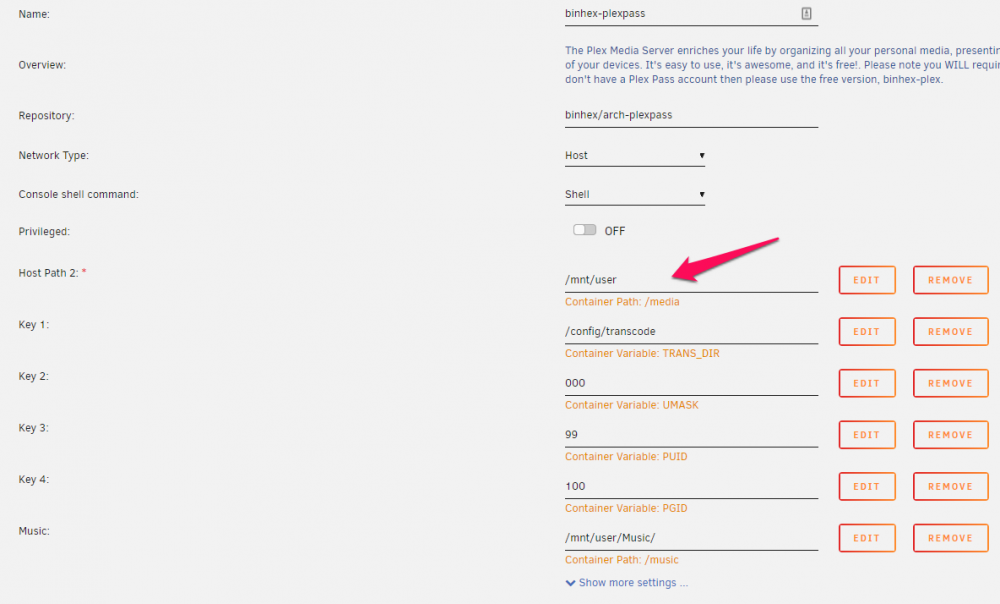
Well, I got it to work again, but I had to (well, not sure if I HAD to but I did...) roll back to an earlier version and edited that one entry, and the paths work now. You had better believe that I will be screenshot-ing (is that a word?) the set up for future reference. Thanks for all the help!
-
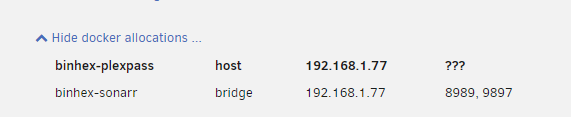
OK, that's what I thought and I was putting my paths in as the same as you show. What I am unsure about is this This path "Host Path 2" has a container path of "media" pre-populated. This is something I don't have and I am not sure I can remove it. Also, when I point to the files I have set up for my various media, I get a response stating that the disc are not mounted, and yet I know that they are (I can get to the media using other players). It may have something with this not being set - and I am not sure where this parameter gets set. Sorry, if this is too much, but it was working fine just a bit ago.
-
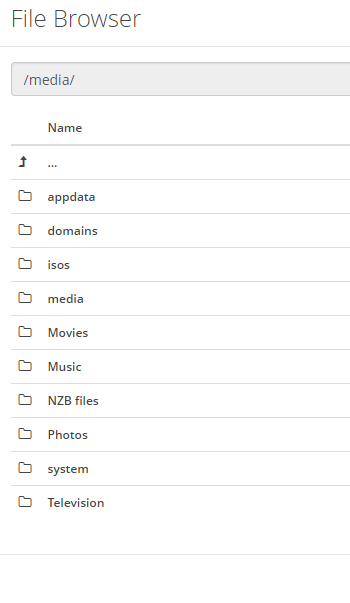
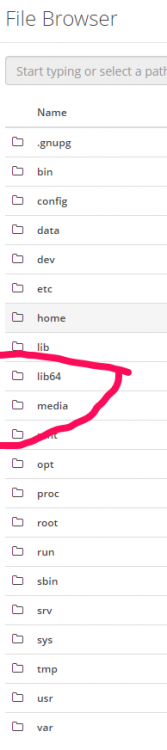
This is what the structure looks like as it is now. I am thinking that PlexPass is set up to find the media files under the "media" folder in the second screen. Can I re-order this?
-
Perhaps someone can help me with this. I have had my system set up with separate shares for each of my media types for a while, (not under "Media", but stand-alone) but now (after an update) I cannot get the system to see any of them. No, let me change that, it sees that they are there and shows them in Plex, but when chosen gives an error of "Please check the file exists, and the necessary drive is mounted". Can someone point me in the right direction? Or tell me if it is possible at this point to re-order the shares so that all my media is seen under "Media"? thanks-
-
FWIW I was able to pull metadata in version 6.6.6 That stopped in version 6.6.7 I reverted back to 6.6.6 and can once again pull the metadata.
-
When running 6.6.6 I got all movie metadata. Running 6.6.7 I got no movie metadata. Upon rolling back to 6.6.6, got the metadata again. tower-diagnostics-20190309-1347.zip

