





M1K3Y
Members
-
Joined
-
I ended up deleting the post shortly after as I noticed the launching URL was is the other port and not https and it works! Thanks for your amazing work on this. Does this mean going forward your fixes with be in futures versions of the drivers?
-
What's the proper way to re-download the driver?
-
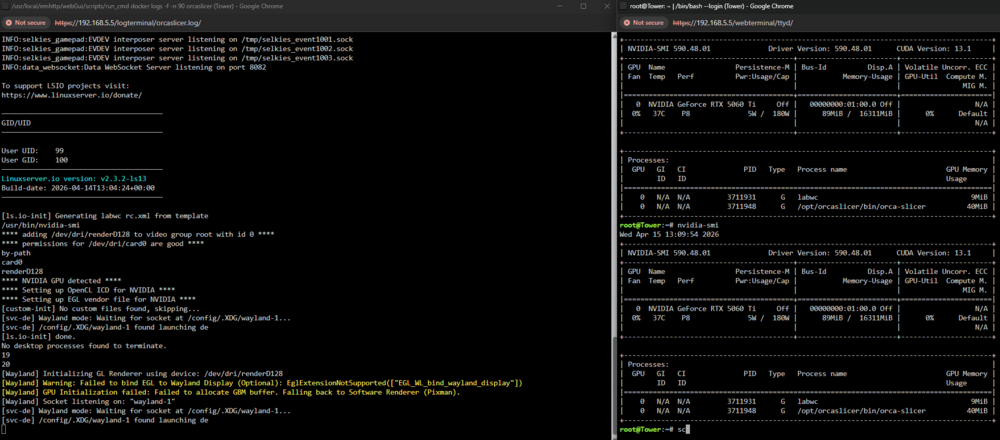
I went through and ran this same test and noticed same results still just a black screen. On Unraid 7.2.4 docker run -d --name='orcaslicer' --net='bridge' --pids-limit 2048 -e TZ="America/Chicago" -e HOST_OS="Unraid" -e HOST_HOSTNAME="Tower" -e HOST_CONTAINERNAME="orcaslicer" -e 'PUID'='99' -e 'PGID'='100' -e 'UMASK'='022' -l net.unraid.docker.managed=dockerman -l net.unraid.docker.webui='http://[IP]:[PORT:3000]' -l net.unraid.docker.icon='' -p '3005:3000/tcp' -p '3006:3001/tcp' -v '/mnt/user/xxxxxx/pursa/':'/prints/':'rw' -v '/mnt/user/appdata/orcaslicer':'/config':'rw' --runtime=nvidia --gpus=all 'lscr.io/linuxserver/orcaslicer' fc1724a6c46d4378a94535b8c51e340d848dac6b865593cc008c4c9f33de03bc
-
I added to my flash drive Syslinux configuration default menu.c32 menu title Lime Technology, Inc. prompt 0 timeout 50 label unRAID OS menu default kernel /bzimage append vfio-pci.ids=1912:0014 pcie_acs_override=downstream,multifunction initrd=/bzroot nvidia-drm.modeset=1 nvidia_drm.fbdev=1 label unRAID OS GUI Mode kernel /bzimage append pcie_acs_override=downstream,multifunction initrd=/bzroot,/bzroot-gui label unRAID OS Safe Mode (no plugins, no GUI) kernel /bzimage append pcie_acs_override=downstream initrd=/bzroot unraidsafemode label unRAID OS GUI Safe Mode (no plugins) kernel /bzimage append pcie_acs_override=downstream initrd=/bzroot,/bzroot-gui unraidsafemode label Memtest86+ kernel /memtest
-
Has anyone been able to get Wayland working with Nvidia? I've been trying to configure a few of the gaming related containers from linuxserver. I've followed the docs and added required values (nvidia-drm.modeset=1 nvidia_drm.fbdev=1), env, etc Example: https://github.com/linuxserver/docker-melonds?tab=readme-ov-file#nvidia-proprietary-drivers I've seen a few posts regarding this and unraid (https://github.com/linuxserver/docker-webstation/issues/3) ``` INFO:main:Parsed DRI node '/dev/dri/renderD128' to index 0. INFO:data_websocket:Registered Wayland cursor callback for 'primary' INFO:data_websocket:Video chunk sender started for display 'primary'. [Wayland] Encode Node Index: 0 | Driver: ../../../../bus/pci/drivers/nvidia [Wayland] Nvidia Encoder detected. Initializing NVENC... [NVENC] Initializing... INFO:data_websocket:SUCCESS: Capture started for 'primary'. INFO:data_websocket:Broadcasting primary stream resolution to all clients: {"type": "stream_resolution", "width": 3440, "height": 1270} INFO:data_websocket:Broadcasting display config update: DISPLAY_CONFIG_UPDATE,{"type": "display_config_update", "displays": ["primary"]} INFO:data_websocket:Display reconfiguration finished successfully. INFO:data_websocket:Reconfiguration process complete (state unlocked). INFO:data_websocket:Initial client settings message processed by ws_handler. INFO:data_websocket:Initial setup: Primary client connected, audio not active, attempting start. INFO:data_websocket:Starting pcmflux audio pipeline... INFO:data_websocket:pcmflux settings: device='output.monitor', bitrate=320000, channels=2 [pcmflux] Attempting to connect to PulseAudio device: output.monitor with latency: 10ms INFO:data_websocket:pcmflux audio capture started successfully. [NVENC] Found 1 CUDA devices: [NVENC] Device 0: NVIDIA GeForce RTX 5060 Ti [NVENC] Bound to CUDA device via PCI Bus ID: 0000:01:00.0 INFO:data_websocket:pcmflux audio chunk broadcasting task started. [pcmflux] SUCCESS: Connected to PulseAudio. [pcmflux] SUCCESS: Opus encoder created. [pcmflux] Capture loop started. Device: output.monitor, Rate: 48000, Channels: 2, Bitrate: 320 kbps, VBR: On, Silence Gate: Off, Debug Logging: Off, PCM Chunk: 3840 bytes INFO:data_websocket:Received redundant resize request for primary (3440x1270). No action taken. INFO:data_websocket:Received START_AUDIO command from client for server-to-client audio. INFO:data_websocket:START_AUDIO: pcmflux audio pipeline already active. [pcmflux] First non-silent audio chunk detected! Encoding... [Wayland] Failed to init NVENC: Failed to initialize encoder. Falling back to CPU. [Wayland] Decision: No GPU Encoder available -> Using CPU Software Encoding. Stream settings active -> Res: 3440x1270 | FPS: 60.0 | Stripes: 1 | Mode: H264 (CPU) FullFrame | CRF: 25 | PaintOver CRF: 18 (Burst: 5f) | Colorspace: I420 (Limited Range) | Damage Thresh: 10f | Damage Dur: 20f INFO:data_websocket:Received STOP_VIDEO for 'primary'. Stopping stream. INFO:data_websocket:Stopping all streams for display 'primary'... [Wayland] Capture loop stopped. ```
-
I have a general question on how the Open Source Driver version is updated in the plugin. So current I see it's on version v580.95.05 . I did some digging and I see in the repo(/unraid/unraid-nvidia-driver/) this plug-in uses there have been multiple releases since this version. Comparing then with https://github.com/NVIDIA/open-gpu-kernel-modules I see the version updates, which do match some of the newer versions in the unraid repo. Just curious if I should expect to be able to update to versions v580.1##.### ? I have a 5070ti.

