IanB
Members
-
Joined
-
Last visited
Everything posted by IanB
-
Great, thanks! I pushed a few updates to the store over the weekend to fix the reported connection issues... ### 1.4 ### - Fix issue preventing dashboard loading when no cache was being used. - Support servers where no password is set. ### 1.3 ### - Fix minor clipping of cards - Fix crash when IP/host included additional whitespace.
-
@MMW - Thanks for the logs, it looks to be failing to either retrieve the Array information or the Cache info. Do you have an array configured and not using any cache drives?
-
I've pushed a fix (v1.3) to Google Play to fix the crash when the IP address includes a space either at the beginning or the end. I'll probably need to do some additional validation of the input (rather than crashing) but wanted to get this fix out ASAP for you. I'm not sure how long Google is taking now, but hopefully you'll receive the update soon.
-
>With just the server ip in a new connection it still just crashes. @MMW Sorry about this. Are you able to send me a bug report from the app? If you're at the Server List page, in the top right the "..." option includes an option "Send Bug Report". This will let you send yourself an email with app logs, which you could upload here for me to take a peak. EDIT: I just checked the crash reporting and see a repeated attempt to add an IP address that includes a trailing space. Looks like i'm not trimming what is entered (sorry). I'll get that fixed ASAP but if that is you, hopefully you can just delete the space character at the end to let you proceed.
-
Thanks @HynesJeff, I really appreciate the support! I don't suppose you could leave an (honest) review via Google Play. I'm hoping that with more feedback, the discoverability of the app will improve via Search. As for your requests, i'd love to implement that (given time), the problem is that with the lack of a real (stable) Unraid API, the more features I add the risk I am at new updates completely breaking everything and needing to rewrite, while still trying to support older server versions - so a headache. It has been suggested that an API is on the way though, and once released I would hope to be able to quickly switch over to it unlocking the potential of additional features like the ones you suggested. My short term plan is to continue working on the core features and the application host itself to make the experience as good as possible, so it's ready for the API to quickly add lots of great new features.
-
And another quick update to resolve an important DNS rebinding issue, along with a small bucketful of fixes. I also gave larger tablets some love with some small optimisations for their screen size. The update should hopefully be available via Google Play soon: ### 1.2 ### - [NEW] Optimised tablet layout support - Display disk state correctly (spun up or down) - Fix issue with self-signed certificates failing DNS rebinding protection - Fix crash when backgrounding app after connecting to server - Fix pie chart when displaying more than 12 shares - Sort disks so that Parity drives are always first
-
Just pushed a new build to Google Play after some great feedback from testers. It should hopefully already be available. ### 1.1 ### - [NEW] Support for self-signed certificates - [NEW] Improved Add Server screen - [NEW] Allow offline servers to be added - Add message to server list when no servers added - Fix crash if trying to add server before providing any host information - Fix share information populating wrongly - Update persisted server information when connecting - Fix crash restoring app - Fix timeout when calculating sizes of large shares
-
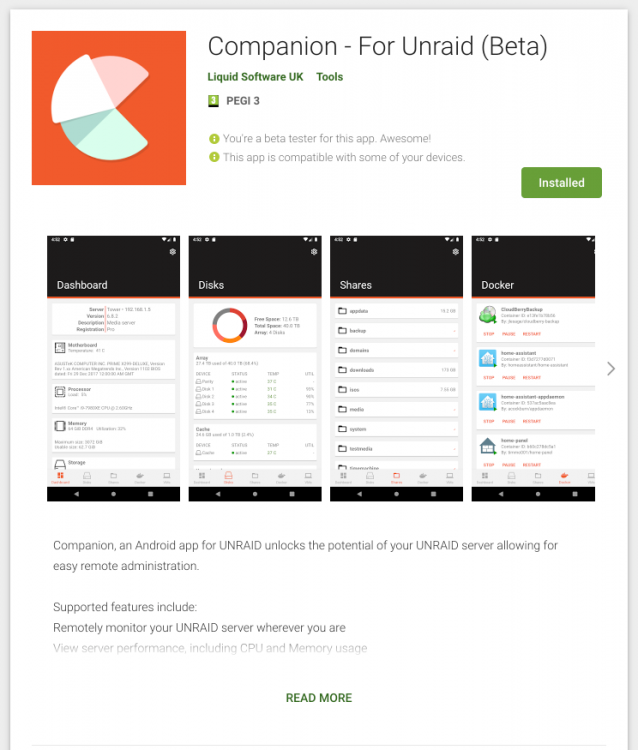
Hey 👋 This started off as a bit of a hobby project that slowly become something that I thought could be useful to others. It was an exercise for me in writing a new app from scratch and the different choices I would make, compared to having to constantly iterate on an existing (large) code base. After sharing this with some of the community in the unofficial discord channel, I was encouraged to get it into a state where it makes sense for others to use. https://play.google.com/store/apps/details?id=uk.liquidsoftware.companion I've already received some great feedback as well as a number of issues and requests for new features, that I hope to add soon. I hope others will find this as useful as I do in managing your UNRAID servers. Enjoy
-
I'm trying to setup a High Sierra VM on my 6.6.3 Unraid Server. I've followed the video multiple times to verify i'm doing everything. However, after Force Stopping my VM (after updating the BIOS resolution) and trying to first boot into the OSX installer things start to go wrong. I'm initially presented with an Apple logo for ~5 seconds (no progress bar). After this, the VM appears to reboot back into Clover. This will then repeat a number of times until finally Clover gives up and i'm displayed with a large X. Does anyone have any useful tips to get additional information from Clover as to what is failing? Thanks in advance
-
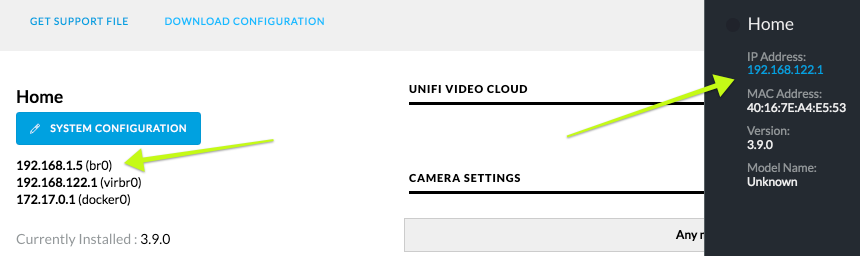
Hi, I've managed to get `pducharme/unifi-video-controller` setup along with my cameras connected to the NVR. However, one thing i'm struggling with is that the controller appears to pick up the wrong IP address: I have tried with various types of Network Type configured, but can't appear to get it to use the correct one (which should be 192.168.1.5). This means that since the NVR is assigned to my account, i'm unable to connect to it remotely. Any help would be appreciated, thanks in advance Ian