ideasman
Members
-
Joined
-
Last visited
-
Hi fellow unraiders, I've been chasing down some errors on my 8tb parity disk for some weeks now without any resolve and was hoping I could get some advice from the brains trust. The errors I'm seeing on the parity drive are below (where the * lines repeat 6 more times): Nov 27 23:08:05 nas kernel: ata7.00: exception Emask 0x10 SAct 0x7f00 SErr 0x4050000 action 0xe frozen Nov 27 23:08:05 nas kernel: ata7.00: irq_stat 0x08000040, interface fatal error, connection status changed Nov 27 23:08:05 nas kernel: ata7: SError: { PHYRdyChg CommWake DevExch } * Nov 27 23:08:05 nas kernel: ata7.00: failed command: WRITE FPDMA QUEUED * Nov 27 23:08:05 nas kernel: ata7.00: cmd 61/90:40:18:d8:52/00:00:30:01:00/40 tag 8 ncq dma 73728 out * Nov 27 23:08:05 nas kernel: ata7.00: status: { DRDY } Nov 27 23:08:05 nas kernel: ata7: hard resetting link Nov 27 23:08:06 nas kernel: ata7: SATA link up 3.0 Gbps (SStatus 123 SControl 320) Nov 27 23:08:06 nas kernel: ata7.00: configured for UDMA/133 Nov 27 23:08:06 nas kernel: ata7: EH completeFollowing advice from other peoples posts, I've: Replaced the SATA cable to the disk 3 times, including buying some cable matters ones which feel notably higher quality and really click in but unfortunately haven't made any difference. Swapped which SATA port it plugs into on the motherboard Set libata.force=3.0Gbps Swapped which string of SATA power cables it was connected to Installed an ASM1061 controller and connected the parity drive to it I did all the above one by one until the error returned, and then i tried the next thing. Some other observations: Parity checks never return any errors No SMART alerts I'll see a handful of these errors and then it'll be clean for the next few days (or weeks?) No errors on any other drives Very rare to see the errors while performing a parity check (for example - last FPDMA error was from 23:08 last night, kicked off a parity check this morning - currently at 91% of 8TB - and no further errors) Just wondering if these are errors to worry about or not? If i should try swap this disk into another slot (perhaps one that's mostly idle and only occasionally spins up)? Or any other advice that can be thrown my way.. Thanks! nas-diagnostics-20251128-2221.zip
-
thanks heaps for this.. i've followed the guide here: https://unraid.net/de/blog/deploying-an-unraid-nfs-server, updated the script with the changes above and forwarded the ports required between my vlans in opnsense but i can see the client trying to access NFS on the unraid server via other ports outside the specified range (38983, 34691 etc) any tips or advice?
-
Noticed over the weekend that transcoding 4k content was not utilising hardware acceleration on our i5-11400. If i disabled tone mapping in the plex options, it would work but who wants transcoded hdr content without tone mapping? We use the linuxserver release and rolled back from 1.32.5.7349-8f4248874 to 1.32.5.7328-2632c9d3a which fixed it immediately.
-
Hi guys, Noticed that i couldn't connect to one of my dockers, went to check it out and unraid was in a weird state. "quick reboot should fix it!" now 2 x nvme cache mirror has the status "Unmountable: No file system" Had a read around but don't want to be a cowboy and try a bunch of commands without someone with some experience having a look at the diags first :) If anyone would be able to lend some assistance, it would be greatly appreciated! Cheers! nas-diagnostics-20230725-1537.zip
-
Hi @JonathanM, Thanks for the reply. The disks are still readable but I'm just a little cautious as Disk 3 has an error: edit: i made use of the parity swap feature! at first it wouldn't let me do it with a "too many disks missing" error but i realised i needed to start the array once with the erroring drive removed/unassigned. After that, I: stopped the array disabled array autostart, vms and docker shutdown the server took out the erroring 4tb drive installed one new 8tb started up the server set the new 8tb disk as parity set the old parity disk as an array member the "start" button confirmed that it would copy the parity from the old 4tb parity disk to the new 8tb after that completed (10 hours?), the array was started and the old parity disk was being rebuilt to replace the original erroring disk Once the old parity disk was rebuilt as an array member, i shutdown the server again and replaced another one of the 4tb drives (which had a few smart errors but was still working) with the second brand new 8tb drive. Thats ticking away now.. gotta say i really do love unraid

-
Hi guys, My current unraid array consists of 6x 4TB hard drives. I've bought two new 8TB drives and my plan was to replace the 4TB parity with one of the 8TB, wait for it to build, and then upgrade the next oldest 4TB drive. Before I had a chance to do anything, one of the non-parity 4TB drives has flagged errors - so I'm not sure my plan above is the best way forward. Am i able to swap out the failing 4TB drive with one of the new 8TB drives, let it rebuild. Once that's complete, replace the 4TB parity with the other 8TB and have all the space available? Or is there another way that would be better? Thanks
-
Hey thanks for the reply. Nah I don’t have any android devices and I don’t think I’ve logged into the interface for a few days. Is there anything I can do to prevent it?
-
oh. its working now i didn't do anything. im wondering if my browser is trying to force it to https...
-
Hi there, I've been having an issue where our unraid server will work fine for a while but at some point, the GUI dies. It's currently in this state so I ran the diagnostic command via SSH and attached for a better set of eyes to check out. Everything seems to be working as expected, it's just the damn gui! If there is a way to kick it back into action without restarting, that would be awesome. I tried a number of commands I found scattered through the forums last time it happened but I feel it made it worse and I had to force shutdown. Cheers! nas-diagnostics-20221104-2103.zip
-
Perfecto! Thanks mate. I was thinking I’d have to move everything off the cache and rebuild the whole thing again. did exactly what you said, it balanced and it’s now happy (so am I 😁) thanks again!
-
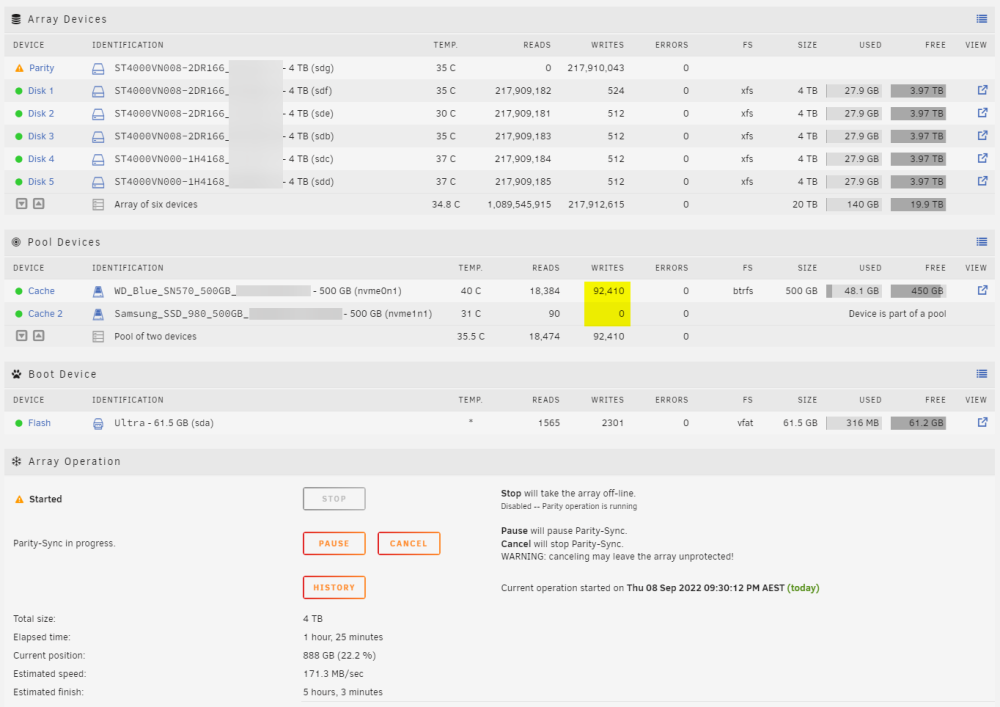
hey there, so i remember trying out unraid back in 2018 but wasn't set on it. looking at it again and it seems its come a long way! i've just installed a fresh copy on the following hardware: - core i5 11400 - gigabyte b560m aorus pro - 16gb ram - 6 x 4TB hard drives - 2 x 500GB nvme The array has the 6 x 4TB drives with a single parity and the 2 x nvme drives are configured in the same cache pool. Currently the parity is syncing but i'm curious about the cache pool - should i see writes happening on both nvmes? I've been clicking around in the interface to try find a "status" of the array but I'm not sure what I'm looking for. Cheers! Edit: clicked the “cache” and noticed this: Data, single: total=46.01GiB, used=44.78GiB System, DUP: total=8.00MiB, used=16.00KiB Metadata, DUP: total=1.00GiB, used=35.36MiB GlobalReserve, single: total=25.34MiB, used=0.00B tried selecting the “switch to raid 1” but still no writes on the second ssd nas-diagnostics-20220908-2259.zip