





Odessa
Members
-
Joined
-
Last visited
-
Hello, both Sonarr and Radarr recently have been unable to connect to Deluge. Both return the following error under System: I suspect this may be related to Privoxy, as my Deluge log shows the following repeating over and over: 2021-03-04 19:35:47,139 DEBG 'watchdog-script' stdout output: [info] Privoxy not running 2021-03-04 19:35:47,143 DEBG 'watchdog-script' stdout output: [info] Attempting to start Privoxy... 2021-03-04 19:35:48,153 DEBG 'watchdog-script' stdout output: [info] Privoxy process started [info] Waiting for Privoxy process to start listening on port 8118... 2021-03-04 19:35:48,159 DEBG 'watchdog-script' stdout output: [info] Privoxy process listening on port 8118 Up until recently everything was working fine. My VPN is PIA. Anyone know where to start? --- ✔️SOLVED: I had to add my server's IP in both Sonarr and Radarr under Settings > General > Proxy > "Addresses for the proxy to ignore" This is described in Q26 in the documentation here: https://github.com/binhex/documentation/blob/master/docker/faq/vpn.md
-
Thanks @aptalca I was able to resolve by reconfiguring the container from scratch based on @SpaceInvaderOne guide: https://www.youtube.com/watch?v=I0lhZc25Sro
-
Tried moving from Letsencrypt to Swag and everything broke. I stopped Letsencrypt, backed up the appdata folder, grabbed Swag from Apps, pointing to same appdata folder. Installation failed and docker won't start: root@localhost:# /usr/local/emhttp/plugins/dynamix.docker.manager/scripts/docker run -d --name='swag' --net='bridge' -e TZ="America/Los_Angeles" -e HOST_OS="Unraid" -e 'EMAIL'='' -e 'URL'='[subdomain].duckdns.org' -e 'SUBDOMAINS'='www,[subdomain],' -e 'ONLY_SUBDOMAINS'='true' -e 'VALIDATION'='http' -e 'DNSPLUGIN'='' -e 'EXTRA_DOMAINS'='' -e 'STAGING'='false' -e 'DUCKDNSTOKEN'='b9911192-b13a-47ab-af33-d7bdd992eeb4' -e 'PROPAGATION'='' -e 'PUID'='99' -e 'PGID'='100' -p '80:80/tcp' -p '443:443/tcp' -v '/mnt/user/appdata/swag':'/config':'rw' --cap-add=NET_ADMIN 'linuxserver/swag' da4142bafd8f2a88b1126a24f5c3eadfec3f49c1d4722a816e6e2d5efb6b567a /usr/bin/docker: Error response from daemon: driver failed programming external connectivity on endpoint swag (8e3934ee2265f3ef9ebccbc5025f08609d479db4f7f030de27d366bb9f904aeb): Error starting userland proxy: listen tcp 0.0.0.0:80: bind: address already in use.
-
Help! Can't access web UI all of a sudden - all browsers say "ERR_EMPTY_RESPONSE". Only thingI changed recently was set STRICT_PORT_FORWARD to "no" to fix PIA issues but I don't think this is relevant as I tried both ways I checked docker port allocations and no conflicts Docker log shows the following in an endless loop (see deluge-vpn-log.txt) deluge-web.log shows an error (deluge-web.log)
-
The UI is empty and unresponsive 90% of the time for me. I have about 20 complete torrents total. No errors in log. Restarting docker doesn't fix it. "The request to rTorrent has timed out."
-
Thanks @strike, are there any settings which can alleviate whatever the Deluge bottleneck is? I.e. memory allocation, CPU priority etc?
-
I am getting a frequent UI error "The connection to the webserver has been lost!". It's been getting worse over time, currently at 628 torrents which I don't think is too much. My system should easily be able to handle this (dual E5-2690, 24GB ram, SSD cache). CPU is typically at 1% with active torrents. I do have some errors in the log but not sure if they are related: 2018-09-14 17:51:07,585 DEBG 'deluge-script' stdout output: [info] Attempting to start Deluge... 2018-09-14 17:51:08,343 DEBG 'deluge-script' stdout output: [info] Deluge listening interface currently defined as 10.62.10.6 [info] Deluge listening interface will be changed to 10.34.10.6 [info] Saving changes to Deluge config file /config/core.conf... 2018-09-14 17:51:09,081 DEBG 'deluge-web-script' stdout output: [info] Starting Deluge webui... 2018-09-14 17:51:14,666 DEBG 'deluge-web-script' stderr output: /usr/lib/python2.7/site-packages/pkg_resources/__init__.py:1231: UserWarning: /home/nobody/.cache/Python-Eggs is writable by group/others and vulnerable to attack when used with get_resource_filename. Consider a more secure location (set with .set_extraction_path or the PYTHON_EGG_CACHE environment variable). warnings.warn(msg, UserWarning) 2018-09-14 17:51:22,418 DEBG 'deluge-script' stderr output: Unhandled error in Deferred:
-
OMG it worked, thank you @aptalca. I will make a donation. I must say it is extremely difficult for a docker newbie to figure out. No other docker approached this level of troubleshooting. Thanks for walking me through. I may create a user friendly guide.
-
tbh this is way over my head. How would you explain this to someone who isn't a networking expert? I am looking in docker advanced view, tools, network settings... I don't see any of these options. thanks
-
Ok thank you I found the readme file. I used the built in config and set ombi base URL but is still gives a 500 error: location /ombi { return 301 $scheme://$host/ombi/; } location /ombi/ { # auth_basic "Restricted"; # auth_basic_user_file /config/nginx/.htpasswd; include /config/nginx/proxy.conf; resolver 127.0.0.11 valid=30s; set $upstream_ombi ombi; proxy_pass http://$upstream_ombi:3579; } if ($http_referer ~* /ombi/) { rewrite ^/dist/(.*) $scheme://$host/ombi/dist/$1 permanent; }
-
Ok I removed the rule for #1. #2 sorry I couldn't figure out what this means - no reference ldap in my settings #3 - I discovered other versions of my site-conf/default file which seemed to be interfering - removed these and I can now access the ngix home page externally! I have hope that this could work. Ok, so I know LE is working! But how do I access my dockers? [domain].duckdns.org/ombi gives a 500 error here's my ombi setting in site-conf/default #OMBI CONTAINER location /ombi { auth_request /auth-4; proxy_pass http://192.168.1.146:3579/ombi; include /config/nginx/proxy.conf; } TY!
-
Correct, I cannot access using my duckdns domain on WAN or LAN.
-
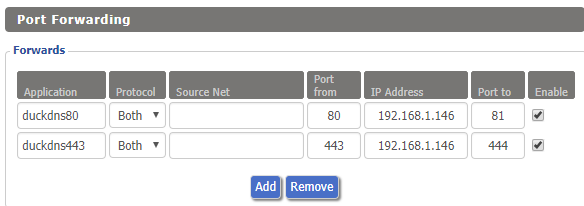
Yeah same error LAN or WAN. Router settings:
-
@CHBMB Line 13 totally blank in site-confs/default https://pastebin.com/PknxvEAg
-
@CHBMB Thank you very much, here is my LE run command: https://pastebin.com/sTnfSFkk My LE log: https://pastebin.com/9DawkVww [personal info obfuscated] I see the error regarding port in the log, but 443 does not show as used in my docker mappings. Note I cannot currently access the default web page from outside, I get "ERR_CONNECTION_REFUSED" in browser.

