





Everything posted by grtgbln
-
This is best directed at the Threadfin GitHub page, as is is unrelated to the Unraid template.
-
Future travelers, conversation was resolved on GitHub: https://github.com/nwithan8/unraid_templates/issues/49
-
Hmm, I don't immediately see any issue in terms of paths. The Docker mapped paths don't seem like they should be conflicting with any internal paths (although it is odd that the path of the Python file that's being called goes down a level into /app, only then to go back up a level and then down again into /diarize), so this might be something to take up with the Scriberr devs
-
Thanks for letting me know. I've updated the template accordingly.
-
I'm chatting with the Sunshine devs currently to investigate similar reports, although I haven't heard about issues with downloading the image, that's new to me. What tag is it attempting to download (which branch did you select)?
-
You can submit it to the SelfHosters repo on GitHub.
-
.env should be a file, not a directory. If the file doesn't exist prior to starting the container for the first time, it will automatically create a directory at the mountpoint. Please refer to the "Requires" warning that should have popped up when you downloaded the template from the store: https://github.com/nwithan8/unraid_templates/blob/0f35f0537ba6ae6ca4c9eb09ebfdc7f842a359f9/templates/anything_llm.xml#L25 Delete the folder and instead create a file, then start your container.
-
Those networks might cause some issues, but I can take a look. You can also request it from the community via the SelfHoster's Unraid template repository: https://github.com/selfhosters/unRAID-CA-templates
-
Since this is actually an app that I created, rather than just made an Unraid template for, let's transfer the conversation to the GitHub for the project. This isn't an Unraid issue at this point. Please open a ticket and provide logs, please: https://github.com/nwithan8/plex-prerolls/issues
-
Use `disable_always` for those Holiday schedules: https://github.com/nwithan8/plex-prerolls?tab=readme-ov-file#disable-always
-
This sounds like an issue with the app itself. Please reach out to the appp developer directly.
-
Inside the container, the config file is stored in "/config/". May I ask why you are manually running the script console'd into the container? The cron job should handle running the script automatically.
-
Unraid automatically passed the host timezone into a Docker container as the TZ variable, so you shouldn't need to specify it manually. If you do, simply add a Variable to the template with TZ as the key and your time zone as the value.
-
Looking at that thread, it seems like it's an upstream issue with the source code/image, not a problem with the Docker container.
-
It's set up to pull whatever the InvokeAI team deems the "latest" Docker image: https://github.com/invoke-ai/InvokeAI/pkgs/container/invokeai/273561071?tag=latest
-
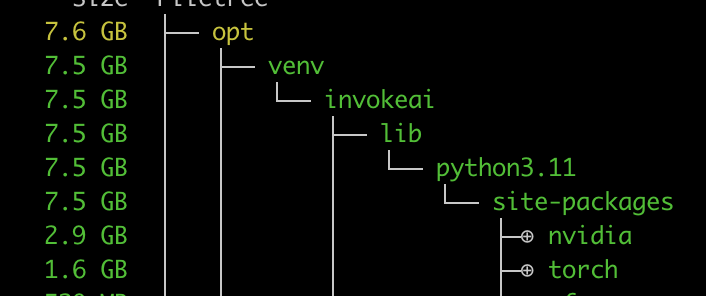
I doubt the underlying dependencies are actually changing, but part of the Dockerfile build file is importing things like NVIDIA SMI and PyTorch on every build, without caching these layers, which unfortunately leads to having to redownload these base layers every time the image updates. https://github.com/invoke-ai/InvokeAI/blob/5eb919f6020118764b8b5ece4f7660bd31f52472/docker/Dockerfile#L36
-
Thanks for diagnosing the issue, I have updated the template accordingly.
-
The support link on the template points to the GitHub page for GPT4ALL, which contains documentation about the project. Please direct your project-specific questions to those locations.
-
Remove "--gpus=all" from the Extra Parameters
-
Can you provide details about your configuration file placement, and verify that the config file is under the correct permissions to be read by the application?
-
As far as I know, GPT4All has an API that is a near one-to-one replica of OpenAI's API, so any frontend built for OpenAI or LocalAI should work, such as AnythingLLM or Big-AGI
-
Some environmental variables need to be changed: https://github.com/RaunoT/plex-rewind/issues/108#issuecomment-2230275895
-
Sorry, my apologies for the misleading information. The container is just the API for GPT4All (https://github.com/nomic-ai/gpt4all/tree/cef74c2be20f5b697055d5b8b506861c7b997fab/gpt4all-api), and does not include the web interface, so that port isn't really the Web UI. I'll remove it from the configuration. In some Googling, it seems there's a number of frontend web UIs that you could use to connect to GPT4All, just anything that works with OpenAI's API schema, which GPT4All mimics.
-
Add it to the "Extra CLI Arguments" configuration under Advanced:

-
Looks like it will use the GPU for transcoding instead of software: https://github.com/Threadfin/Threadfin/pull/141



