casperse
Members
-
Joined
-
Last visited
-
Thanks @JorgeB I tried something like this on my Unraid server some years ago on some old version and they disappeared in future releases! I havent installed anything new in a very long time things just worked! and dockers get auto updated, So maybe I am back to scheduling a monthly reboot, better than a crash.
-
Hi, My server had been stable for approximately two months before this incident. On 28 September 2026 it became almost completely unresponsive and eventually required a hard reset. Symptoms - The WebGUI and all hosted applications stopped responding. - The server still answered ICMP ping consistently. - TCP connections to HTTP and SSH could be established, but HTTP returned no usable data and SSH never presented a usable session/banner. - A local SSH/Telnet attempt from another device on the LAN also failed. - Remote access through Tailscale failed in the same way. - The BMC/IPMI interface remained reachable and its sensor overview looked normal. - A graceful ACPI shutdown requested through the BMC did not complete. The BMC reported that the host OS was taking unusually long to shut down. - A hard reset was ultimately required. - Ping returned after approximately 4 minutes 42 seconds, followed by normal SSH/Telnet and WebGUI access. This did not look like a simple WAN, NIC, Tailscale or WebGUI problem: the network stack still handled ping and TCP handshakes, while multiple unrelated userspace services and the ACPI shutdown path stopped making progress. System context - Unraid 7.3.2, upgraded from 7.3.1 - Linux 6.18.38-Unraid - Intel Core i9-14900K, 128 GiB RAM - ASUS Pro WS W680-ACE IPMI, BIOS 3101 (2023) - Broadcom/LSI SAS3224 SAS-3 HBA with expanders - 28 data drives, dual parity and four NVMe pool devices - Dual Intel I226-LM 2.5 GbE in an active/backup bond - A scheduled non-correcting parity check was active before the incident Evidence after reboot - Unraid recorded an unclean shutdown/system crash. - The pre-reset parity check was reported as cancelled with zero parity errors recorded. It had approximately 11 hours of actual runtime. - Unfortunately, /var/log was RAM-backed and neither remote syslog nor flash mirroring was enabled. The diagnostics therefore start with the new boot and contain no pre-crash kernel messages, blocked-task output or call trace. - The first diagnostics were collected shortly after reboot while the encrypted array was still stopped, so Docker, VM and filesystem runtime information in that package is incomplete. - After the array was unlocked, the array and Docker services started again. The automatic parity check caused by the unclean shutdown was visible but paused at 0.0%. The preserved post-boot diagnostics look healthy: - load average 2.02 / 1.53 / 0.77 on 32 logical CPUs; - approximately 98.6% CPU idle, 0.0% I/O wait and no D-state processes; - ample free memory and no OOM evidence; - no kernel panic, call trace, hung task, lockup, MCE/EDAC, filesystem-corruption, block-I/O or NIC-watchdog errors; - SAS HBA/expanders and both 2.5 GbE links initialized normally; - all HDD and NVMe SMART health assessments passed; - no current ATA pending, offline-uncorrectable or CRC errors; - all NVMe devices reported zero critical warnings, zero media/data-integrity errors and zero error-log entries. There are a few small historical SMART counters on older HDDs, but no current error or timing correlation that identifies a failed drive. The boot USB also initialized normally. One separate maintenance warning is present: NUT reports that the UPS battery should be replaced. I saw no evidence of a power loss during this incident, because the BMC and host stayed online, but I will service the battery and export the BMC System Event Log. The motherboard BIOS is old for a 14th-generation Intel CPU. Linux loaded microcode revision 0x133 during boot and there are no MCE or thermal errors, but I will also verify the appropriate ASUS BIOS/Intel ME update path after the storage investigation. Current assessment My leading hypothesis is a host-wide kernel/storage-I/O stall, possibly involving the md/parity path, mpt3sas, an expander, a disk path or a mounted filesystem. This is based on the symptom pattern and the active parity workload, not on a preserved pre-crash trace. A kernel/driver/plugin deadlock or a slow resource leak is also possible. I am not claiming that the parity check, HBA, a disk or Unraid 7.3.2 is proven to be the cause. This appears similar to the recently reported case here: Questions 1. Does this symptom pattern suggest an md/storage-I/O or mpt3sas stall, given that ICMP and TCP handshakes still worked while userspace services stopped responding? 2. Are there known Unraid 7.3.2 / Linux 6.18.38 issues involving parity checks, mpt3sas, expanders or host-wide userspace stalls? 3. Would you recommend testing Safe Mode, temporarily rolling back to 7.3.1, or checking/updating HBA firmware first if it recurs? 4. Is the older motherboard BIOS/ME a meaningful suspect despite the newer Linux-loaded microcode and absence of MCE/EDAC errors? 5. Which Magic SysRq traces or console commands would be most useful during the next hang? 6. Besides remote syslog to a different physical machine and the BMC SEL, what additional persistent diagnostics should I enable? I plan to enable remote syslog to another device. If the problem recurs and the console responds, I plan to capture D-state tasks with: ps -eo pid,stat,wchan:32,args | awk '$2 ~ /D/' unraid-diagnostics-sanitized-20260928-1638.zip
-
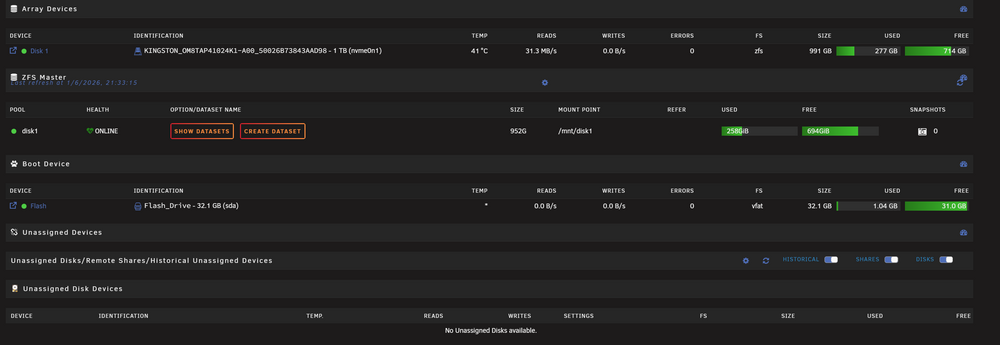
Yes so do I dont define them as a mirror cache? I just create one big ZFS Pool? - I create this for everything and forget about the traditional Unraid server setup ? (Sorry this is so strange to me) (It complain about parity hope that goes away if I remove the one Nvme drive (As this one drive is now listed in my Array) I have never created anything but either a Array with parity drives and some different cache pools
-
But is it correct that with a small server like this that everything is best setup and defined as cache drives maybe in a Raid/mirror setup?
-
Update: When the SATA bracket is installed: ❌ The Gen4 NVMe slot cannot be used for an NVMe drive ✅ The other two NVMe slots (PCIe 3.0 x4 + x2) still work ✅ You can run 2× NVMe + 1× 2.5” SATA When the SATA bracket is not installed: ✅ 3× NVMe (1× Gen4 + 2× Gen3) This is reported to be working if I go with external case.... Broadcom LSI SAS3008 9300-8e ?? ooH this is pretty cool: https://youtu.be/3MDzL2mxYcY?si=qaWH1qmfiPqfokab
-
Okay I might have misunderstod this.... If I use the adapter for the 2.5" I lose the fast 4 gen NVMe drive....
-
Hi All Fellow "Unraiders" I am in the process of setting up Unraid on this great little server MS-01 with 32G Ram and a 1TB Nvme drive (Package) So with the limited options on storage and my need to get some security I need some guidance Parity vs Cache Pools? The HW have some limits also: The MS-01 has 3 NVMe slots with different PCIe versions: Left slot (primary) = PCIe 4.0 x4 (max ~7000 MB/s) Middle slot = PCIe 3.0 x4 Right slot = PCIe 3.0 x2 (lower bandwidth) SSD adapter included: The MS-01 supports 1× 2.5” SATA SSD/HDD, and the mounting plate/bracket is included in the box. This is SATA 6 Gb/s (≈ 550 MB/s max). No NVMe speeds here – but stable additional storage. The limitation is only here: If you use the PCIe x16 expansion slot, lanes are shared and one NVMe slot is disabled Without a PCIe card → full configuration is possible Bottom line: Yes: 3× NVMe + 1× 2.5” SATA SSD = the optimal MS-01 setup No: Using a PCIe adapter at the same time = you sacrifice one NVMe What you should NOT do (if you want the most NVMe): Use a PCIe adapter card (it disables an NVMe slot) So that leaves me with 3 x Nvme + 1 x 2.5" SSD Creating 1 Array with parity doesn't make much sence so would it be better to just make one big cache pool with raid? and a SSD UAD assigned drive This would mix fast Gen4 with Gen 3 Nvmes? Or Cache single gen 4 Nvme Array with 1 parity drive 2 x gen3 Nvme and the 2.5" as a ZFS drive having all my snapshots on here? I can see other people have used the MS-01 as a small server, what did you decide on? Cheers Casperse
-
I did the download diag after ssh reboot and the UI came back to live. diagnostics-20251127-1625.zip
-
ok did ssh: reboot Need my UI back....
-
I tried the "old" /etc/rc.d/rc.nginx restart /etc/rc.d/rc.nginx resload But no change....
-
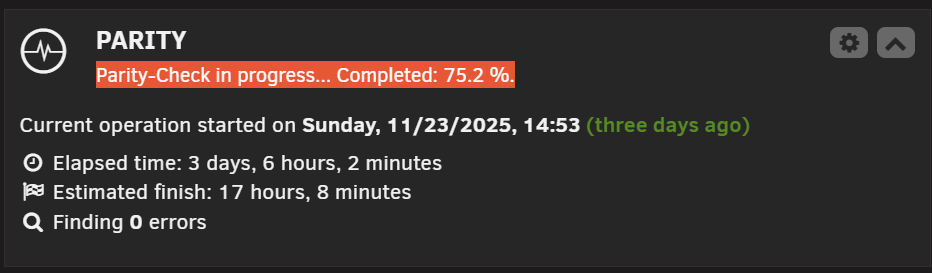
Hi All My unraid is non responsive? But all my docker apps are running fine? Trying to connect from any device locally IP or using connect I just get.... Sorry no logfile cant get one.... No problem with the version before? and no changes or new installs after upgrading? UPDATE: on a tab I can see a frozen UI with parity running: (No way to refresh)

-
Mine was dead doing the reboot not even terminal access locally. I did a power reset and it started up after that, no swapping of USB ports
-
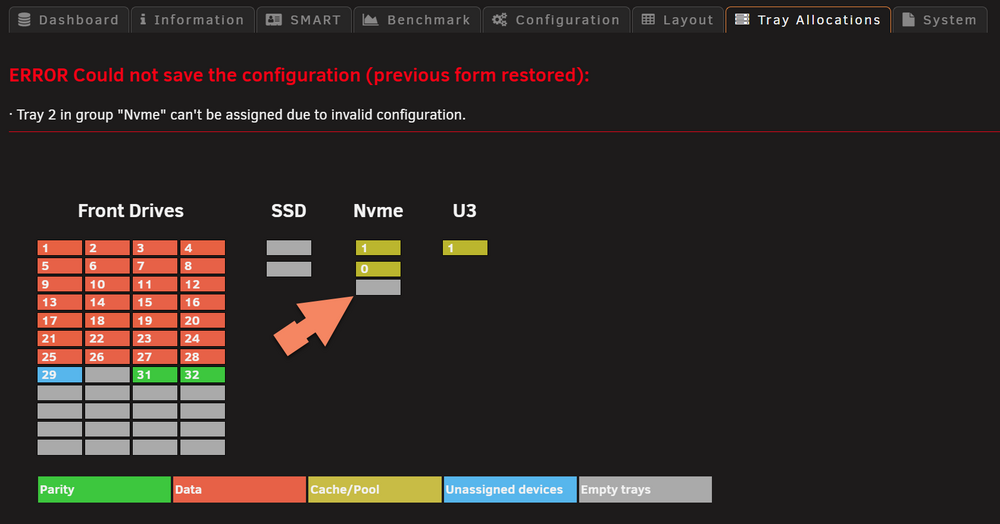
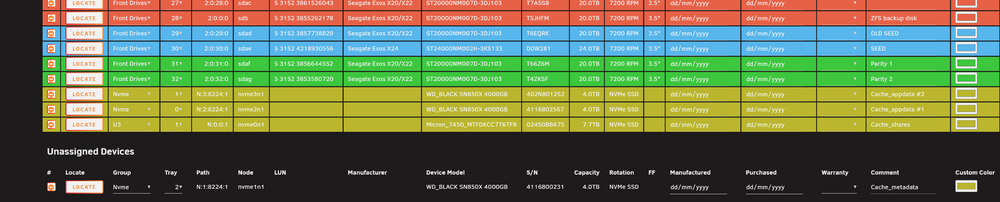
Hi I still have a problem adding a 3 nvme (We talked about this in a older post, problem finding it) I cant add the below nvme as tray 2 above I have the nvme as 0 and 1 and I cant edit these tray either. Pressing save and nothing happens but I can see the NVME below so it is found
-
HAs anyone gotten the gluetunvpn with the Qbittorrent working with PIA? I keep getting stale because port forwarding is a problem with Gluetunvpn.
-
I have a NVME and it is dicovered by scan, but for some reason I can add it to the "bay" Dont know what this error mean?