





Badboy
Members
-
Joined
-
Last visited
-
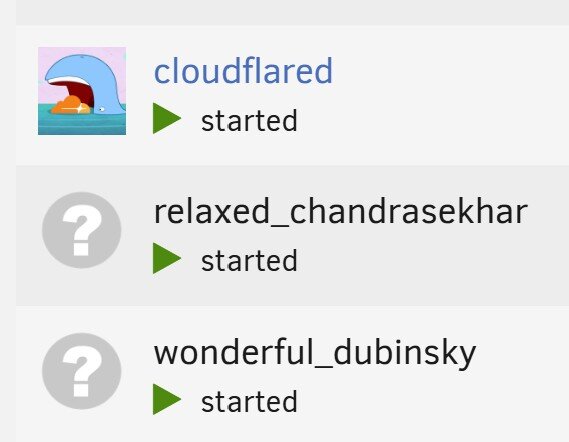
Hi, Need some input please. I'm using the Cloudflare docker by crazymax/cloudflared. Is it normal for it to have 3 separate dockers / pieces installed? See attachment. I'm also using Cloudflare-DNS, it's seems to be working but returning an error - "Invalid CloudFlare Credentials - 000". It's updating the Ip address. Thank you.
-
Hi, I think you can, but I thought I would ask. Can I override the Linusserver Emby container folder with the Emby Official container, without losing my data? Thanks
-
Hi guys, Need some help please. Been having an issue for a while, with the dockers occasionally disconnecting from the internet. I seem to be able to trigger it if I use nzb360 on my phone and manually send requests to Sabnzb. I had a look at the logs and found this below. I assuming I have a docker trying to use the same connection / ip? What's the easiest way to fix this? Hopefully it's easy, this is not something I'm real good at. Error response from daemon: network dm-5ed99d1ce0e1 is already using parent interface br0 Sep 26 19:26:53 Tower kernel: docker0: port 1(vethb8489c9) entered blocking state Sep 26 19:26:53 Tower kernel: docker0: port 1(vethb8489c9) entered disabled state Sep 26 19:26:53 Tower kernel: device vethb8489c9 entered promiscuous mode Sep 26 19:26:53 Tower kernel: docker0: port 1(vethb8489c9) entered blocking state Sep 26 19:26:53 Tower kernel: docker0: port 1(vethb8489c9) entered forwarding state Sep 26 19:26:53 Tower kernel: docker0: port 1(vethb8489c9) entered disabled state Thank you.
-
Stupid me I guess, never noticed the array was using the full amounts. How many disks should you have before considering a second parity drive? Thanks.
-
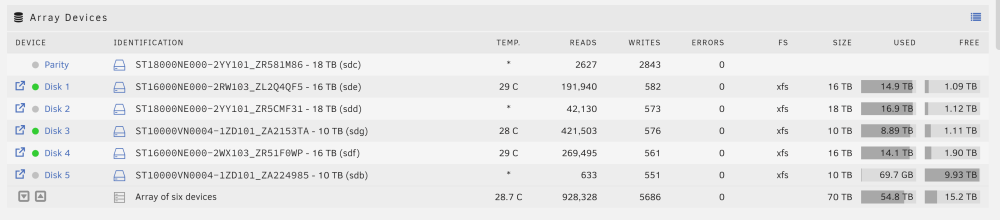
Disk #5 is showing all it's space is available, when only half of it should be.
-
The pool is set in raid mode. If I add 50tb of space, I'm only going to have 25tb available. That is the way mine is working. Up until now, when I added 10tb and it gave me the whole thing. I only had 5tb left, it should have been 10tb when I added the disk., but it's showing 15tb. Can't post anything at the moment.
-
Sorry, mirrored was the wrong word. They are in raid mode. Each one only uses half its capacity. Up unit this last one added. Didn't add it that way.
-
Hi, I have the following : Parity is 18tb Disk 1 16tb Disk 2 18tb Disk 3 10tb Disk 4 16tb I was starting to get low on space, so I activated one of my old 10tb drives. It was sitting there doing nothing and it still worked. My disks are mirrored so obviously whatever I add I lose half. It wiped the disk, and then I formatted it, and it added it to the pool. The problem is, it added the full 10tb, it should have only added 5tb. It's also not showing a file system for the disk I added. I'm assuming with the new changes to Unraid I must have done something wrong? Never had this problem before. Another question, how many disks should you have before using a second parity disk? I was going to setup a second set of disks for backups, but I just have too much data. I'm just going to have to take my chances. I try not to let my disks get too old. Any help is appreciated.
-
Hi, My vpn download speeds have tank severely, thinking it could be related to Deludge VPN, won't let me past 10mbs. Tried different vpns to see if that was it, didn't matter. I thought I would try the bult-in vpn, so I setup a tunnel on Unraid just for dockers, when I imported the config file it killed my internet. Had to do a shutdown and delete the vpn files off the usb. What did I do wrong? I thought you just gave the tunnel a name, import your file, and turn it on. Any help is appreciated.
-
I gave in and upgraded, it broke Plex LOL...This might have been in the release notes, that I didn't read. I guess I had to go to the app store and download a docker patch. which fixed the issue. This patch should have been incorporated into the update, or put a big note under the update button. Maybe it's just me. Other then that no issues.
-
This is why I quit doing updates...Still on 6.12.4. Nothing is broken, no issues. If something breaks I will then look at upgrading. Don't change what isn't broke.🤣
-
Hi, I think I'm going to have to do it the way you have done it. I have a desktop I can convert, with some newer parts sitting here. The major expense will be the GPU for Plex, in case I ever have to switch over from the main server. I like the Nvidia cards. I have a p2200, works great, good for Fileflow compression, low power consumption. I'm currently using old disks that I have replaced to back all my media files again. Thought it was better then them just sitting there. Not really old (5 or 6 years), they fit in the same server case. The only bad thing is they are not in a raid, so if one dies the whole backup dies. I figure if it happens, it happens. Still have the main server drives. Thanks for your input, appreciate it.
-
I now know it won't work that way. The only other way is to build a completely separate server and have the data sync as it changes. I think Space Invader had a video on this, where the other server was setup to turn off after it had updated the data. If the main server ever goes down, you can use the other one. I guess the short cut is out of the question. LOL...Thanks for the input.
-
That's what I was asking, thank you.
-
Sorry, I currently have all my disks in a Thermaltake case with motherboard etc. I would like to move all my disks to an external enclosure so the second server I build can access them, so if my main server goes down I just flip over to the other one. Is this doable?
