





chiefo
Members
-
Joined
-
Last visited
-
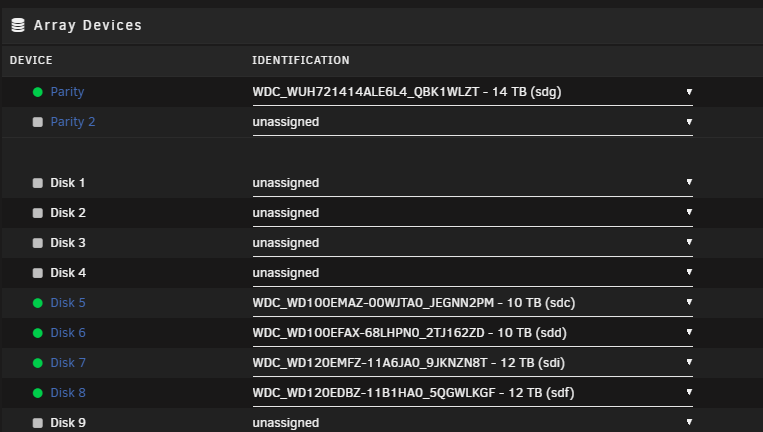
Thanks. That did it. I then stopped the array and added the old parity disk as disk 5. Its currently clearing with the rest of the array running properly.
-
Currently on 7.0.0-beta.2, however I originally shrunk the array probably over a year or two ago so it would have been on 6.x at the time.
-
Hi All, At one point i extended my array, and then removed the old 4tb disks. Just recently I bought a 14tb disk to replace my 12tb parity and am now trying to add the 12tb disk to the array. The array currently looks like this: If I put the old parity in slot 1-4, unraid wont let me format and start and says no data disks. If i add it to slot 9+, it shows as valid new disk and lets me start the array. Is there some sort of new config I need to do to get disks back into slots 1-4? With the old parity disk in slot 4, and the rest of the disks in 5-8:

-
Well. Looks like it happened again this morning. Although it lasted a lot longer this time.
-
Whelp. Been a week and seems to be solved. Before it wasn't making it more then say a day or so. Thanks!
-
So far so good. I kind of assumed that was a generic message since this system has been stable for years with the same hardware. Was there something that recently changed in the unraid kernel that may have changed how this works?
-
Started happening a few weeks ago, thought It may have been urbackup or a lack of trim since apparently I didn't reenable once the plugin moved to the OS. Happens on the latest unraid 6 release and the unraid 7 beta. Essentially my ssd randomly will drop from the os, causing all my shares and dockers to lock up. Sometimes i can stop the array and reboot from the gui, other times I have to ssh and do a shutdown -r. A reboot brings the drive back. SMART doesn't seem to show any errors. Any suggestions? 2832 Jun 30 11:10:04 Alpha rc.docker: Containers started. 2833 Jun 30 11:10:04 Alpha rc.docker: bazarr: started successfully! 2834 Jun 30 11:10:44 Alpha kernel: iommu ivhd2: AMD-Vi: Event logged [INVALID_DEVICE_REQUEST device=0000:00:00.0 pasid=0x00000 address=0xfffffffdf8000000 flags=0x0a00] 2835 Jun 30 11:11:00 Alpha flash_backup: adding task: /usr/local/emhttp/plugins/dynamix.my.servers/scripts/UpdateFlashBackup update 2836 Jun 30 11:11:07 Alpha kernel: nvme nvme0: controller is down; will reset: CSTS=0xffffffff, PCI_STATUS=0x10 2837 Jun 30 11:11:07 Alpha kernel: nvme nvme0: Does your device have a faulty power saving mode enabled? 2838 Jun 30 11:11:07 Alpha kernel: nvme nvme0: Try "nvme_core.default_ps_max_latency_us=0 pcie_aspm=off" and report a bug 2839 Jun 30 11:11:07 Alpha kernel: nvme0n1: I/O Cmd(0x2) @ LBA 731666232, 256 blocks, I/O Error (sct 0x3 / sc 0x71) 2840 Jun 30 11:11:07 Alpha kernel: I/O error, dev nvme0n1, sector 731666232 op 0x0:(READ) flags 0x80700 phys_seg 3 prio class 0 2841 Jun 30 11:11:07 Alpha kernel: nvme0n1: I/O Cmd(0x2) @ LBA 84296928, 8 blocks, I/O Error (sct 0x3 / sc 0x71) 2842 Jun 30 11:11:07 Alpha kernel: I/O error, dev nvme0n1, sector 84296928 op 0x0:(READ) flags 0x80700 phys_seg 1 prio class 0 2843 Jun 30 11:11:07 Alpha kernel: nvme0n1: I/O Cmd(0x2) @ LBA 98138344, 8 blocks, I/O Error (sct 0x3 / sc 0x71) 2844 Jun 30 11:11:07 Alpha kernel: I/O error, dev nvme0n1, sector 98138344 op 0x0:(READ) flags 0x80700 phys_seg 1 prio class 0 2845 Jun 30 11:11:07 Alpha kernel: nvme0n1: I/O Cmd(0x2) @ LBA 48090744, 8 blocks, I/O Error (sct 0x3 / sc 0x71) 2846 Jun 30 11:11:07 Alpha kernel: I/O error, dev nvme0n1, sector 48090744 op 0x0:(READ) flags 0x80700 phys_seg 1 prio class 0 2847 Jun 30 11:11:07 Alpha kernel: nvme0n1: I/O Cmd(0x2) @ LBA 788687176, 8 blocks, I/O Error (sct 0x3 / sc 0x71) 2848 Jun 30 11:11:07 Alpha kernel: I/O error, dev nvme0n1, sector 788687176 op 0x0:(READ) flags 0x80700 phys_seg 1 prio class 0 2849 Jun 30 11:11:07 Alpha kernel: nvme0n1: I/O Cmd(0x2) @ LBA 499727632, 8 blocks, I/O Error (sct 0x3 / sc 0x71) 2850 Jun 30 11:11:07 Alpha kernel: nvme0n1: I/O Cmd(0x2) @ LBA 683782920, 32 blocks, I/O Error (sct 0x3 / sc 0x71) 2851 Jun 30 11:11:07 Alpha kernel: nvme0n1: I/O Cmd(0x2) @ LBA 75812848, 8 blocks, I/O Error (sct 0x3 / sc 0x71) 2852 Jun 30 11:11:07 Alpha kernel: nvme0n1: I/O Cmd(0x2) @ LBA 731666488, 256 blocks, I/O Error (sct 0x3 / sc 0x71) 2853 Jun 30 11:11:07 Alpha kernel: nvme0n1: I/O Cmd(0x2) @ LBA 688794488, 8 blocks, I/O Error (sct 0x3 / sc 0x71) 2854 Jun 30 11:11:07 Alpha kernel: I/O error, dev nvme0n1, sector 683782920 op 0x0:(READ) flags 0x80700 phys_seg 1 prio class 0 2855 Jun 30 11:11:07 Alpha kernel: I/O error, dev nvme0n1, sector 499727632 op 0x0:(READ) flags 0x80700 phys_seg 1 prio class 0 2856 Jun 30 11:11:07 Alpha kernel: I/O error, dev nvme0n1, sector 75812848 op 0x0:(READ) flags 0x80700 phys_seg 1 prio class 0 2857 Jun 30 11:11:07 Alpha kernel: I/O error, dev nvme0n1, sector 688794488 op 0x0:(READ) flags 0x80700 phys_seg 1 prio class 0 2858 Jun 30 11:11:07 Alpha kernel: I/O error, dev nvme0n1, sector 731666488 op 0x0:(READ) flags 0x80700 phys_seg 3 prio class 0 2859 Jun 30 11:11:07 Alpha kernel: nvme 0000:41:00.0: enabling device (0000 -> 0002) 2860 Jun 30 11:11:07 Alpha kernel: nvme nvme0: Shutdown timeout set to 8 seconds 2861 Jun 30 11:12:10 Alpha kernel: nvme nvme0: I/O tag 14 (400e) QID 0 timeout, disable controller 2862 Jun 30 11:12:10 Alpha kernel: nvme nvme0: failed to set APST feature (-4) 2863 Jun 30 11:12:10 Alpha kernel: nvme nvme0: Disabling device after reset failure: -4 2864 Jun 30 11:12:10 Alpha rsyslogd: file '/mnt/user/Syslog/syslog-10.0.2.0.log'[10] write error - see https://www.rsyslog.com/solving-rsyslog-write-errors/ for help OS error: Input/output error [v8.2102.0 try https://www.rsyslog.com/e/2027 ] 2865 Jun 30 11:12:10 Alpha kernel: I/O error, dev nvme0n1, sector 23453552 op 0x1:(WRITE) flags 0x800 phys_seg 1 prio class 0 2866 Jun 30 11:12:10 Alpha kernel: I/O error, dev nvme0n1, sector 488618439 op 0x1:(WRITE) flags 0x9800 phys_seg 1 prio class 0 2867 Jun 30 11:12:10 Alpha kernel: XFS (nvme0n1p1): log I/O error -5 2868 Jun 30 11:12:10 Alpha kernel: I/O error, dev nvme0n1, sector 14882216 op 0x1:(WRITE) flags 0x800 phys_seg 1 prio class 0 2869 Jun 30 11:12:10 Alpha kernel: I/O error, dev nvme0n1, sector 23453560 op 0x1:(WRITE) flags 0x800 phys_seg 1 prio class 0 2870 Jun 30 11:12:10 Alpha kernel: I/O error, dev nvme0n1, sector 633858960 op 0x1:(WRITE) flags 0x100000 phys_seg 1 prio class 0 2871 Jun 30 11:12:10 Alpha kernel: nvme0n1p1: writeback error on inode 561999096, offset 9269248, sector 633858960 2872 Jun 30 11:12:10 Alpha kernel: nvme0n1p1: writeback error on inode 23454846, offset 24576, sector 23453552 2873 Jun 30 11:12:10 Alpha kernel: nvme0n1p1: writeback error on inode 21467663, offset 0, sector 21464784 2874 Jun 30 11:12:10 Alpha kernel: nvme0n1p1: writeback error on inode 23454846, offset 28672, sector 23453560 2875 Jun 30 11:12:10 Alpha kernel: XFS (nvme0n1p1): Filesystem has been shut down due to log error (0x2). 2876 Jun 30 11:12:10 Alpha kernel: nvme0n1p1: writeback error on inode 21451625, offset 413696, sector 14882216 2877 Jun 30 11:12:10 Alpha kernel: XFS (nvme0n1p1): Please unmount the filesystem and rectify the problem(s). 2878 Jun 30 11:12:10 Alpha rsyslogd: file '/mnt/user/Syslog/syslog-10.0.2.0.log': open error: Input/output error [v8.2102.0 try https://www.rsyslog.com/e/2433 ] 2879 Jun 30 11:12:10 Alpha kernel: nvme0n1p1: writeback error on inode 21451625, offset 417792, sector 14883416 2880 Jun 30 11:12:10 Alpha kernel: loop: Write error at byte offset 2464059392, length 4096. 2881 Jun 30 11:12:10 Alpha kernel: I/O error, dev loop2, sector 564032 op 0x0:(READ) flags 0x1000 phys_seg 1 prio class 0 2882 Jun 30 11:12:10 Alpha kernel: I/O error, dev loop2, sector 4812616 op 0x1:(WRITE) flags 0x0 phys_seg 3 prio class 0 2883 Jun 30 11:12:10 Alpha kernel: BTRFS error (device loop2): bdev /dev/loop2 errs: wr 0, rd 1, flush 0, corrupt 0, gen 0 2884 Jun 30 11:12:10 Alpha kernel: BTRFS error (device loop2): bdev /dev/loop2 errs: wr 1, rd 1, flush 0, corrupt 0, gen 0
-
Just got the same issue in 6.12.8. Even though the transcode mount is optional, it seems with the latest version of docker included with the new unraid tries to put a : in for a blank variable in the template. If you delete the optional variables like /transcode in the template, it will start correctly.
-
+Also ran into upgrade issues with the update to v4. Per the v4 sonarr release notes I was able to uncorrupt database and it is now working fine. " Issues when upgrading If you had a lot of preferred words in Sonarr v3 then you will see many migrated custom formats in v4. These will need to be edited or deleted and readded. The {Preferred Words} naming token is also replaced with the {Custom Formats} token. Check your naming strings. Due to multiple database migrations we’ve seen that some corrupt databases that were doing OK in v3 have broken in v4. You can try to follow our corrupt database repair guide Useful Tools | Servarr Wiki 102 or reach out to one of our Support channels."6
-
Per the Github for this docker, this is a Ubuntu Jammy docker. We need docker 20.10.10 or higher to resolve. Unraid 6.10 RC-6 was released today that includes 20.10.14. After upgrading to rc-6, i was able to swap to latest ombi docker correctly.
-
Change the repository in the docker from :latest to the version you want, ie: linuxserver/ombi:v4.16.12-ls119
-
Updated my docker today and now I'm seeing Failed to create CoreCLR, HRESULT: 0x80070008 spammed in the log. Web gui isn't working any more either. Anyone seeing this? Rolled back to v4.16.12-ls119 to resolve
-
Glad you were able to find a fix! I already had an email out to support who replaced my key.
-
After two moves, I was finally able to boot my server again. Turns out my flash drive died/corrupted. Was able to successfully pull my flash backup down from the tool and get the server booted up (all though all my plugins were in an error state, manually reinstalled community apps from the file on the err folder then pulled the latest myservers plugin). Once I had the plugin I tried to replace my key, it initially errored out due to multiple keys on my flash drive, which I would have expected. I then removed the extra keys and attempted to replace my Plus License key as it no longer matched. After hitting replace key, the myservers popup briefly flashed the logon window as if I wasn't logged in, then returned to purchase/replace key. Tried in both chrome and edge. Unraid 6.9.0 and myserver 2021.10.12.1921. I moved my key from /config so I now had no valid key on the server. Now hitting replace key takes me to an actual log on attempt, which then took me to a page that says key couldn't be replaced and to contact support. I've sent an email to support to get a replacement, but it seems like the logic for replacing a key with an invalid key is causing some sort of loop. I would have expected to get the same sort of error/contact support message when replacing a mismatched key instead of the window looping repeatedly on purchase/replace key. Has anyone seen this or is it just a bug? Does the plugin have any logs I can provide to help see why it was looping?
-
Just today noticed that a recent update seems to have broken my ability to approve requests. I've been on V4 for some time now. Basically the screen dithers and it looks like its popping up my approval button too far below the screen as I can barely see the box. Is anyone else running into this? I tried from my desktop and mobile. Also tried switching from the dev docker repo back to the stable as well to no avail. Edit: Appears to be a known issue: https://github.com/Ombi-app/Ombi/issues/4208


