randomaccess
Members
-
Joined
-
Last visited
-
Just to follow-up to my own question, the only thing that worked for me after days of trying was to delete the Binhex dockers (Sonarr, Radarr, Sabnzbd) and install the Linuxserver.io ones. With the exact same settings, everything worked perfectly. ¯\_(ツ)_/¯
-
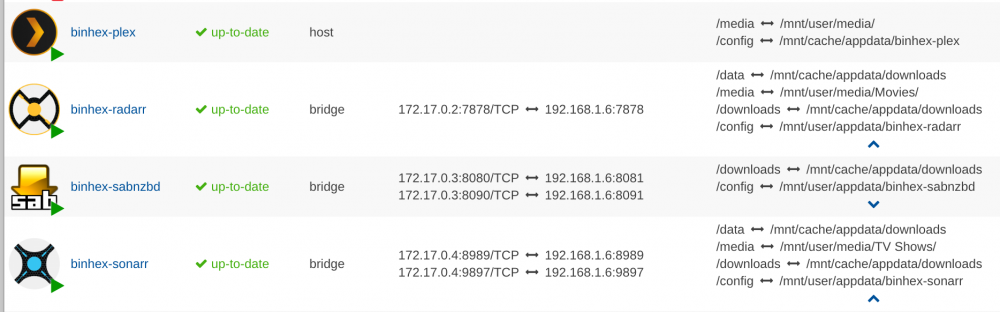
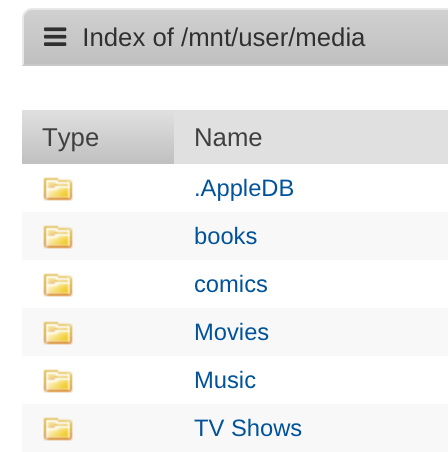
Hi @binhex First off your docker images are fantastic. Thank you -- made using UnRAID very easy and I use a number of them. I recently added a cache drive and since then (in spite of a few days of reading threads, FAQs, and reinstalls, spaceinvader videos, etc.) I've been completely unable to get Sonarr / Radarr to move files after they've downloaded. I know this is a newbie question but what's frustrating is that it was working, and is no longer. Can you (or someone) please take a quick peek at these settings and let me know what the heck I'm doing wrong?? Radarr is reporting that it is "Missing root folder: /media/Movies" Sonarr reports that it is "Multiple root folders are missing: /mnt/users/media/TV Shows | /media/TV Shows" Capitalization looks correct. Not sure why it's looking for "/mnt/userS" though? Here's my run command from Sonarr: root@localhost/# /usr/local/emhttp/plugins/dynamix.docker.manager/scripts/docker run -d --name='binhex-sonarr' --net='bridge' -e TZ="America/Denver" -e HOST_OS="unRAID" -e 'UMASK'='000' -e 'PUID'='99' -e 'PGID'='100' -p '8989:8989/tcp' -p '9897:9897/tcp' -v '/mnt/cache/appdata/downloads':'/data':'rw' -v '/mnt/user/media/TV Shows/':'/media':'rw' -v '/mnt/cache/appdata/downloads':'/downloads':'rw' -v '/mnt/user/appdata/binhex-sonarr':'/config':'rw' 'binhex/arch-sonarr' And run command from Sabnzbd: root@localhost:# /usr/local/emhttp/plugins/dynamix.docker.manager/scripts/docker run -d --name='binhex-sabnzbd' --net='bridge' -e TZ="America/Denver" -e HOST_OS="unRAID" -e 'UMASK'='000' -e 'PUID'='99' -e 'PGID'='100' -p '8081:8080/tcp' -p '8091:8090/tcp' -v '/mnt/cache/appdata/downloads':'/data':'rw' -v '/mnt/user/media':'/media':'rw' -v '/mnt/user/personal':'/personal':'rw' -v '/mnt/cache/appdata/downloads':'/downloads':'rw' -v '/mnt/user/appdata/binhex-sabnzbd':'/config':'rw' 'binhex/arch-sabnzbd' Not sure what other information is needed to help me figure this out but any leads would certainly be appreciated! Thank you.