





Dmitry Spikhalskiy
Members
-
Joined
-
Last visited
Everything posted by Dmitry Spikhalskiy
-
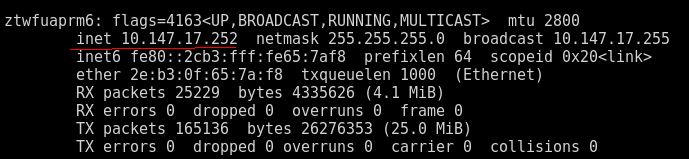
1. In Zerotier UI interface, in a "Managed IPs" column for the UnRaid machine. 2. Or by running `ifconfig` in the UnRaid CLI, finding the network interface added by Zerotier docker (name starts with zt) and taking an "inet" value from it.
-
SpaceInvaderOne's script indeed works, I added the instruction step to the first post. It also looks very much like a bug in recent versions of Unraid. This workaround shouldn't be needed (and it wasn't needed before). Nginx should be listening on all the interfaces listed in "Listening interfaces" after the server restart and not require a manual reboot. So I reported it here.
-
I maintain Zerotier Docker extension. The extension creates a virtual interface and provides remote access to the server through the private virtual network. Through the years and recent updates of Unraid, the extension experienced several changes / troubles, but the latest one does look like a bug. Many versions ago, something changed and UI stopped listening on the virtual interface. It wasn't on the Release Notes I believe. However, after some investigation, I found a solution and added one more step to the instructions to manually add the virtual network to the set of the "listening interfaces" in network settings. Unfortunate, but not a big deal. Things worked. Somewhere in 6.12.x updates, it broke worse. Now, when you initially add the virtual network to "listening interfaces", UI starts to respond on this interface correctly. However, after the server restart, the connection to port 80 (and 22) is rejected with a "connection reset" if accessed through the virtual network. While the virtual interface is still on the list of the "listening interfaces" in the UI, the server UI doesn't listen on it after restart. To fix it, after every restart, you need to manually remove the interface and re-add it. What makes matters worse, you need to have local access to do that. This doesn't look right, it does look like a bug. Users of the extension found a workaround and published a User Script. The script waits for the docker image to start and restarts Nginx after that. This looks like a hack and shouldn't be needed. Please note that the problem and all these manual steps exist for Unraid UI only, all the docker containers and their ports are available this whole time just fine without manually adding the network interface altogether. My speculation is Nginx starts first, doesn't see the interface, ignores it, and doesn't pick it up later when the docker that services that network actually starts up. Could you please help to investigate and fix the recent bug that broke UI ability to listen and respond on an explicitly declared additional interface serviced by a docker image after a server restart? It didn't require a manual Nginx restart before and shouldn't need it now. Could we also consider reverting the original change from many versions ago and making UI listening on all network interfaces by default again? This was so much easier and it feels like a sensible default. Related user bug report: The issue is present on the latest Unraid 6.12.13
-
Also, an advanced trick that may work for users who can't make Unraid UI to respond on zerotier interface, but need to access the UI. You can use ssh port-forwarding by running the following in the terminal: ssh -L 8080:localhost:80 root@<put ip address of you server in Unraid Virtual Network here> So for me, it's `ssh -L 8080:localhost:80 [email protected]`. It will ask for your root password. This will make UI of your remote Unraid server accessible on "localhost:8080" address in your local browser. For this to work, Unraid ssh server needs to listen on port 22 on Zerotier Virtual Network. It does it on Unraid 6.12.11, even if UI is not listening on port 80.
-
The latest image tag was upgraded to Zerotier 1.14.0. If you wish to stay on 1.12.1, you can explicitly specify "spikhalskiy/zerotier:1.12.1" in the image settings. The template was un-deprecated.
-
I will update the image to the latest zerotier release. Stuff had been working for me personally, so I didn't have a need to touch it. But if there is demand, it can be done. Just FYI, an official version in Ubuntu store for Zerotier is 1.10.2, most linux machines don't really need the latest versions and will not benefit much from them. @Squid please consider reactivating the template, as I'm still actively using it personally in my environment (and prefer it over any other available solutions to the remote access problem) and I'm around.
-
The image was upgraded to Zerotier 1.12.0 UPD Aug 27: Zerotier 1.12.1
-
The above solution originally published by @Vivent that includes setting "Include listening interfaces" works for me with the latest 6.12.4-rc18 and 6.12.4-rc19. unRaid UI, shares, and docker containers are fully available for other nodes in Zerotier virtual network again. Important, if you upgrade from 6.12.3 and have the listening interfaces already set up as suggested: wipe them out, save, and put your zerotier gateway name back again. It was a necessary step for me to make things work after 6.12.3 -> 6.12.4-rc18/19 upgrade.
-
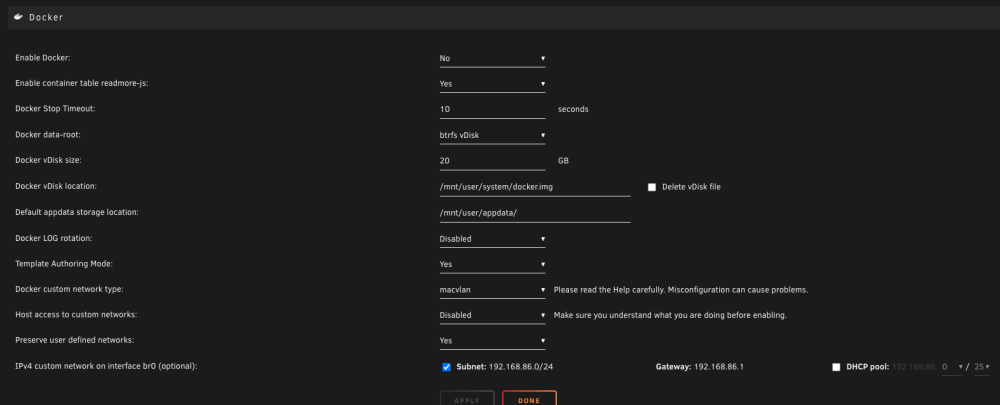
There will be no updates from me here. There were no changes in the container and its configuration and the same exact container with the same exact configs continues to work successfully on Servers with other Linux distributions. So the problem is in the Unraid update and the fix if any will come from the Unraid team. What I personally observe, with the following Docker settings at least, Zerotier can connect to the service just fine, and other devices in the virtual network can successfully ping the Unraid virtual IP address. And I even can open a directory listing on <unraid virtual ip>:6080. But Unraid UI and docker container ports are not available for devices in the virtual network. My only guess is that 6.12 brought some unannounced changes in isolation causing it. iptables? nginx? I can't figure it out.
-
@Elmojo Shouldn't be happening. Next time it happens, try to check the logs of the container. They are available by clicking on the icon in the Docker tab and choosing Logs. Also, check the logs on your UnRaid server too around the time it happens. Some IO problem or a crash on your specific configuration may be causing it.
-
A repository this Dockerfile builds from is: https://github.com/Spikhalskiy/zerotier-unraid-docker and it's not archived. I archived repo with a Dockerfile that was actually building a base underlying image. Now there is an actively maintained zyclonite/zerotier image and I switched on it as a base image and just adapt it for Unraid.
-
@Demon1337 Thanks for the report! Yeah, during the last major upgrade of the container I indeed lost a docker ENTRYPOINT. I just released the fix, it should initialize as expected now.
-
Most users don't need to go into any directory or even open the cli. Please see the first post of this thread for a manual on how to use this container.
-
@Moepsindi Why do you run ./zerotier-cli at all? This container doesn't have runnable `zerotier-cli` in the root of the file system. So, this command is not expected to work. zerotier-cli executable is in `/usr/bin/zerotier-cli`. `zerotier-cli join` or `zerotier-cli info`, etc will work in this container.
-
@air1kdf this container does exactly that on every start. If this command helped you, you either put an incorrect networkId in the container settings or a simple restart of the container would also help.
-
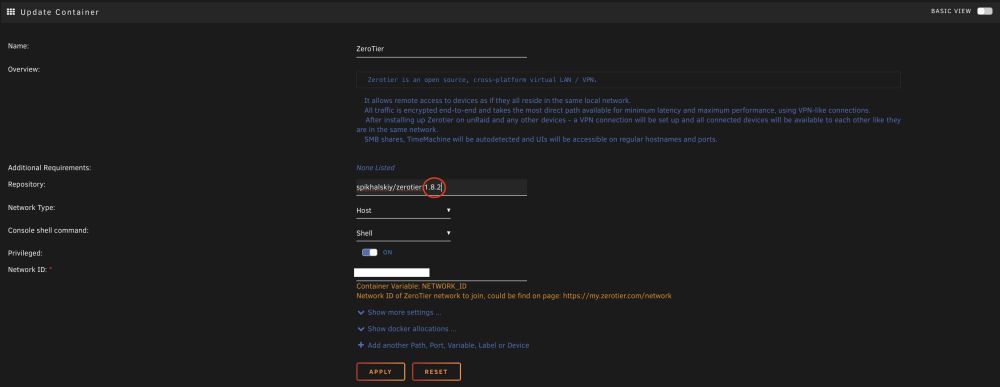
@ilpixelmatto 4 days ago I upgraded the container from 1.8.2 to 1.10.2. If you want to check if that is what causes your instability, you may downgrade by specifying a tag "spikhalskiy/zerotier:1.8.2" and see how it behaves.
-
The image was upgraded to the latest Zerotier 1.10.2
-
This app/container works fine with Unraid 6.10.2 or 6.10.3, there is nothing to fix. You have to debug your own environment. In the root post you can find steps that you should do to make a meaningful information about your issue. Somebody in this thread may help if you provide enough info.
-
1.10.0? I will skip this one. 1. I see several issues in github that after an upgrade specifically to 1.10.0 users installations stopped working. I inclined to wait for at least first patch version. https://github.com/zerotier/ZeroTierOne/issues/1692 https://github.com/zerotier/ZeroTierOne/issues/1695 2. I'm not sure what's going on with 1.10.0. The latest code changes in zerotier github are for 1.8.10. There is neither Release Notes related to 1.10.0 (https://github.com/zerotier/ZeroTierOne/blob/master/RELEASE-NOTES.md), nor code changes between 1.8.10 - 1.10.0. I don't want to upgrade to some version that is stated just on their website and completely doesn't exist in the code repository. I guess it's ok if they suddenly went closed source, but it's not ok that I can't find any information or statement about it around at all.
-
Is there a problem 1.8.10 solves for you that 1.8.2 doesn't?
-
Yes, it's a custom image. First of all, it's on Alpine and it's much lighter. Zerotier official image moved to debian at some time, I took their image at that time and maintain myself: https://github.com/Spikhalskiy/zerotier-containerized/blob/master/Dockerfile Second, it has a custom starter script that wires parameters the right way: https://github.com/Spikhalskiy/zerotier-unraid-docker/blob/master/Dockerfile It doesn't have any changes to zerotier binaries and install them from the official sources. It's all on github, suit yourself.
-
@Wingmanos This doesn't make much sense. Zerotier needs 9993 port and it's true and was true all the way. Nothing need to be added to template or config for it to work, because this Zerotier image and template uses and requires "Host" network type (https://github.com/Spikhalskiy/docker-templates/blob/master/zerotier.xml#L34).

-
@Caldorian Will 1.8.6 make your life better in comparison with 1.8.2? I don't see anything in release notes worth upgrading for the needs of this specific docker image.
-
I'm going to - update to 1.8.x and - expose allowManaged, allowGlobal, allowDefault options in unRAID UI But no specific timelines. When I get some free hands on a weekend.
-
Not I'm aware of, but I didn't spend any time resolving it. Stuff works just fine and it's safe to ignore. If it bothers you to the extend of looking for a solution, contributions are welcomed!






