





TrainWreck
Members
-
Joined
-
Last visited
Everything posted by TrainWreck
-
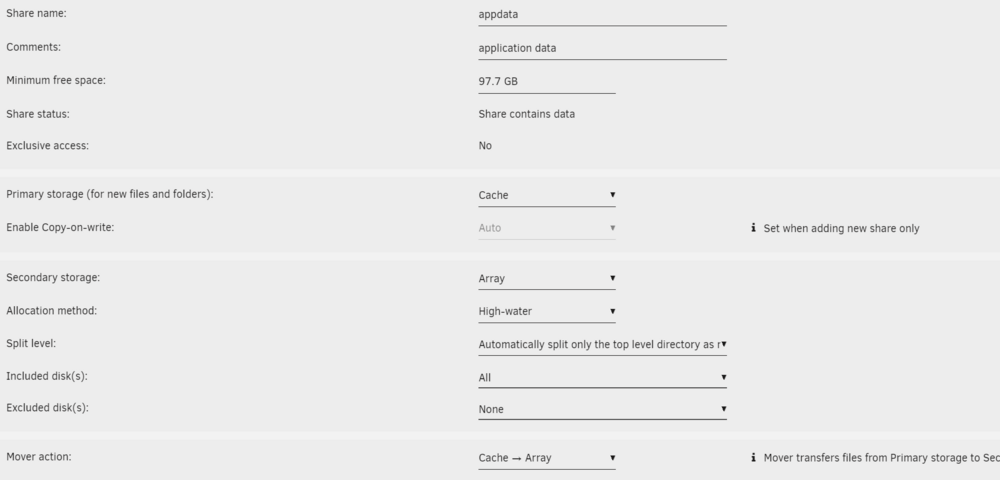
Awesome. I now have it set to: I re-ran FCP and "No Errors" for the first time in weeks. FWIW .. this setting of "Array ---> Cache" seems backwards to me and is probably why I couldn't figure it out. In my (obviously, WRONG) thinking, it should be first "Cache" THEN to "Array." This is why I had such trouble with it. Thank you!

-
Thank you. I have that setting to: although I have no idea how to reset it if I need to. I tried stopping the array and looking for a way but couldn't find it. And according to the setting above, it appears that I DO have the share set to the cache (first) before it is copied to the array. SO I am confused why I am getting this message. Here are the settings when I click on the Appdata share: So, again .. when the post that directed me here states: "This is a performance only error. If you have a cache pool, it is highly recommended that the appdata location (Settings - Docker - Default Appdata path) reference a share that is set to be either Use Cache: Prefer or Use Cache: Only." it seems that I DO have it set thusly. And is why I am so confused why I am getting this error now. Maybe I'm just looking in the wrong places for the proper setting?

-
I guess I don't know what the hell I'm doing! Got this message: "Default docker appdata location is not a cache-only share" Seems self-explanatory. But when I try to "fix" the problem, I cannot figure out how to do it. My Appdata is located at: /mnt/user/appdata/ I have ONE cache drive. A 1TB NAND SATA SSD. I have ZERO idea what to do when it says the Appdata location should "reference a share that is set to be either Use Cache: Prefer or Use Cache: Only." WHERE do I set this? I don't see it in settings/docker. Do I have to set aside ("waste") a single drive in the array to put the Appdata on? I don't remember getting this error until the last few weeks though my server has been running constantly since 2021. Why would it just start giving me this error? I don't recall changing anything but maybe I somehow screwed things up. I would appreciate any help.


