s.lamoureux
Members
-
Joined
-
Last visited
Everything posted by s.lamoureux
-
my error message is: Import failed, path does not exist or is not accessible by Sonarr: /config/Downloads/complete/Vikings.S05E05.REPACK.720p.HDTV.x264-AVS-BUYMORE/ Close
-
Can someone help me out with my docker settings? I keep getting the "Import failed, path does not exist or is not accessible for items that do not exist error in sonarr. Within the sab settings it shows that my downloads are pointed to /config/Downloads/complete so I tried switching the sonarr container dir to that with no luck. This is my current setting:
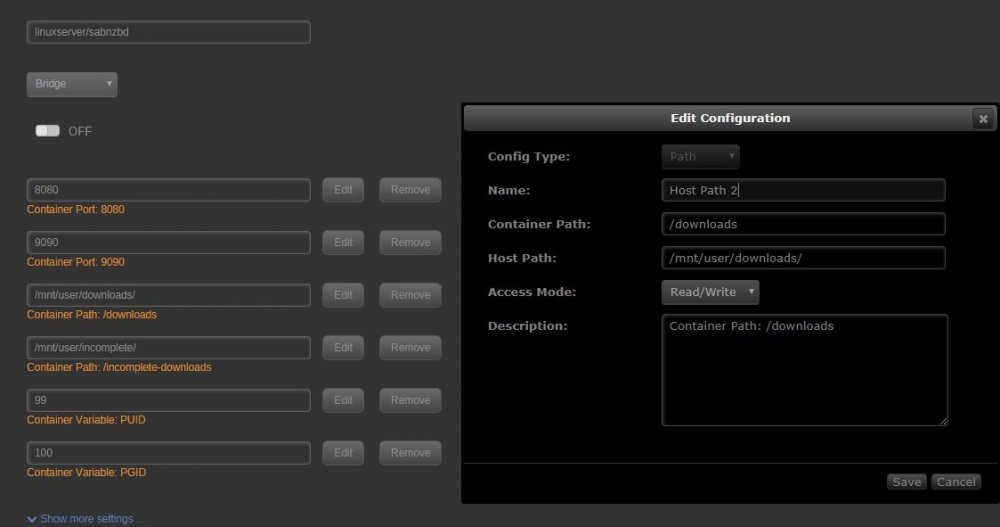
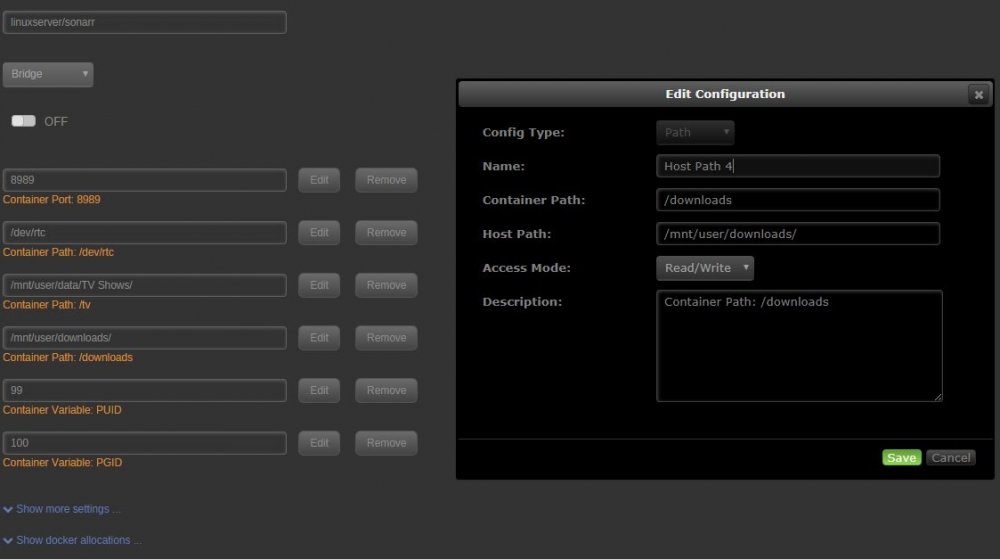
-
I tried that as well and my movies are still not showing in Plex. edit: I'm an idiot and forgot to change the container path! all is well.
-
How am I supposed to set up my user shares and what are the location settings for my Plex library? On the linuxserver page it says to put my media in a share called data, so I did that and inside I just have /Movies and /TV Shows. In the plex web ui I created a Movies playlist with the directory as /mnt/user/data/Movies and nothing is showing up.