





mamaraci
Members
-
Joined
-
Last visited
Everything posted by mamaraci
-
Hello! Can I please ask, what can be the problem behind? I have Roon installed in the docker @ Unraid, steefdebruijn/docker-roonserver (latest version). Client is Win11 machine, playing to Topping DX1 and sometimes the playback stops, saying that "Roon has lost the control of the audiodevice". If I'm playing through antoher output, Arturia Minifuse 4, from the same Roon Core, I've never faced (at least I don't remember) such an issue. Sometimes it's quite stable, and can play for an hours without a stop. And sometimes it stops just every minute or so. A part of the log is here: at System.Threading.Tasks.TaskToApm.End[TResult](IAsyncResult asyncResult) at Sooloos.RnetJsonClient.<>c__DisplayClass65_0.<_BeginRead>b__0(IAsyncResult ar) System.Net.Sockets.SocketException (104): Connection reset by peer at System.Net.Sockets.Socket.AwaitableSocketAsyncEventArgs.ThrowException(SocketError error, CancellationToken cancellationToken) at System.Net.Sockets.Socket.AwaitableSocketAsyncEventArgs.System.Threading.Tasks.Sources.IValueTaskSource<System.Int32>.GetResult(Int16 token) at System.Threading.Tasks.ValueTask`1.ValueTaskSourceAsTask.<>c.<.cctor>b__4_0(Object state) --- End of stack trace from previous location --- at System.Threading.Tasks.TaskToApm.End[TResult](IAsyncResult asyncResult) at Sooloos.RnetJsonClient.<>c__DisplayClass65_0.<_BeginRead>b__0(IAsyncResult ar) System.Net.Sockets.SocketException (104): Connection reset by peer at System.Net.Sockets.Socket.AwaitableSocketAsyncEventArgs.ThrowException(SocketError error, CancellationToken cancellationToken) at System.Net.Sockets.Socket.AwaitableSocketAsyncEventArgs.System.Threading.Tasks.Sources.IValueTaskSource<System.Int32>.GetResult(Int16 token) at System.Threading.Tasks.ValueTask`1.ValueTaskSourceAsTask.<>c.<.cctor>b__4_0(Object state) --- End of stack trace from previous location --- at System.Threading.Tasks.TaskToApm.End[TResult](IAsyncResult asyncResult) at Sooloos.RnetJsonClient.<>c__DisplayClass65_0.<_BeginRead>b__0(IAsyncResult ar) System.Net.Sockets.SocketException (104): Connection reset by peer at System.Net.Sockets.Socket.AwaitableSocketAsyncEventArgs.ThrowException(SocketError error, CancellationToken cancellationToken) at System.Net.Sockets.Socket.AwaitableSocketAsyncEventArgs.System.Threading.Tasks.Sources.IValueTaskSource<System.Int32>.GetResult(Int16 token) at System.Threading.Tasks.ValueTask`1.ValueTaskSourceAsTask.<>c.<.cctor>b__4_0(Object state) --- End of stack trace from previous location --- at System.Threading.Tasks.TaskToApm.End[TResult](IAsyncResult asyncResult) at Sooloos.RnetJsonClient.<>c__DisplayClass65_0.<_BeginRead>b__0(IAsyncResult ar) What can be a reason for my issue?
-
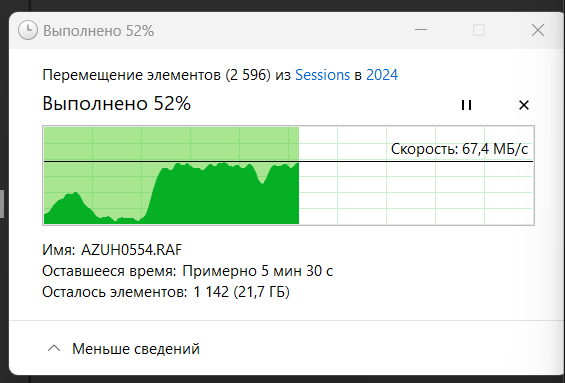
Sorry for the long silence. But here it is, the same issue. Copying from external (main desktop, 1gbit lan, ssd nvme) to the unraid server, bu 1gbit lan, to the cache on unraid (ssd 512gb). Transfer speeds are jumping, from 30-60mbytes/ sec, sometimes dropping to below 1MB /s (see the screenshot attached). And the latest diags, taken during the copying process, is attached. Files in copy are photos: raw, jpg files, and XMPs, a mix of everything. I guess, the main drop in speed while copying a lot of smaller XMP files, or touching (viewing) the files on the server with the other parallel process. Should I upgrade already? ) Motherboard (+processor since it's soldered), RAM or LAN? Or smth can be solved in easier / cheaper way, without new hardware.. linertower-diagnostics-20240708-1456.zip
-
Looks like ok: unraid server as server: [ ID] Interval Transfer Bandwidth [ 4] 0.00-10.00 sec 533 MBytes 447 Mbits/sec sender [ 4] 0.00-10.00 sec 533 MBytes 447 Mbits/sec receiver reverse mode: [ ID] Interval Transfer Bandwidth Retr [ 4] 0.00-10.00 sec 728 MBytes 610 Mbits/sec 904 sender [ 4] 0.00-10.00 sec 725 MBytes 608 Mbits/sec receiver
-
And, again going back to my initial issue of the slow speed. trying to copy to the cache from my desktop ssd - 5MB/s. Rebooted, restarted the copy - just 7-8MB/s, not higher. Diags before reboot is attached Is that a limit? What's the weak point of my system, can you please advice? slow_copy_to_cache_6MB_linertower-diagnostics-20240323-1322_.zip
-
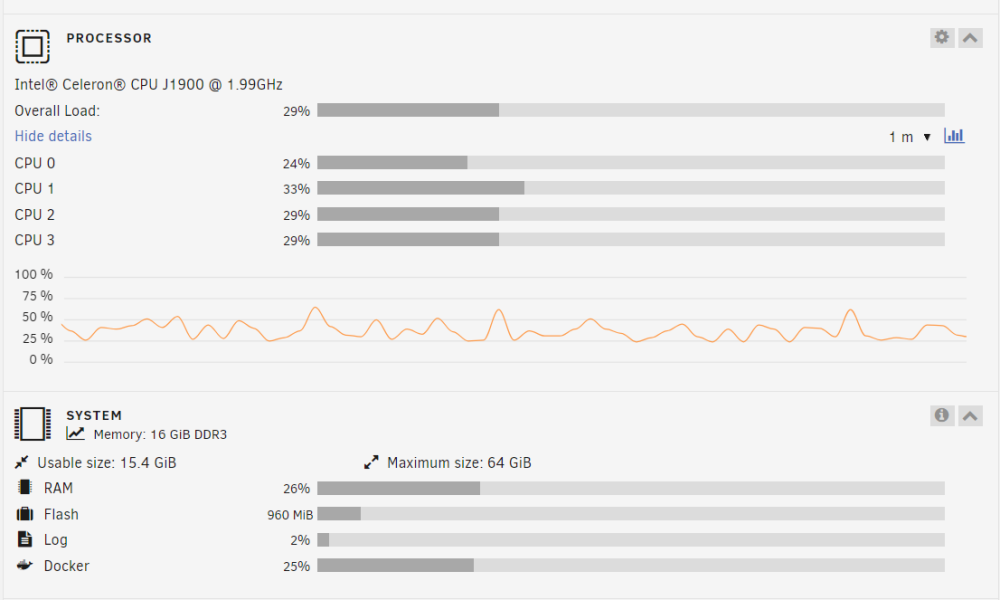
Thanks for your replies. So, currently I didn't had memory issues, as per screenshot above. I've followed your link, run the command (btrfs dev stats /mnt/cache), got this: root@LinerTower:~# btrfs dev stats /mnt/cache [/dev/sdb1].write_io_errs 0 [/dev/sdb1].read_io_errs 0 [/dev/sdb1].flush_io_errs 0 [/dev/sdb1].corruption_errs 313360 [/dev/sdb1].generation_errs 0 Then I've created a script for regular checks, and reset the stats - it was some like 10 days ago. No notifications during that period. I didn't changed the cable yet, but would do in some close future, or, if any other notifications will arise. Am I right in understanding, that some of the data could be moved to the array with some errors, as per this information, right? I didn't notice any facts of the data corruption yet there, rechecked the latest contributions of the data to the array. Didn't check also RAM modules seprately - too difficult keeping in mind my set-up... Thanks a lot!
-
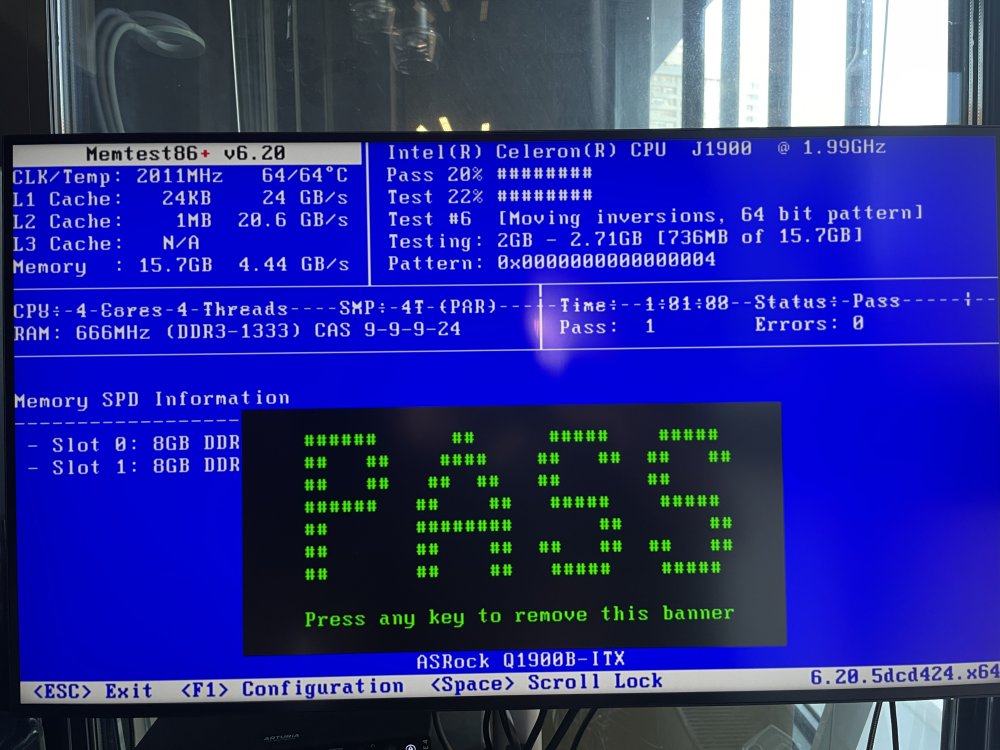
Memtest seems to be ok. Can you please advice, what should be my next steps on both issues? (Btfrs data corruption, but I didn’t notice any data loss, and the transfer speed). thanks in advance!
-
thanks. would update the back-ups and then try to do memtests. server is headless, so it involves some of the equipment relocation in the apartment.
-
This is a coping to cache, sorry for the mess. But also experienced the similar while copiing from array to the desktop. so I should run memtest, ram is the most obvious candidate to be the reason of the decline, right? thanks, @JorgeB
-
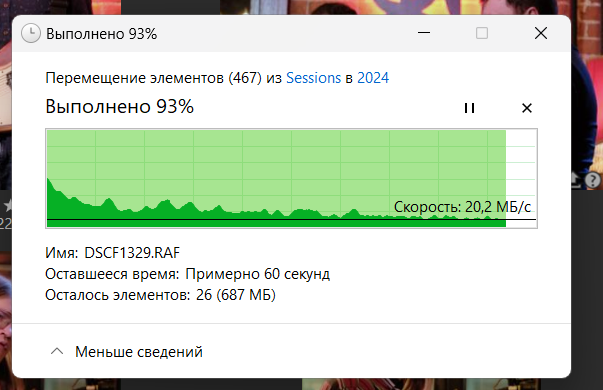
Hello! I'm experiencing slow transfer speed during files copiing operation from / to array by the LAN, from my desktop, connected wiredly (with ssd nvme in the desktop). I can consider that my unraid hardware specs are not great (Celeron J1900 + 16gb ram, 1gb lan), but with the highest speeds I saw 50MB/s (which I can live with), but during the copiing progress it seems like slowing down, going to as low as 20-10-5 or even 1MB/s closer to the end of the process. Server reboot can (temporary) ease the issue, but after a while it starts to slowing down again. Diags and the progress copiing bar are attached. It's clearly visible speed decline during the process. Can you please advice what should be I'm thinking about? Is the only way I have is to upgrade the motherboard + processor? linertower-diagnostics-20240309-1159.zip
-
Hello! Thanks for the script. Can I ask for the advice, how should I know if the script completed successfully? I was trying to remove Disk4 from the array, and was preparing it as per https://wiki.unraid.net/Shrink_array Method 2. I've left the tab with User's Script open over a night, but the web-client switched off during the night. How can I understand was the process completed successfully or not? If I should re-run it, would it work, if I run it with "Run in background", can the web-client be disconnected in that case? Initially I've run it with "Run Script" button, and failed to keep it open for such a long time. linertower-diagnostics-20230510-0857.zip
-
Thanks for your support! Yes, shares look OK now. As for the cache /pool, i've run the checks, it shows the errors, but I think it doesn't correct anything - would look more carefuly into this. Also would search for the memtest as well. Thanks again!
-
After moving the content from Disk3 to new replaced Disk2 share that I was missing returned now and visible & accessible. Thanks a lot! linertower-diagnostics-20230503-0738.zip
-
Thanks guys for your support! I've replaced Power Supply (no changes after that), then replaced Disk2 with a new one. It started clicking ike a hell (one of 3 Ironwolfs bought for the replacement creates clicky sounds - returned it), so I've stopped, inserted another one. Recreated parity after New Config, and currently moving with Unbalance everything from Disk 3 to new Disk 2 inside the array. Then the plan is to replace Disk 3 with a new disk, then get rid of Disk 4 at all. The question I have now: on disk 3 there is (looks like non-corrupted) a folder, that is just missing in the Shares. So, I have the Share "videos", and it's not accessible anymore by SMB, it's not visible in/mnt/user/, but it exisits on /mnt/Disk3/ directly, with its contents inside. What's the proper way of restoring it to become a normal share?
-
ok clear, so would start with disk 3 and and disk 2 as a new.
-
Thanks, @JorgeB! So, my way would be: 1) save everything from Disk 3 - or check at least that it's backed-up - 1st priority 2) replace the power supply 3) change the disk 2, rebuilt 4) change the disk 3, rebuilt
-
Ok, I've run again extended tests for both Disk2 and Disk3. For Disk3 it doesn't even launch, showing "completed" just in a couple of seconds after launch. On the Disk2 it worked all night, it was 90% in the morning today, and after that it's stopped at 90% with "Interrupted (host reset)" and after the relaunch with the "Aborted by host" error. Actually, I'm already OK with the data loss that I would have in an amount that is visible now - some folders are gone, and the rest I can see and use. Luckily, those that are already lost are the most sensitive and, thus, backed-up to Amazon Glacier in full. Of course I would feel the pain downloading it back from Glacier (I've tried already, and Amazon would obviously force me to buy "Provisioned capacity unit" to download it... So, probably should I already go for the disks swap?.. and the question is the same: the proper order, not to ruin things further? Disk2 or Disk3 should be replaced first? And, second question should I backup the rest of the files (that visible now), since during these disks swaps something can be lost additionally vs what I've already lost? Thanks for your attention, really appreciate your support! linertower-diagnostics-20230426-0754.zip PS. Also decided to change Power supply before disks swapping - just in case, probably, current one is behaving poorly already... Ordered a new one.
-
So, I've run xfs_repair(s) with modify flags, both on Disks 2 and 3, and extracted the diags immediately after that. Hope it would help... Thanks in advance! linertower-diagnostics-20230425-1021.zip
-
Oh. Ok, now I'm running xfs_repair(s) with -v only for the corrections on my both disks 2 and 3 - since there are both already "Unmountable", then in this session, before reboot I'm making the fresh diags, and post it here. Right? Sorry, feeling realy dumb...
-
Here it is. It's after power shutdown and fresh start, not immediately after xfs_repair - is that OK? Now both Disk2 and Disk3 show "Unmountable: wrong or no filesystem..." linertower-diagnostics-20230424-2052.zip
-
It says: xfs_repair: libxfs_device_zero write failed: Input/output error disk2 checkfs_log.txt
-
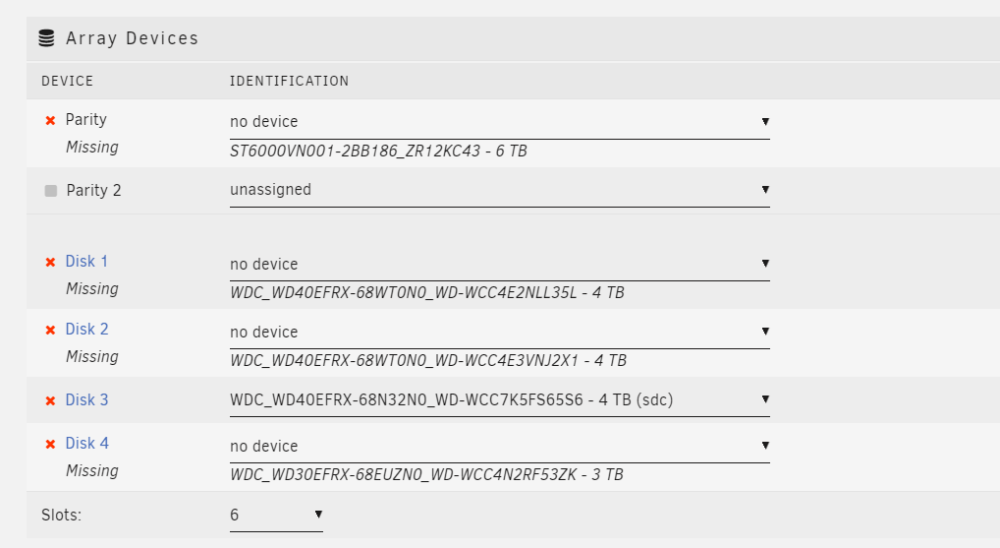
Thanks for your support & advice, JorgeB! After reboot, I'm getting this. No changes in hardware config was implemented... The majority of the disks are "missing" now. Avialble drives were the drives connected directly to the motherboard, so I've replaced the Raid controller with a new one (I know I 've installed not recomended Marvel one as a reserve one, but now for the sake of the data restoration / disks swap I suppose I can use it temporary). Btw, the previous controller is also a Marvel (this one http://www.iocrest.com/index.php?id=2208). With new controller, Array started with similar status: Disk 2 umountable FS, Disk 3 disabled. diagnostics-Controller_failed_20230423-1436.zipdiagnostics-After_Disk2_checkFS_20230423-1518.zip I'm attaching the fresh Diags, with Disk 2 CheckFS results log inside.
-
Hooray, it's finally completed the extended test for Disk 2! So, what would be the recomended order of disks replacement? linertower-diagnostics-20230423-0634.zip
-
Hm.. I'm sure I've launched Extended yesterday evening. It was long staying at 10% (couple of hours for sure). Today in the morning I've logged in and saw that Last Smart results is "Completed without error" at Disk2 page, then I've downloaded the diags. linertower-smart-20230422-1048.zip So this one doesn't contain the extended info as well, right? Ok I would try to launch it once more.
-
Oh sorry I thought it's the proper approach to attach to the closest existing topic, in order to avoid the threads multiplication. I've run the extended smart test @ Disk 2, and here is the diags after that. And, today I see some missing folders / files already 😢 linertower-diagnostics-20230422-0713.zip
-
Hello! Can I please ask for the advice, what order of my disks replacement would mininimize the possible damage? I have 4 data + 1 parity drive. Parity drive is quite fresh and new, while the data drives were supposed to be changed soon (40-50K hours of power-on hours life). After we moved to the new flat (with my nas as well)))), I've got the error "DEVICE IS DISABLED, CONTENTS EMULATED" on Disk 2. (Probably, some cables touched during the move, but rechecked, reattached everything). Smart was saying that the disks are still pretty healthy, so I've rebulit it - no issue, all was OK after it, (it was 5 months ago). Last week I've got again the same error on the same Disk 2. OK, I've started the rebuilt process again, but during the process the system was reading other disks heavily (obviously), and all the reads from Disk 3 resulted in Errors. So, currently I'm in position that Disk 2 was supposed to be rebuilt (rebuilt process finished in maintainance mode, everything was in green), but after I launched the Array in normal mode, I'm having now: Disk 2 - Unmountable, wrong file system (despite the 4 days data rebuilt process for the 2nd time during last half-year) Disk 3 - DEVICE IS DISABLED, CONTENTS EMULATED - now and this one as well... But while the content from the disks is unprotected (with exclamation signs), it LOOKS like it exists, it's OK, I see that my biggesst, most important folders / file are OK. So, today I'm receiving 3 new 6TB IronWolf disks from the store, so the quesion is: in what proper order should I replace the disks, in order to avoid data loss/ minimize it at least? Disk 3 replace with new one -> rebuilt -> Disk 2 replace with new -> rebuilt -> Disk 4... ? Or should I go for Disk 2 -> Disk 3 -> Disk 4? Diags is attached. Thanks in advance for the advice! linertower-diagnostics-20230421-0937.zip



