





tayshserve
Members
-
Joined
-
Last visited
Everything posted by tayshserve
-
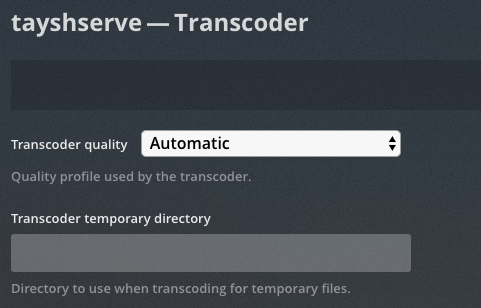
Ah.. I actually have nothing in there. Didn't see that guy hiding behind the advanced filter. Should that be set to `transcode` or `/transcode`? edit - typed `config` instead of `transcode`
-
Clicking the Container Size button get's me the following: Name Container Writable Log --------------------------------------------------------------------- plex 33.0 GB 32.6 GB 495 kB binhex-krusader 2.29 GB 30.3 MB 468 kB radarr 658 MB 76.6 MB 23.7 MB ombi 633 MB 224 MB 486 kB sonarr 617 MB 39.1 MB 29.2 MB glances 615 MB 355 kB 130 B duplicati 598 MB 301 kB 7.30 kB DDclient 315 MB 1.3 MB 2.73 MB letsencrypt 294 MB 55.5 MB 17.1 kB sabnzbd 268 MB 301 kB 220 MB tautulli 234 MB 45.4 MB 1.76 GB openvpn-as 221 MB 1.2 MB 9.56 kB telly 124 MB 0 B 5.89 MB transmission 37.4 MB 6.47 kB 506 kB Seems like all my other container are within reason except for Krusader which probably just needs a trashcan emptied or something.. Interesting. Is there a way I can browse the containers filesystem to see where all that space is being used? Appreciate the reply
-
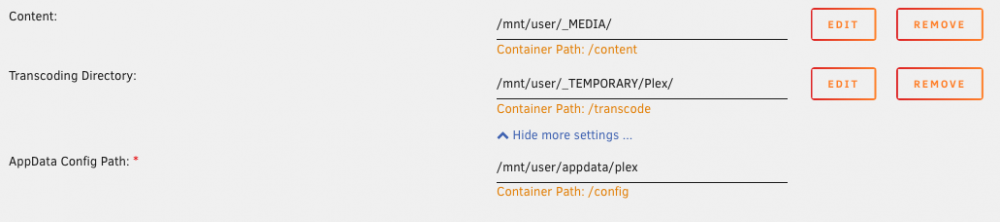
Am I doing something wrong here? I seem to have to boost the size of my docker.img file every few weeks to account for a growing Plex container. Right now I'm up to about 33GB (with my docker.img size at 40GB). From what I can tell, I have everything setup to be outside of the container.. however note that originally I had the transcode folder setup to run in the container. I have since moved that. Usage: CONTAINER ID IMAGE COMMAND CREATED STATUS PORTS NAMES SIZE b92f3afec57d linuxserver/plex "/init" 2 weeks ago Up 21 minutes plex 32.6GB (virtual 33GB) Anyway, let me know if you see any problems with my setup: Thanks in advance, let me know if any more information is needed!
-
I'm guessing the problem I referenced above is related to this line.. 2018-09-12 16:16:20-0700 [-] PortPool: port 984: [Errno 98] Address already in use: util/sock:199,python2.7/socket:228 (socket.error) When I check what's on that port I get the following... COMMAND PID USER FD TYPE DEVICE SIZE/OFF NODE NAME rpc.statd 1656 rpc 5u IPv4 8965 0t0 UDP tower:984 I'm seeing this is related to NFS? EDIT: I feel like I should also note.. I have Bonding turned ON but I have no idea what it is or why I would need it. I think it was on by default. I'm using whatever onboard LAN my mother board has, nothing special.
-
Hey All, Having some trouble getting OpenVPN-as running on my machine. Seems like the only way I've been able to actually get it running and access the web ui is when I run it in `Bridge` mode, which from what I understand is not the correct way to get this set up. Any insight here would be greatly appreciated! Here is my log from Docker Initializing OpenVPN... Adding new user login... useradd -s /sbin/nologin "admin" Writing as configuration file... Perform sa init... Wiping any previous userdb... Creating default profile... Modifying default profile... Adding new user to userdb... Modifying new user as superuser in userdb... Getting hostname... Hostname: tayshserve Preparing web certificates... Getting web user account... Adding web group account... Adding web group... Adjusting license directory ownership... Initializing confdb... Generating init scripts... Generating PAM config... Generating init scripts auto command... Starting openvpnas... Error: Could not execute server start. [cont-init.d] 40-openvpn-init: exited 0. [cont-init.d] 50-interface: executing... MOD Default {u'admin_ui.https.ip_address': u'all'} {u'admin_ui.https.ip_address': 'bond0'} MOD Default {u'admin_ui.https.ip_address': u'all'} {u'admin_ui.https.ip_address': 'bond0'} MOD Default {u'cs.https.ip_address': u'all'} {u'cs.https.ip_address': 'bond0'} MOD Default {u'vpn.daemon.0.listen.ip_address': u'all'} {u'vpn.daemon.0.listen.ip_address': 'bond0'} MOD Default {u'vpn.daemon.0.server.ip_address': u'all'} {u'vpn.daemon.0.server.ip_address': 'bond0'} [cont-init.d] 50-interface: exited 0. [cont-init.d] done. [services.d] starting services [services.d] done. And here is the full log from the OpenVPN container itself: https://pastebin.com/V8ZAHfDZ @aptalca fixed! My bad.
