





zmanfarlee
Members
-
Joined
-
Last visited
-
Got venmo or something? Paypal charges a dollar to send which is crazy if I'm sending smaller amounts. I don't know when that changed.
-
Anyone that sees this the issue with not being able to see it over samba was that the files owner was "Unknown" instead of "nobody" now the issue I am having is an options.json.lock file messing everything up and ownership switching back to unknown every restart but I can start a new thread for that.
-
I want to be able to access it in the context menus of Foundry. The path in unraid for my docker is /mnt/user/appdata/felddy. I can access anything in there in context menus in the foudnry file system rather than having to Choose File every time which opens a windows window. The area where assets I want to use is in my home network array non cache drive. /mnt/user/home network/DnD assets..... Am I saying this right/ THe file system really messes me up here. Thank yoU!
-
That's fine but my foundry server won't recognize this files and use them for the docker which is an issue as well. Any ideas on that? You've helped me a lot recently so thank you btw. Is there anyway to donate coffee money to you helpers?
-
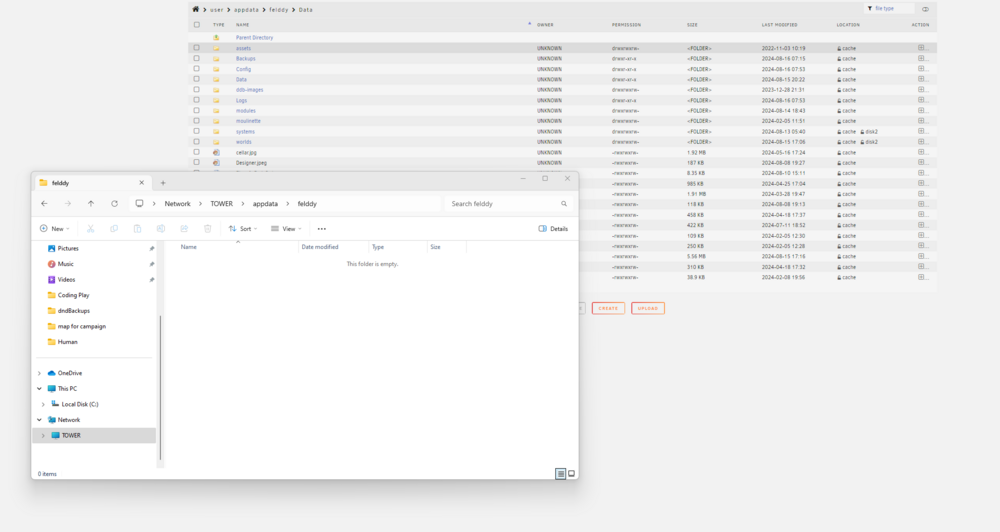
Is there a reason I can't see the folders in my unraid cache drive on my file explorer???? Its driving me crazy and my unraid can't access the items that show on the cache drive but not the file explorer. I've been battling this week with my server. Appreciate any help. tower-diagnostics-20240816-1025.zip

-
Ok who is ready for the next challenge I have?! I will admit this is likely easy for many of you... but I am not like you! lol I have attached the mapping of my docker to the data path. This is where stuff for my foundry world resides. When I go to look at files in the Foundry server it points to things in this area. This is on my Cache drive. I want to map to assets on my Array though. The folder I want to be able to access when choosing files is /Home Network/DnD Assets. I have tried to add a path but I have screwed it up so much I have actually lost data.... How can I map this area to my fouindry game (if possible) so I can access this content as well (tokens, images, and other stuff I don't want stored on cache drive). It's ok if it pulls it in there when I grab from this folder I just dont want it ALL in there from the start. This will elminate me having to "Choose File" and do extra steps. I hope I can do this. Anyone who can help TYIA

-
THANK YOU!!!! Was able to reinstate plex and delete the old files and am rescanning. It works!!!!
-
this was the output: Phase 1 - find and verify superblock... Phase 2 - using internal log - zero log... ALERT: The filesystem has valuable metadata changes in a log which is being destroyed because the -L option was used. - scan filesystem freespace and inode maps... clearing needsrepair flag and regenerating metadata sb_icount 96064, counted 76224 sb_ifree 1954, counted 5733 sb_fdblocks 1854068584, counted 1851387458 - found root inode chunk Phase 3 - for each AG... - scan and clear agi unlinked lists... - process known inodes and perform inode discovery... - agno = 0 - agno = 1 - agno = 2 - agno = 3 - agno = 4 - agno = 5 - agno = 6 - agno = 7 - process newly discovered inodes... Phase 4 - check for duplicate blocks... - setting up duplicate extent list... - check for inodes claiming duplicate blocks... - agno = 0 - agno = 2 - agno = 1 - agno = 3 - agno = 4 - agno = 5 - agno = 6 - agno = 7 Phase 5 - rebuild AG headers and trees... - reset superblock... Phase 6 - check inode connectivity... - resetting contents of realtime bitmap and summary inodes - traversing filesystem ... - traversal finished ... - moving disconnected inodes to lost+found ... Phase 7 - verify and correct link counts... Maximum metadata LSN (1:1964882) is ahead of log (1:2). Format log to cycle 4. done _________________________ Was able to mount drive 2 but still cant use plex cause of this: [s6-init] making user provided files available at /var/run/s6/etc...exited 0. [s6-init] ensuring user provided files have correct perms...exited 0. kill: usage: kill [-s sigspec | -n signum | -sigspec] pid | jobspec ... or kill -l [sigspec] [fix-attrs.d] applying ownership & permissions fixes...kill: usage: kill [-s sigspec | -n signum | -sigspec] pid | jobspec ... or kill -l [sigspec] kill: usage: kill [-s sigspec | -n signum | -sigspec] pid | jobspec ... or kill -l [sigspec] kill: usage: kill [-s sigspec | -n signum | -sigspec] pid | jobspec ... or kill -l [sigspec] [fix-attrs.d] done. [cont-init.d] executing container initialization scripts... [cont-init.d] 40-plex-first-run: executing... Plex Media Server first run setup complete [cont-init.d] 40-plex-first-run: exited 0. [cont-init.d] 45-plex-hw-transcode-and-connected-tuner: executing... [cont-init.d] 45-plex-hw-transcode-and-connected-tuner: exited 0. [cont-init.d] 50-plex-update: executing... [cont-init.d] 50-plex-update: exited 0. [cont-init.d] done. [services.d] starting services Starting Plex Media Server. [services.d] done. Error: Unable to set up server: sqlite3_statement_backend::prepare: malformed database schema (2) - orphan index for SQL: PRAGMA cache_size=2048 (N4soci10soci_errorE) Stopping Plex Media Server. Starting Plex Media Server. Error: Unable to set up server: sqlite3_statement_backend::prepare: malformed database schema (2) - orphan index for SQL: PRAGMA cache_size=2048 (N4soci10soci_errorE) Stopping Plex Media Server. Starting Plex Media Server. Error: Unable to set up server: sqlite3_statement_backend::prepare: malformed database schema (2) - orphan index for SQL: PRAGMA cache_size=2048 (N4soci10soci_errorE) Stopping Plex Media Server. Starting Plex Media Server. Error: Unable to set up server: sqlite3_statement_backend::prepare: malformed database schema (2) - orphan index for SQL: PRAGMA cache_size=2048 (N4soci10soci_errorE) Stopping Plex Media Server. Starting Plex Media Server. ___________________________________________ I think I will delete config and rescan plex?
-
do I do the -L option?
-
oh crud it shows disk 2 is unmountable or no file system
-
Thank you fo rlooking at this. This is the output I got: Phase 1 - find and verify superblock... Phase 2 - using internal log - zero log... ERROR: The filesystem has valuable metadata changes in a log which needs to be replayed. Mount the filesystem to replay the log, and unmount it before re-running xfs_repair. If you are unable to mount the filesystem, then use the -L option to destroy the log and attempt a repair. Note that destroying the log may cause corruption -- please attempt a mount of the filesystem before doing this. ____________ Is this saying Restart in non-maintanence mode then start in maitanence mode again and check the filesystem status again?
-
tower-diagnostics-20240812-2019.zip
-
Thanks bud. Greatly appreciated!
-
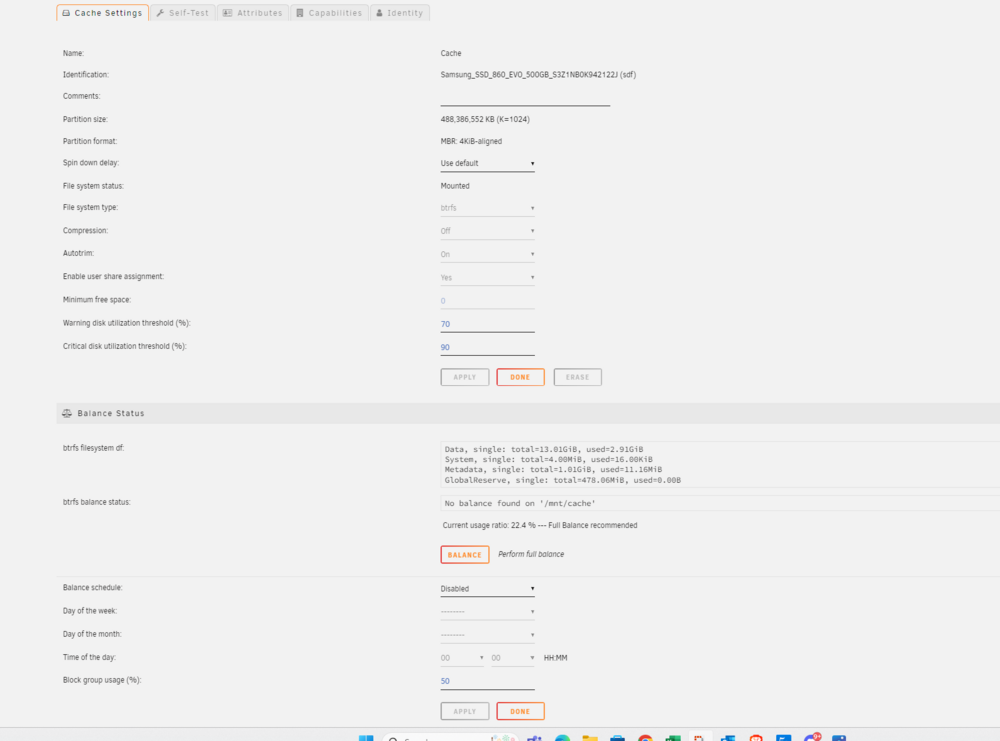
I have multiple issues I am fixing but right now I can't get some dockers to run and am getting the following error: PMS: failure detected. Read/write access is required for path: /config/Library/Application Support/Plex Media Server kill: usage: kill [-s sigspec | -n signum | -sigspec] pid | jobspec ... or kill -l [sigspec] PMS: failure detected. Read/write access is required for path: /config/Library/Application Support/Plex Media Server kill: usage: kill [-s sigspec | -n signum | -sigspec] pid | jobspec ... or kill -l [sigspec] Fix common problems says: Unable to write to disk2Drive mounted read-only or completely full. Begin Investigation Here The cache is now almost empty but I cant even edit min free space (see pic) Anyone know how to fix this? tower-syslog-20240812-2223.zip
-
Thank you. Can I just have all the folders that save to cache save to pool, invoke mover, replace cache and then undo/


