





RxLord
Members
-
Joined
-
Last visited
-
My Unraid server continues for freeze up once I start certain docker containers (resilio-sync, Sabnzbd,any ARRs). System can run for days in NAS mode but once I start trying to start containers, the containers freeze up and system basically locks up. MEMTEST passes, so it's not a memory issue. I have been trying to remedy this for 2+ months on my 2 servers that are giving me issues. syslog-previous tower-diagnostics-20240408-1937.zip
-
That work! Thanks for the quick reply!
-
My Unraid system is freezing on startup with the line: /tmp/disklocation-install: line 215:[: ==: unary operator expected Thanks in advance
-
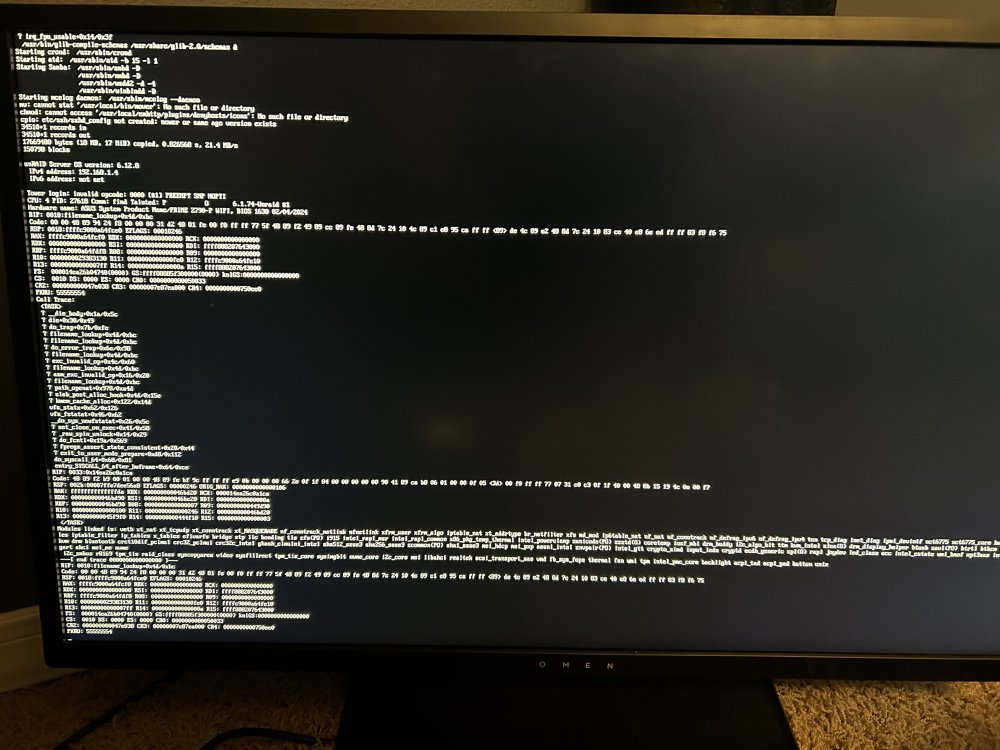
Here is my screen after my latest failure.
-
Thanks. Will give it a try.
-
Is there a log or app to monitor cpu/motherboard temp?
-
System just shut down (powered down). Last container was Krusader that I opened. syslog-previous
-
My first server froze after opening binhex-nzbhydra2 container. Secondary server has linuxserver version is still running. Going to remove the binhex-nzbhdra2 container and install the linuxserver version. syslog-previous
-
Varies based on what containers I open. I have autostart turn off on all containers. Going to mirror what containers I open on each system every 15 to 30 minutes.
-
How long is long enough? Fifteen, thirty minutes?
-
I don't think it's a docker in general issue. I think its related to a container like plex or emby. These are the usual suspects.
-
Another thing to point out is I have 2 identically build system and both systems are giving me the same issue. Same hardware throughout the machines.
-
I have done this multiple times and the issue starts once I open docker and slowly start opening my applications. I have deleted my previous docker image and redownloaded the apps from the previous apps in community application store. Issue still persists.
-
Here is my latest logs from my last freeze. Thanks! syslog-previous
-
The motherboard is the Asus Prime Z790-P WiFI D4. The memory is G.Skill Ripjaws S5 32GB (2 x 16GB) DDR5-6000 PC5-48000 CL36 Dual Channel Desktop Memory Kit F5-6000J3636F16GX2-RS5K - Black. Processor is Intel Core i7-13700K Raptor Lake 3.4GHz Sixteen-Core LGA 1700 Boxed Processor. Purchased as a bundle from microcenter. From the Manual: 4 x DIMM, Max. 128 DDR5 7000(oc)/6800(oc)/6600(OC)/6400(OC)/6200(OC)/5800(OC)/5600/5400/5200/4800 Non-ECC, Unbuffered Memory Dual Channel Memory Architecture Supports Intel Extreme Memory Profile OptiMEM II *Suppported memory types, data rate (speed) and the number of DRAM Modules vary depending on the CPU and memory configuration, for more information refer to www.asus.com for memory support list. ^Non-ECC, un-buffered DDR5 memory supports on-die ECC Function II currently have 2 sticks in 32gb and it was been running all night. I am going to try to install plex media server again. Cross your fingers.
