





donglobal
Members
-
Joined
-
Last visited
Everything posted by donglobal
-
Add "Mount options" Field for Remote SMB Shares in Unassigned Devices Hello Unraid Community & Support Team, I am in the process of setting up a new Unraid server (currently on version 7.1.4) which will run a number of Docker containers that need to access a media library on a separate NAS via remote SMB shares. The Challenge: To ensure my Docker containers (running with a specific PUID/GID of 1000) have the correct read/write permissions on the remote media library, it is essential to add mount options like uid=1000,gid=1000 to the CIFS mount command. Currently, the graphical interface for adding or editing a remote SMB share in the "Unassigned Devices" plugin does not have a visible field to add these custom mount options. The current workaround is to bypass the GUI and use a custom startup script, which, while functional, feels counterintuitive for a GUI-focused platform like Unraid. The Feature Request: I would like to formally request the addition of a text field to the "Edit SMB Share" window. This field could be labeled "Mount options" and would allow users to directly enter crucial options like uid=, gid=, noperm, iocharset=, etc., when defining a remote share. Benefits of this Feature: Simplifies Docker Permissions: This would make setting up Docker containers that interact with remote shares dramatically simpler and would prevent a common source of file permission errors. Enhances GUI Functionality: It would bring the functionality of the remote share feature in line with the rest of Unraid's powerful, GUI-based management philosophy. Reduces Need for Custom Scripts: It would eliminate the need for users to create and manage command-line scripts for what is a very common and important use case. Thank you for your time and for creating such a fantastic platform. I believe this feature would be a valuable addition for many users in the community. Best regards, Donald
-
found it, thanks
-
I cant see how to get to that thread
-
Hello Unraid Community & Support Team, I am in the process of setting up a new Unraid server (currently on version 7.1.4) which will run a number of Docker containers that need to access a media library on a separate NAS via remote SMB shares. The Challenge: To ensure my Docker containers (running with a specific PUID/GID of 1000) have the correct read/write permissions on the remote media library, it is essential to add mount options like uid=1000,gid=1000 to the CIFS mount command. Currently, the graphical interface for adding or editing a remote SMB share in the "Unassigned Devices" plugin does not have a visible field to add these custom mount options. The current workaround is to bypass the GUI and use a custom startup script, which, while functional, feels counterintuitive for a GUI-focused platform like Unraid. The Feature Request: I would like to formally request the addition of a text field to the "Edit SMB Share" window. This field could be labeled "Mount options" and would allow users to directly enter crucial options like uid=, gid=, noperm, iocharset=, etc., when defining a remote share. Benefits of this Feature: Simplifies Docker Permissions: This would make setting up Docker containers that interact with remote shares dramatically simpler and would prevent a common source of file permission errors. Enhances GUI Functionality: It would bring the functionality of the remote share feature in line with the rest of Unraid's powerful, GUI-based management philosophy. Reduces Need for Custom Scripts: It would eliminate the need for users to create and manage command-line scripts for what is a very common and important use case. Thank you for your time and for creating such a fantastic platform. I believe this feature would be a valuable addition for many users in the community. Best regards, Donald
-
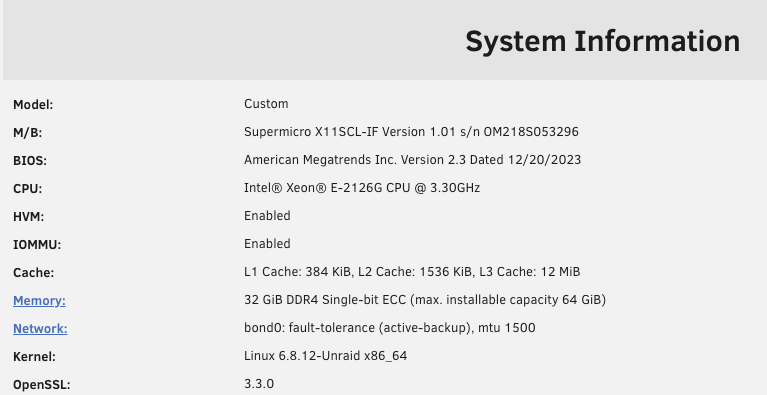
Great advice JorgeB, you have made me rethink the structure of this disk layout again. In this implementation I will not be running any VDevs as the processor is not that strong so will mainly be used for locally run docker containers, and a file server for working documents, photo archive, videos and a timeMachine Backup of a local machine. I plan to make a more beefier machine for virtual machines and heavier workloads once I have proven the reliability of running this one for a few months. Thanks @jorgeB & @Kilrah for all your assistance.
-
Thanks for the advice Kilrah
-
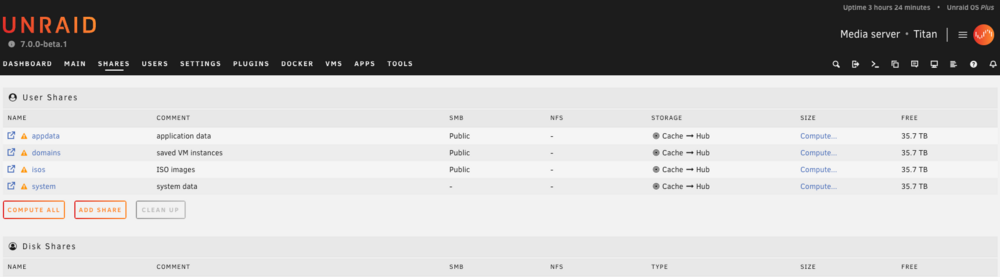
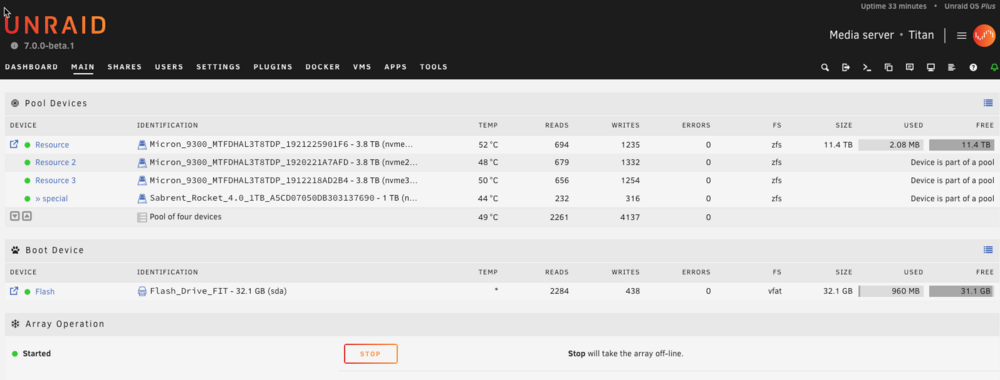
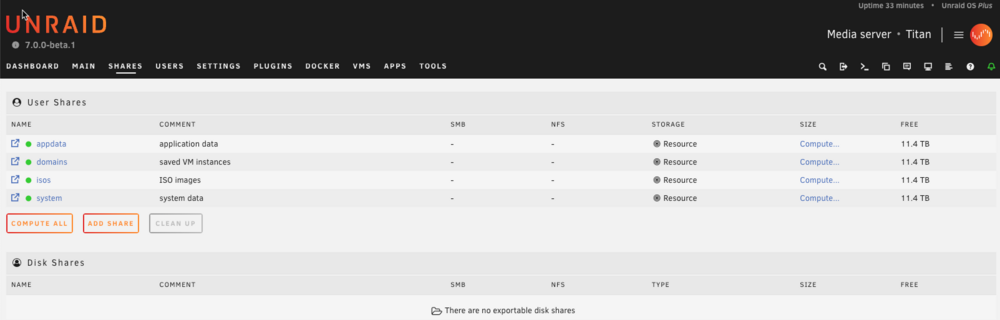
Questions for Clarification: Creating Shares Manually: If I recreate a fresh pool with the HDDs, should I manually create the default shares (Appdata, Domains, ISOS, System) in this pool? Should these shares be created before or after setting up the NVMe as special metadata storage? Using NVMe as Special Metadata Storage: After creating the shares manually, can I then add the NVMe as special metadata storage under the HDD pool? Will this ensure that the shares are created in the HDD pool and benefit from the NVMe’s performance for metadata storage? Optimal Configuration: Is it more optimal to create two separate pools (one with the HDDs and one with the NVMe) or combine them into a single pool with NVMe as special metadata storage? For performance, especially for VMs, should the `domains` share specifically be placed in the NVMe pool, or can it remain in the combined pool with special metadata storage? I want to ensure I’m setting this up in the most efficient way for performance and reliability before populating the drives with data and installing apps. The two pool setup is mapped like the attached as present Thank you for your assistance JorgeB!
-
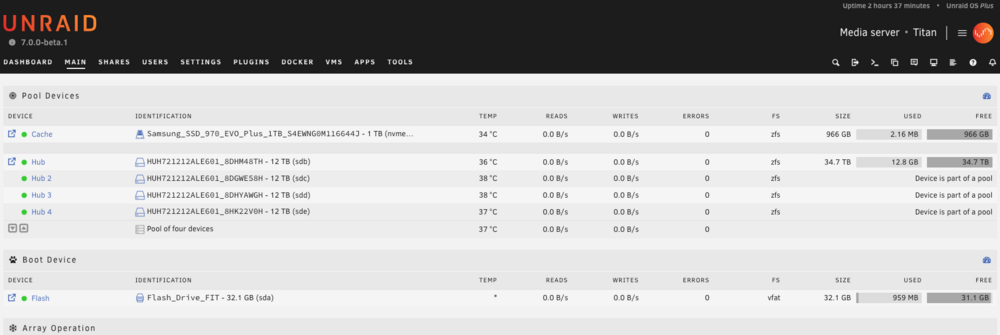
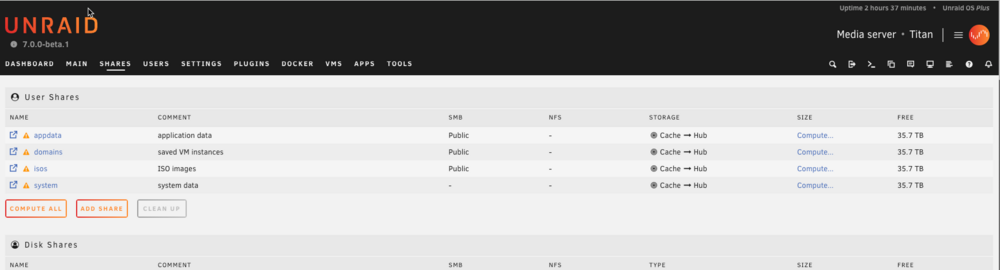
Hi everyone, I'm seeking advice on optimizing my Unraid ZFS pool setup. I'm currently running Unraid 7 beta 1 with the following hardware: Four 12TB HDDs One 1TB NVMe Goals: Utilize the HDDs as the main storage pool. Use the NVMe as a cache drive where data is first written before being moved to the HDD pool for faster access. Leverage a 10GBe connection to my local switch for high-speed access. Current Setup: 1. First Pool (HDDs): Configured as a ZFS RAIDZ array. Issue: Default shares (Appdata, Domains, ISOS, System) are not automatically created. 2. Second Pool (Cache): Configured with the single NVMe drive. Default shares are created when setting up this pool first with the name 'Cache.' 3. Share Settings: Allocated the NVMe (CACHE) as the primary drive. HDD pool as the secondary drive for each share. 4. Special Metadata Storage Attempt: Tried using the NVMe for Special Metadata storage in the HDD pool. Issue: Default shares were still not created, so I abandoned this setup. Problems Faced: Default shares not being created when setting up the ZFS RAIDZ pool first. Uncertainty about the current setup's efficiency with two separate pools (one for HDDs, one for NVMe). Need guidance on the optimal file structure before populating drives with data and installing apps. Questions: Is there a way to force the creation of default shares when setting up a ZFS RAIDZ pool? Would it be more efficient to combine the NVMe and HDDs into a single pool using a different configuration? How should I configure the NVMe to best serve as a cache drive in a ZFS setup? Has anyone successfully set up a similar configuration, and what best practices or tips can you share? I want to ensure my setup is optimized for performance and reliability before I start adding data and installing applications. Any advice or experiences you can share would be greatly appreciated. Thank you!
-
Thank JorgeB, A complete reinstall did the trick, it all works fine now, i noticed it took a lot longer to upgrade than the first time.
-
Thanks a lot I iwll try it, for the new nstall I did an upgrade from the existing setup 6.12, I will recreate the flash drive as you have suggested and do a complete fresh install.
-
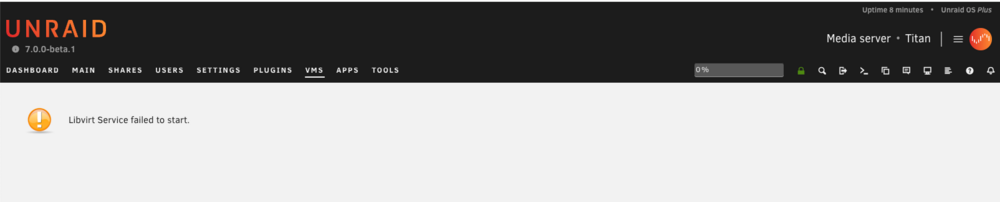
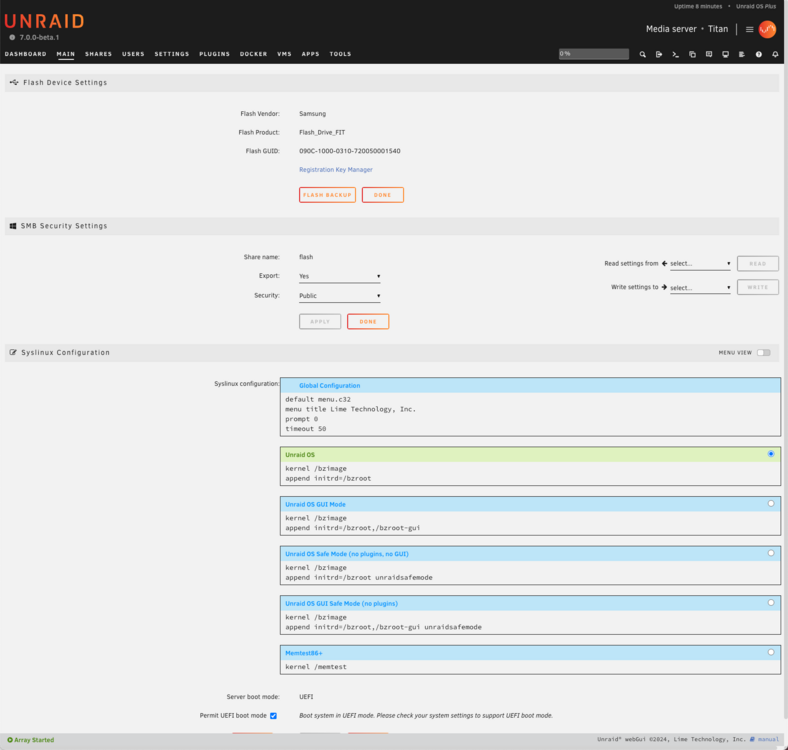
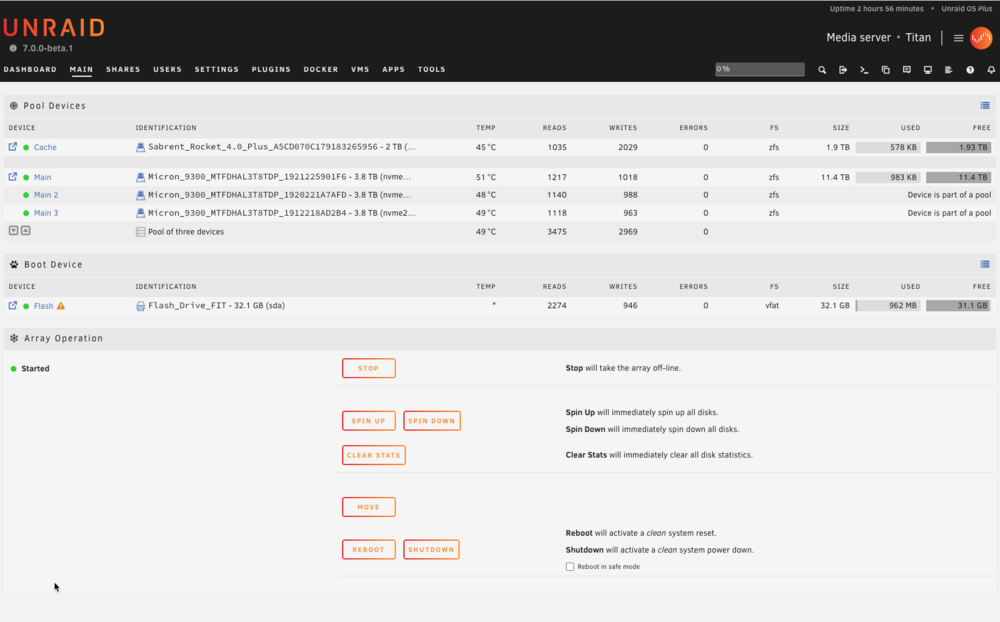
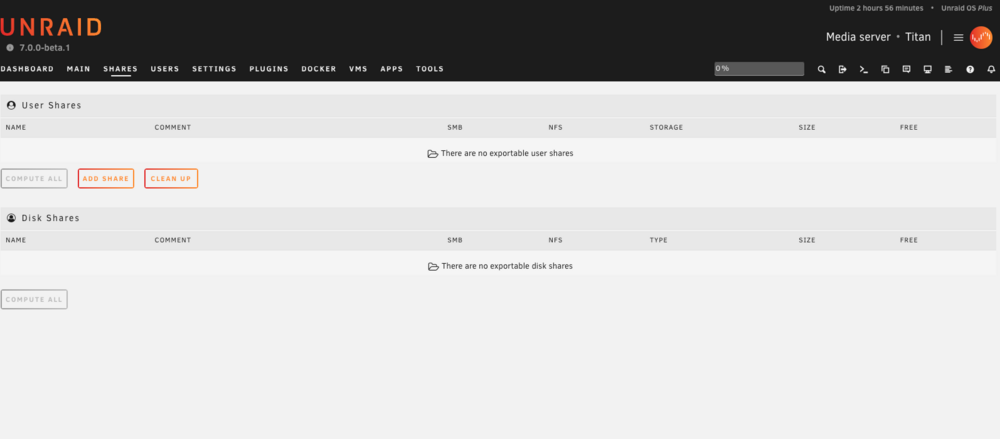
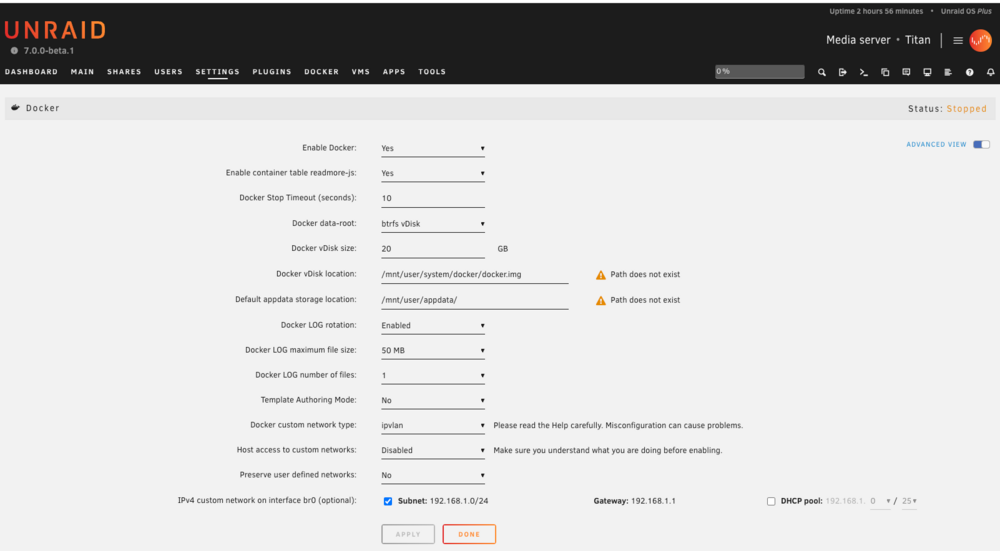
Thanks for the suggestions, i carred them all out and restarted the machine, but with the same results, atached is a new diags file and a few more screenshots. it also seesm like the Linvirt driver is not loading for VM.s also when i select to rebooot the machien actually turns off completly within t en second and does not reboot, which i have to turn on aai nmanually. titan-diagnostics-20240629-1544.zip
-
Here are a few screenshots
-
After doing a fresh install of unraid 7 beta and seeting up a singlew drive cache pool and a 3 disk u.2 NVME ZFS pool as a stripped dataset, i can no longer see any of the default prefdined Unraid shares, is this normal and do I need to recrearte them all myaself? I have attached the diagnostics file for rev titan-diagnostics-20240629-1452.zip
-
Thanks a lot JorgeB, that was very helpful,
-
Hello Unraid Community, I'm currently planning a setup using ZFS on Unraid and would appreciate some expert advice. Here are the details of my proposed hardware configuration: Drives: 4 x 2TB NVME drives Proposed Pool Layout: 3 x NVME drives in a RAIDZ1 configuration Cache: 1 x NVME drive Array: A single 32GB thumb drive I'm also considering upgrading these drives to 4TB NVMEs in the future. Given this setup, I have a few questions: Is a cache drive necessary, given that it's the same specification as the pool drives? Could I potentially configure all four drives into a single RAIDZ1 pool instead? Regarding future upgrades to 4TB drives: How complex is the process? Previously, I used TrueNAS Scale with HDDs in a similar configuration (3 drive RAIDZ1 pool upgraded from 6TB to 12TB drives by replacing each drive one by one). However, after upgrading, the pool size didn't increase until I destroyed and recreated the pool. Would I face the same issue in Unraid? Thank you for your insights and advice. Regards,
-
Thanks Jorge, but How would l use ZFS for the array and also have an old flash drive in there as well? Would I get the benefit of speed that a pool of disks formatted in ZFS would get if I do it this way? Or is it just worth waiting until the next version of Unraid which apparently will have a full implementation of ZFS to do my install? I'm a bit lost as to whats the best way forward for now. I currently have my data in Truenas Scale and used to using an equal number of disks of the same size, but I don't like its limited application support and having to jump through hoops just to get to configuration files, here is where Unraid really shines.
-
Hello everyone! I'm looking to set up a new Unraid system with a ZFS pool. I plan to use three NAS hard drives along with a 1 TB NVMe drive intended for caching. From the documentation I've come across, it seems that even when using ZFS for all disks, one still needs to maintain a separate drive/disk in the array. Is this correct? I've been unable to find a guide that specifically covers setting up a ZFS-based Unraid system from scratch. If anyone could share some tips, guides, or resources on this, I would really appreciate it. Thanks in advance for your help!
-
what settings did you use to get it working? I'm in the same boat right now.





