





zolle76
Members
-
Joined
-
Last visited
-
Why wouldn't it be ok to use a 5.4k disk?
-
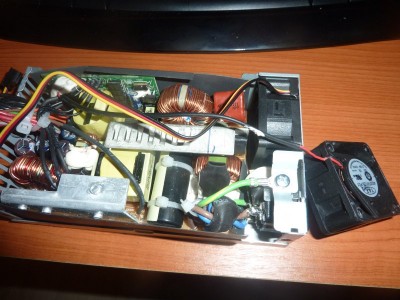
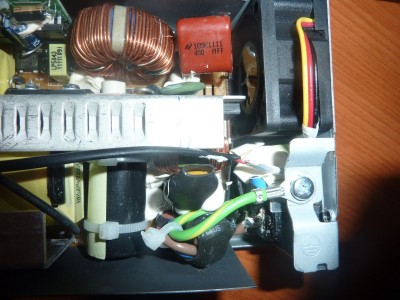
Replacing the PSU fan is simple, cut the cable, solder the red with the red and the black with the black wire. You can lead the cable as show attached.
-
I've just replaced my fan in the PSU, it had hell of a sound. So far so good, I hope it won't melt the system, according to the specs the new fan is better than the original one. I used this one: http://skinflint.co.uk/eu/265947
-
You are right, the link for the bios flash is dead. Try this: http://www.avforums.com/forums/networking-nas/1521657-hp-n36l-microserver-updated-ahci-bios-support.html
-
You can easily flash the BIOS of the server to support 6 disks, see Jens' guide on the previous page. AFAIK PCI-E slots are backwards compatible so the x1 card should work fine in either the x4 or the x16 slot but this needs confirmation. For the Passport - I've removed a WD Disk from a MyBook Essential (WD15EARX) and it worked just fine in unRAID, so I believe it would be the same with the Passport.
-
I downloaded it with unMENU.
-
OK I think I managed to understand how this works. This script loops in an endless cycle and checks a few things including disk and network activity. If no activity is registered a counter starts from 45 and decreases by one each minute. Once it reaches zero a shutdown occurs. Right? Edit: it works like a charm. Even WOL is working fine from my Mac with a widget. Thanks!
-
Clean powerdown is a package from unmenu to stop the array in a controlled manner before reboot or shutdown. Even when I disabled the EM was the same. Checked the auto_s3_sleep script with -xv and it gave no error, detected the disks as idle when powered down. However the error happens when I press the Sleep button. Is there another script which is called by the "Sleep" button from the Web GUI? EDIT: Cool! I have it, it's the following: "echo -n mem >/sys/power/state" in SimpleFeatures include command.php it says "bash: echo: write error: No such device"
-
I know that S3 is not supported. I've removed the TCP check, and the powerDownInsteadOfSleep is enabled. Same EM. Can the Clean_Powerdown interfere with your script?
-
Jens, Can you please tell me how this sleep script of your should it work? When I press the sleep button the log states it goes to sleep, and immediately wakes after. In reality nothing happens. Does this need a specific simpleFeatures package (I'm using 0.9b)? Or am I missing something? console says sh: error line 0 echo no such device or something like that thx Zoltan
