





Slippin' Jimmy
Members
-
Joined
-
Last visited
-
Thank you both @JorgeB and @Jandrop . I re-installed the Plugin with the new update as i'd previously uninstalled it, stopped the array and the issue was immediately fixed without a reboot. Thanks!
-
Here are my diagnostics; baldrick-diagnostics-20261003-2048.zip
-
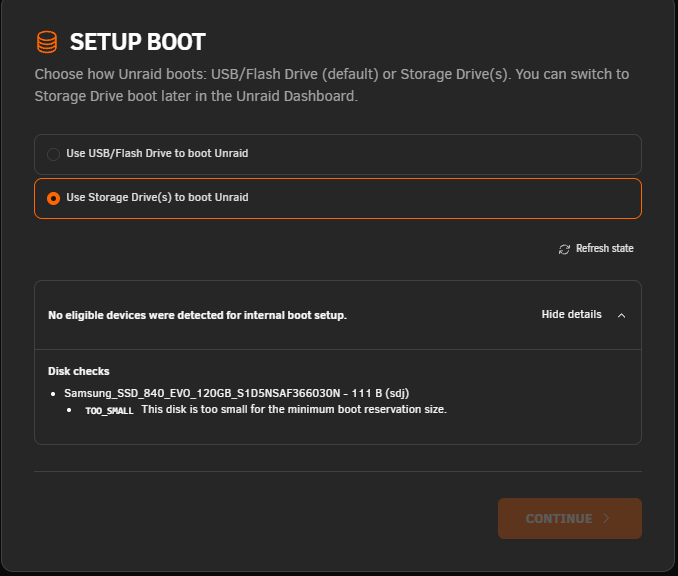
I tried to make my Samsung SSD 840 EVO 120GB into a boot drive, but just get a 'TOO-SMALL' Error. I tried formatting it numerous times, but still the same issue. Any idea into why this is, please?
-
Finally got this sorted. It was my setups fault all along. I have a PCIE LSI Array card. Both SSDs were plugged into there, doh. Swapping over both the SSDS straight into the motherboard sata ports has resolved the issue. Was a bottleneck with storage speed. May be useful for others with the above command to find the issue drive! 😁
-
Spoke too soon, still having the issue. I've seen in another thread that running zpool iostat -vyl 10 1 can retrieve some useful stats. This is the output when idle; And this is when trying to write to it and decrypt/extract files; Does this suggest an issue with my sdj1 drive? 5s wait write! They're both brand new SSD's, which is strange.


-
I followed the SpaceInvaderOne tutorial for setting up ZFS on the cache drive, which means I can snapshot all my individual apps within AppData and restore each one individually. Turning off compression didn't work. But running these commands looks to have resolved the issue for the most part; zfs set primarycache=none poolname/datasetname zfs set sync=disabled poolname/datasetname Everything else is running fine, so i'm just running them on the dataset that the downloads go into. Thanks for the help all 😊
-
Thanks! I've run the command to turn off compression on just the one dataset I'm downloading to. I'll have a good test tomorrow and get back 😊
-
I did try temporarily disabling that and trying Jdownloader again, and got the same experience. If I disable it, do I have to re-create the dataset for it to start writing that with no compression?
-
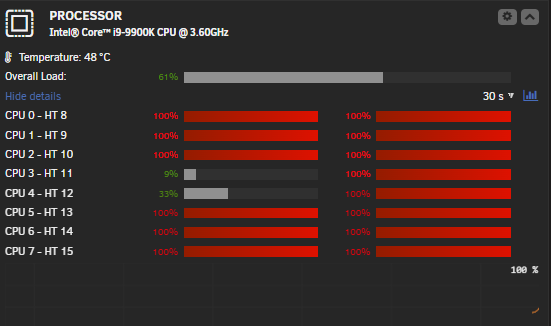
I've recently upgraded to Unraid 7.2.0 and changed my cache pool to ZFS. I have two SSD drives in a mirror configuration. I get really strange performance issues when items in Jdownloader start decrypting to the cache pool. My CPU jumps to really high usage on certain cores during this, and the cache drive usage often locks up, with no other application able to read or write to it. I check the Docker containers' CPU usage and use the top command, and can't see a process that's eating it up. Everything will pause for a good few minutes, and then it'll catch up. Even after the decryption has finished, the high CPU usage and writes on the cache drives will continue for another minute or so, then it'll calm back down. It seems like the decryption is causing a write queue on the cache or something? I didn't have this issue when I had a single cache drive of XFS. If someone could please help me out and take a look at my logs to see if there's anything obvious, I'd really appreciate it. baldrick-diagnostics-20251118-2059.zip System info: i9-9900k 64gb ram with current usage sitting at around 46%. 2x2tb ssds for the cache drives.
-
Getting the same here, too. Except it made me re-connect my account and doesn't seem to have done any backup sync.
-
Was holding off for the full release 😊 Upgraded from 7.0.0 > 7.2.0. No issues so far.
-
How did you fix the webui to work again please? as i'm getting the same
-
@stephondoestech It seems the docker webui no longer works which i've just noticed. Another user above has reported it too so it's not just me
-
Just to confirm the steps I have to do. I create an API key, if I try to use it, it doesn't work. If I refresh the page, the key disappears. I have to uninstall the plugin, and re-install. The API key then shows up on the management page, and it starts to work. So there's something weird going on. Happy to provide logs/help you narrow down the cause.
-
Reinstalling the plugin seems to be a temporary fix for me. Reinstalling the plugin showed all the API keys I created which wasn't shown before. Still have the issue where creating new API keys don't show, but at least i'm able to use one now.


