





springsman
Members
-
Joined
-
Last visited
Everything posted by springsman
-
I finally got it working. Thanks everyone.
-
Thanks for the information. I can't seem to be able to back up what is on the drive. Any insight on how to best accomplish this?
-
My Docker will not run and I see an error from Fix Common Problems that my Cache is Read Only. I checked the permissions, and everything seems ot be set to Read/Write. Not sure what to do next. The "Recreate Docker Image File" instructions will not work because it can't access the Cache to delete the file. Attached is my DIagnostic file. homenet-unraid-diagnostics-20250305-1423.zip
-
Thank you. That did the trick. On the video from Spaceinvader1 (for the older Krusader version) it showed as Privileged as Off. thanks again for the reply.
-
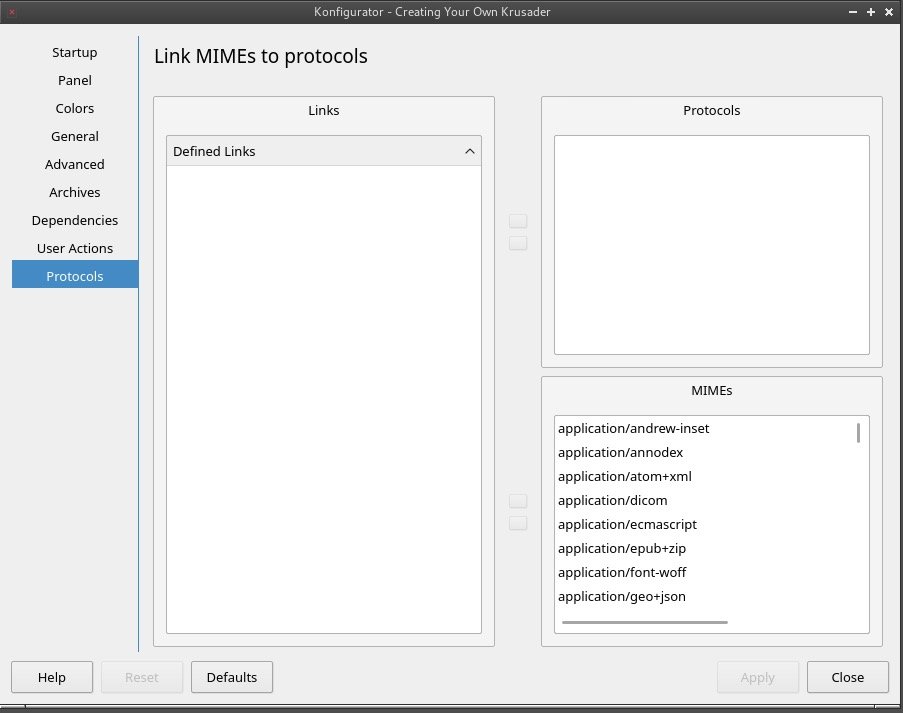
This is what I have in the Krusader Settings. It does not refer to the SSD anywhere. Unless you mean some other Setting in another area.
-
I unmounted the SSD and restarted Krusader. Still the same error regarding Protocol.
-
That is an SSD that I have in Unassigned Devices. It is not being used by anything at the moment.
-
OK. I think the two attached files are what you are asking about. homenet-unraid-diagnostics-20181207-2154.zip Log for_ binhex-krusader.htm
-
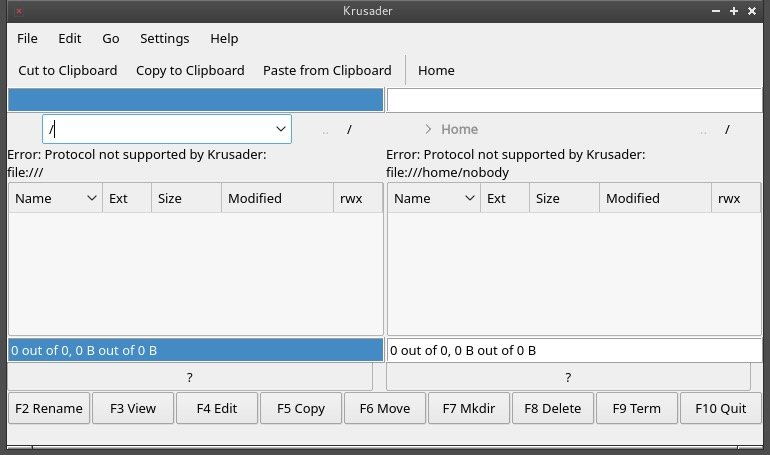
I am not familiar on where to pull these on this system. From within Krusader all I get is what I have posted in the Screengrab.
-
This is the log I just pulled: Dec 7 21:13:14 Homenet-Unraid kernel: docker0: port 2(vethfad639d) entered disabled state Dec 7 21:13:14 Homenet-Unraid avahi-daemon[12120]: Withdrawing address record for fe80::1c8a:8aff:fed8:27da on vethfad639d. Dec 7 21:13:16 Homenet-Unraid kernel: docker0: port 2(vethfe47e86) entered blocking state Dec 7 21:13:16 Homenet-Unraid kernel: docker0: port 2(vethfe47e86) entered disabled state Dec 7 21:13:16 Homenet-Unraid kernel: device vethfe47e86 entered promiscuous mode Dec 7 21:13:16 Homenet-Unraid kernel: IPv6: ADDRCONF(NETDEV_UP): vethfe47e86: link is not ready Dec 7 21:13:16 Homenet-Unraid kernel: docker0: port 2(vethfe47e86) entered blocking state Dec 7 21:13:16 Homenet-Unraid kernel: docker0: port 2(vethfe47e86) entered forwarding state Dec 7 21:13:16 Homenet-Unraid kernel: docker0: port 2(vethfe47e86) entered disabled state Dec 7 21:13:16 Homenet-Unraid kernel: eth0: renamed from vethd9caef1 Dec 7 21:13:16 Homenet-Unraid kernel: IPv6: ADDRCONF(NETDEV_CHANGE): vethfe47e86: link becomes ready Dec 7 21:13:16 Homenet-Unraid kernel: docker0: port 2(vethfe47e86) entered blocking state Dec 7 21:13:16 Homenet-Unraid kernel: docker0: port 2(vethfe47e86) entered forwarding state Dec 7 21:13:17 Homenet-Unraid avahi-daemon[12120]: Joining mDNS multicast group on interface vethfe47e86.IPv6 with address fe80::30d5:9ff:fea6:926f. Dec 7 21:13:17 Homenet-Unraid avahi-daemon[12120]: New relevant interface vethfe47e86.IPv6 for mDNS. Dec 7 21:13:17 Homenet-Unraid avahi-daemon[12120]: Registering new address record for fe80::30d5:9ff:fea6:926f on vethfe47e86.*. Dec 7 21:21:55 Homenet-Unraid kernel: vethd9caef1: renamed from eth0 Dec 7 21:21:55 Homenet-Unraid kernel: docker0: port 2(vethfe47e86) entered disabled state Dec 7 21:21:55 Homenet-Unraid avahi-daemon[12120]: Interface vethfe47e86.IPv6 no longer relevant for mDNS. Dec 7 21:21:55 Homenet-Unraid avahi-daemon[12120]: Leaving mDNS multicast group on interface vethfe47e86.IPv6 with address fe80::30d5:9ff:fea6:926f. Dec 7 21:21:55 Homenet-Unraid kernel: docker0: port 2(vethfe47e86) entered disabled state Dec 7 21:21:55 Homenet-Unraid kernel: device vethfe47e86 left promiscuous mode Dec 7 21:21:55 Homenet-Unraid kernel: docker0: port 2(vethfe47e86) entered disabled state Dec 7 21:21:55 Homenet-Unraid avahi-daemon[12120]: Withdrawing address record for fe80::30d5:9ff:fea6:926f on vethfe47e86. Dec 7 21:21:59 Homenet-Unraid kernel: docker0: port 2(veth1e10a28) entered blocking state Dec 7 21:21:59 Homenet-Unraid kernel: docker0: port 2(veth1e10a28) entered disabled state Dec 7 21:21:59 Homenet-Unraid kernel: device veth1e10a28 entered promiscuous mode Dec 7 21:21:59 Homenet-Unraid kernel: IPv6: ADDRCONF(NETDEV_UP): veth1e10a28: link is not ready Dec 7 21:21:59 Homenet-Unraid kernel: docker0: port 2(veth1e10a28) entered blocking state Dec 7 21:21:59 Homenet-Unraid kernel: docker0: port 2(veth1e10a28) entered forwarding state Dec 7 21:21:59 Homenet-Unraid kernel: docker0: port 2(veth1e10a28) entered disabled state Dec 7 21:22:00 Homenet-Unraid kernel: eth0: renamed from vetha3b85af Dec 7 21:22:00 Homenet-Unraid kernel: IPv6: ADDRCONF(NETDEV_CHANGE): veth1e10a28: link becomes ready Dec 7 21:22:00 Homenet-Unraid kernel: docker0: port 2(veth1e10a28) entered blocking state Dec 7 21:22:00 Homenet-Unraid kernel: docker0: port 2(veth1e10a28) entered forwarding state Dec 7 21:22:01 Homenet-Unraid avahi-daemon[12120]: Joining mDNS multicast group on interface veth1e10a28.IPv6 with address fe80::1099:84ff:fe92:b0f1. Dec 7 21:22:01 Homenet-Unraid avahi-daemon[12120]: New relevant interface veth1e10a28.IPv6 for mDNS. Dec 7 21:22:01 Homenet-Unraid avahi-daemon[12120]: Registering new address record for fe80::1099:84ff:fe92:b0f1 on veth1e10a28.*.
-
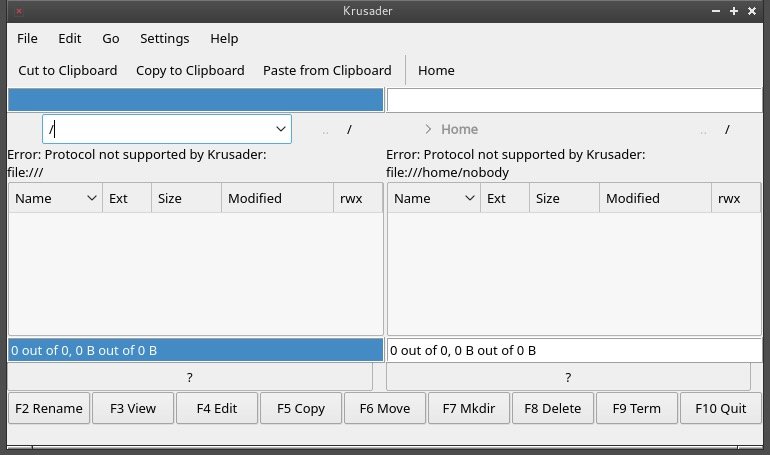
Krusader does not show me any of the shares or files. Just the Protocol error. The screengrab attached is all I get.
-
I have been trying to get this to work for quite a while now, but still get the same error. Any ideas? The only place I see anything about Protocols is in the screengrab attached. Not sure where to go from here.
-
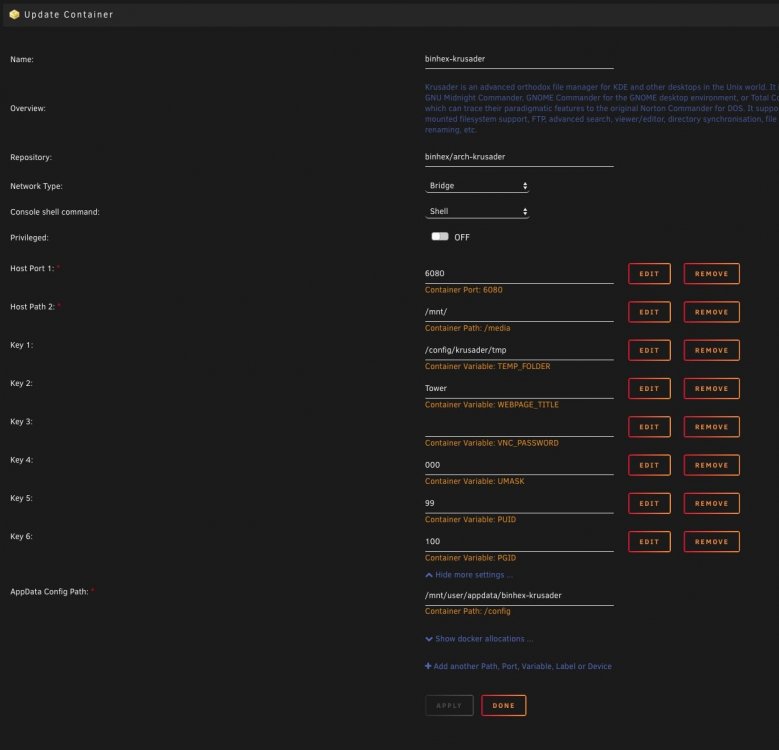
This is the Docker setupPlease see screenshot attached.
 New to Unraid, and I just installed the Krusader Docker and I am getting an error: Protocol Not supported by Krusader. I am using /mnt/ for the /media path.



