





Dolce
Members
-
Joined
-
Last visited
-
Good day all, Happy to report I believe the issue is resolved. I have had no further issues since reformatting the drive to XFS Encrypted. Thank you all for your assistance and patience!
-
Hey all, Hopefully this is my final update with regards to this matter. I have remained on 6.12.6 I was using ZFS - Encrypted and attempted to move all remaining data off of my cache to the array so that I could reformat my cache to XFS. During the moving process, it would start to trigger the kernel panic immediately after attempting to move my appdata. I believe this is due to some level of corruption either in the file format, the kernel working with ZFS encrypted, or a combination of both. In short, I had to abandon my current docker appdata and did a hard reset/reformat of my cache disk. I have successfully reformatted to XFS Encrypted and the issues appear to be absolved, but it has only been a few days. That being said, I am feeling pretty confident this is the final solution. As to what caused these issues in the first place, I am not really sure. It could be the fault of bad memory still but I have not been able to reproduce an issue in my RAM or NVME disks. For now, I have decided to turn off XMP on my RAM and move forward with the hopes that this does not become an issue again. To summarize what happened: - Swapped hardware to intel i5-13500 from a 10850K platform. Memory and all other components remained the same. Change was mostly igpu related. - At the same time, upgraded to 6.12 unraid version from 6.11.5 - Started to have significant issues with BTRFS on my original NVME drive. Mostly kernel panics related to BTRFS Encrypted. - Copied/moved all data off of BTRFS cache to array - Purchased new NVME and formatted to ZFS Encrypted - Moved old appdata back to cache and the issue appeared gone for approx 3 weeks. - Started to have significant issues again but now with kernel panics on ZFS Encrypted. - Memtested two sets of ram (16GBx4 & 16GBx2) with no issues present after 72 hours of tests on each. - Replaced motherboard to rule out issues related to the motherboard. Issue persisted. - Replaced processor (13500 -> 12700K) to rule out issues related to processor. Issue persisted. - Attempted to copy/move appdata again back to array but moving or copying of appdata began to cause immediate failure and kernel panic of the system. - Abandoned existing appdata on cache and reformatted cache to XFS Encrypted (single nvme cache). - No issues appear to be present after 72 hours. Will continue to monitor and update as time progresses. Thank you everyone for your support and help!
-
Thanks Jorge, To add more clarity: 1. I have two sets of hardware at this time now. The original motherboard and original processor, and a new motherboard and a new processor. I have two sets of DDR4 RAM as well (16GBx2 and another set of 16GB x 4). All RAM has been tested for 72 hours in memtest86 with no errors. I find it extremely unlikely the issue is related to the motherboard, processor or RAM at this time but would appreciate further insight if there is additional functional testing needed. 2. The only ZFS pool I have is that of the NVME cache drive. As per my original post, I was using 6.11.5 with a BTRFS cache pool that had no known issues prior to updating to 6.12. I was under the impression the issue was related potentially to the original BTRFS NVME drive, so I swapped to a new drive and formatted it with ZFS. Now the errors are showing as ZFS errors instead of BTRFS errors. 3. The rest of the disk pool array is formatted in XFS. Unsure if I need to upload a separate configuration file or detail that outlines the server config. Any further diagnostics steps would be greatly appreciated. Thank you again!
-
Good evening all, New follow up. I have now replaced the microprocessor (old one was a 13th gen i5-13500, new one is a 12th gen i7-12700k). The error has occured again with booting up the system. To date I have completed the following: 1. Replaced the NVME drive and reformatted it from BTRFS to ZFS. 2. Replaced the RAM with known good working ram (passed memtest 86) 3. Replaced motherboard with new motherboard 4. Replaced CPU with new CPU. I was able to download the latest log before being locked out. Please review and any advice for future steps would be greatly appreciated! Thank you again! tower-syslog-20231213-0453.zip
-
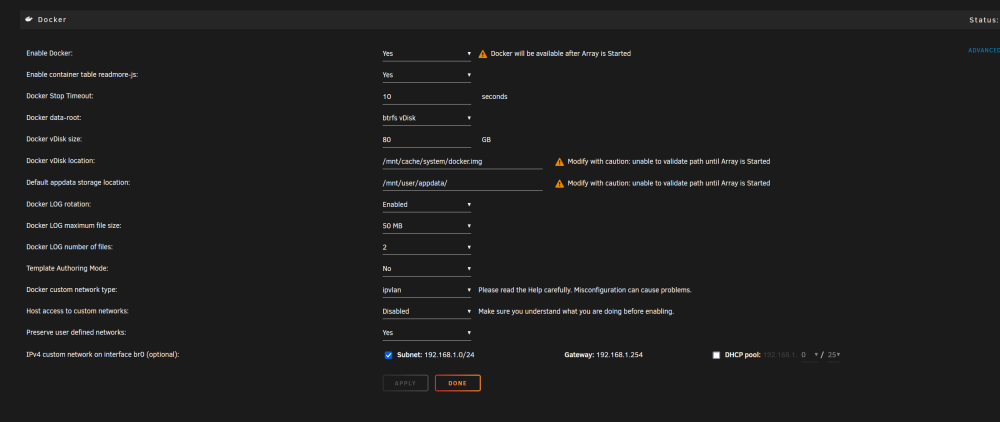
Hello again, Just providing an update. I have replaced the motherboard but kept the same CPU and ram. I did run the ram for 72 hours on memtest 86 with no errors. After replacing the motherboard, the system appears to continue to have the same problem. I am hesitant to replace my CPU, I am using the latest unraid as well. My current next steps are to "reinstall" unraid and see if it resolves the issue. One note I would also like to discuss is that my docker image is using BTRFS, any red flags with the current docker setup?
-
When I migrated to the new NVME for my cache drive, I believe I created a new docker image and then re-installed all of my dockers and copied over a backup of the original appdata used. That being said, I had to rebuild my plex docker from scratch. I will have to grab a new CPU and see if it fixes the problem I suppose. Don't have time for warranty back to Intel. I will follow up once I've tested this hardware. Thanks again for everyone's responses and support!
-
Hi Jorge, Thanks for the quick response as usual. I have done the following changes already: 1. Replaced my NVME drive with a new one. 2. Replaced RAM with known, memtest passed RAM. Could it possibly be a corrupted docker image? What would be the recommended steps to isolate the issue? Thank you
-
Dolce changed their profile photo
-
Sorry for the delay. See attached for logs and diagnostics... One thing I see is: Nov 9 21:42:44 Tower kernel: loop2: detected capacity change from 0 to 167772160 Nov 9 21:42:44 Tower kernel: BTRFS: device fsid 001882df-bd56-4551-ae14-501b609bf131 devid 1 transid 177608 /dev/loop2 scanned by mount (28158) Nov 9 21:42:44 Tower kernel: BTRFS info (device loop2): using crc32c (crc32c-intel) checksum algorithm Nov 9 21:42:44 Tower kernel: BTRFS info (device loop2): using free space tree Nov 9 21:42:44 Tower kernel: BTRFS info (device loop2): bdev /dev/loop2 errs: wr 0, rd 0, flush 0, corrupt 28, gen 0 Nov 9 21:42:44 Tower kernel: BTRFS info (device loop2): enabling ssd optimizations Nov 9 21:42:44 Tower root: Resize device id 1 (/dev/loop2) from 80.00GiB to max But I do not have a single disk formatted to BTRFS... tower-diagnostics-20231109-2243.zip tower-syslog-20231110-0545.zip
-
Sorry for the delayed response, I have been trying to diagnose this issue and so far I am getting stumped. I have reformatted the cache drive to ZFS and the issue persists. I have tried a BIOS update, going over my configuration, etc. I've also replaced the RAM with known good working RAM. I am using an intel 13th gen processor, do we know if there are issues with the latest intel processors? Any further insight or suggestions will be greatly appreciated. Thank you!
-
And it's back! I have now replaced my ram as well, but it appears this BTRFS issue crops up every few days (still random). Any advice on next steps? Thanks!
-
Just wanted to follow up now as it has been a few days. As stated prior, the memtest has passed and I moved on to changing out my cache drive from my old NVME to a new NVME. This was a bit of a painful process as I did not have a good backup of my appdata folder but spent most of the weekend reinstalling dockers & reconfiguration. I am happy to report that so far, this issue appears to be fixed now that the nvme disk has been changed. Thanks everyone!
-
Thanks! I have ran a memtest today and it passed. Starting to think its my 4 or 5 year old cache drive so I've changed it out for a new one and hopefully this is the fix. I will report back in a few days! Thanks again
-
Hello Unraid Community! I am facing a critical issue with my Unraid server (version 6.12.3) since updating from version 6.11. I need assistance to resolve the problem. System Information: Unraid Version: v6.12.3 (previously v6.11) Hardware: Intel Core i5-13500, 32GB RAM Plugins/Addons: Community Applications, Dynamix System Buttons, Dynamix System Information, Dynamix System Temperature, Fix Common Problems, Intel GPU TOP, NerdTools, Prometheus Node Exporter, rclone, Tips and Tweaks, Unassigned Devices, Unassigned Devices Plus, Unassigned Devices Preclear, unBALANCE, Unraid Connect, User Scripts. Errors Encountered: BTRFS and I/O errors, kernel warnings related to nf_nat Additional Information: The problem started occurring after the update from version 6.11 to 6.12.3. I have already updated my BIOS to the latest version. Problem Description: After updating my Unraid system from version 6.11 to 6.12.3, I started facing I/O errors that I had never encountered before. The system has become unstable, and I'm concerned about potential data loss. I have attached the complete syslog and SMART reports to help understand what went wrong. I have not yet rebooted the system to ensure that all relevant logs are preserved. Attachments: Diagnostics File SMART Reports for nvme drive I have followed the guidelines as closely as possible to provide all the necessary information. If further details are required or if there are any specific tests I should run, please let me know, and I will respond promptly. Thank you everyone for your assistance and time! tower-diagnostics-20230820-2113.zip tower-smart-20230820-2024.zip
-
I'm trying to access qbittorrent via sonarr and I've tried multiple attempts at remotely connecting. Is there a setting that must be enabled via qBittorrent for this to work? I am able to remotely log in via the web GUI but no luck with sonarr. Does anyone else have this working? Thanks.


