





Jargo56
Members
-
Joined
Everything posted by Jargo56
-
rebooted server and my docker engine won't start. please help. attached log tower-diagnostics-20230910-1237.zip
-
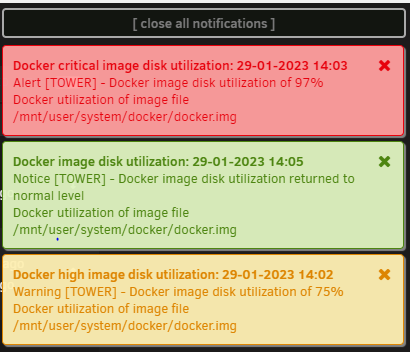
I've attached a screenshot of my docker image randomly filling up then clearing itself out. When it does this my server because unresponsive which isn't a surprise. How can I tell what is doing this so I can fix it? I run the scripts from spaceinvader to find orphan images but that's not the issue here. Its probably log files filling it up but I have no idea what they could be from. I have also attached my diagnostic logs if those can help. Any help would be appreciated. Thanks tower-diagnostics-20230129-2051.zip
-
I apologize if this has been asked before, but how do you pipe the traffic out from this docker to a VPN? I know other people include VPN settings in the docker setup but I would rather use the Linuxserver dockers and its not clear how this works for the torrent dockers. Thanks in advance.
