





alinkognito
Members
-
Joined
-
Last visited
Everything posted by alinkognito
-
aye aye captain
-
Powered down the server. On reboot to ran the command. # xfs_repair -v /dev/md12 Phase 1 - find and verify superblock... bad primary superblock - bad CRC in superblock !!! attempting to find secondary superblock... .found candidate secondary superblock... verified secondary superblock... writing modified primary superblock - block cache size set to 1397184 entries Phase 2 - using internal log - zero log... zero_log: head block 142733 tail block 142729 ERROR: The filesystem has valuable metadata changes in a log which needs to be replayed. Mount the filesystem to replay the log, and unmount it before re-running xfs_repair. If you are unable to mount the filesystem, then use the -L option to destroy the log and attempt a repair. Note that destroying the log may cause corruption -- please attempt a mount of the filesystem before doing this. Now drive is back up and it's re-building - phew Let's see what if it get's over the 1% Thanks in the meanwhile
-
There is also a XFS error on sceen on md12 Above my skill level on what to do 😥
-
Hello community. Sunny greeting. I think I messed up somewhere and require your help or direction to the right place. I replaced drive 12 recently with a new 18TB HDD as the one before failed. Everything was running fine with drive 12 emulated. New disk in - started re-building nicely but stopped at around 1% with a few drives showing errors. Replaced my cables, checked all the connections and rebooted. Started re-building again but again stuck at around 0.6% Rebooted again and now drive shows as "unmountable: wrong or no file system" with the option to format the new drive. Also my total array space seems to of changed too. I paused the data-rebuild as I cant stop the array and now reaching out to you AMAZING peps for help as I don't want to lose any data. Could someone assist please? Much appriciated. Al kraken-diagnostics-20220714-1844.zip
-
Solved: Cables checked and all working fine now (parity build at 20% and going strong with no errors)
-
Not long rebooted and now only 1 x disk is showing errors! - straaaange. I will re-check the cables (which are 3 x months old). I will also check the power supply - (3 x years old), so could be the PSU. The PSU has modular cables so I will try a new cable on the PSU and see what that does. Thanks again.
-
Hi all. Sunny greetings. So, replaced my disk 12 from a 4TB to a 18TB. Disk started rebuilding, but started getting errors on Disk 1, 4, 6 & 9 No indication of errors beforehand. I rebooted and it's doing a Data-rebuild again. Just wanted to check with the community what you suggest I should do next? New cables and a beefy power supply in the server. Disk 1, 4 & 6 are all relativyly new SG Exos drives so Disk 1 - new Exos Disk 4 - new Exos Disk 6 - new Exos Other disks are a mixure of of SG/Toshiba drives. Your comments, sugestions will be appriciated. Many thanks, Al After reb kraken-diagnostics-20220625-0609.zip
-
New cables added. 18TB Parity drive added. New config config'ed. Rebuilding with no errors so far. Happy days. Thank you for all your help and fast reply.
-
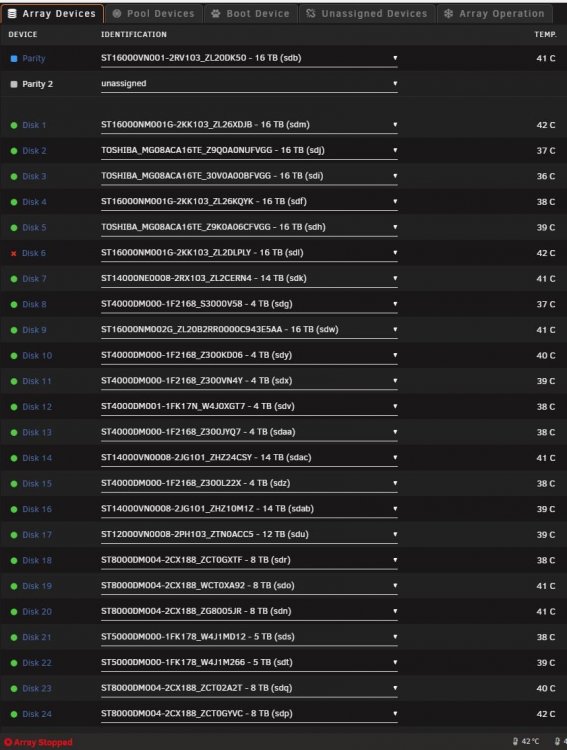
Cool thanks. I have stopped the array. Never done a new config before. So... in the tools/new config, do I need to preseve any current assignment? Also, will I allocated the original 16TB drive as the parity and although drive 6 still showing is showing as diabled do I allocated the respective drive to it? (Screen shot attached). Sorry, just want to be safe than sorry and avoid any data loss. Thanks. Al
-
Hello everyone. Hope everyone is well and that you can assist. So, got myself a new 18TB drive to replace my working 16TB parity drive. I replaced the drive and while parity sync/rebuilding I started getting read errors on some of the drives. Reading the forums, I understand it could be some cable issues, so I have ordered new cables SAS cables. I stopped it and rebooted the server and now drive 6 (another 16TB) is showing as disabled. Panic started.... A ordered a new 16TB drive to replace the disabled drive. In the meanwhile, I removed the new 18TB parity drive and put back the original 16TB parity but now I am getting one of two additional issues: 1) With the old parity drive in the error = "Stopped. Invalid configuration." 2) If I disable the parity drive, the array starts with disk 6 disabled/emulated. My plan is to once I get the 16TB, put it in to replace the disabled disk 6, but without the parity will I lose data? If not, then replace the 16TB parity to the 18TB and sync/rebuild. As you can probably tell I am probably not the most experienced in unraid, but tech savy, but wanted to reach out and get your advice/suggestion on how to proceed before I create more issues and how to get my server back to it's full glory (of course if you have any other suggestion on how toi make it better, let me know too)🙂 Appreciate your assistance. Thank you Al kraken-diagnostics-20211120-1148.zip


