mccarthyrobert8
Members
-
Joined
-
Last visited
Everything posted by mccarthyrobert8
-
Hi, I'm trying to install HaCasa and am stumped. Following their guide here: https://damianeickhoff.github.io/HaCasa/getting-started/download And for the life of me I cannot find "the root of your HA configuration (this is where your configuration.yaml lives" as they say in the guide. I feel like this should be really obvious, what am I missing? thanks
-
Is this normal, copying a file from cache to array. Very fast in the beginning and drops throughout the rest of the transfer, seems like the same behavior as the torrents.

-
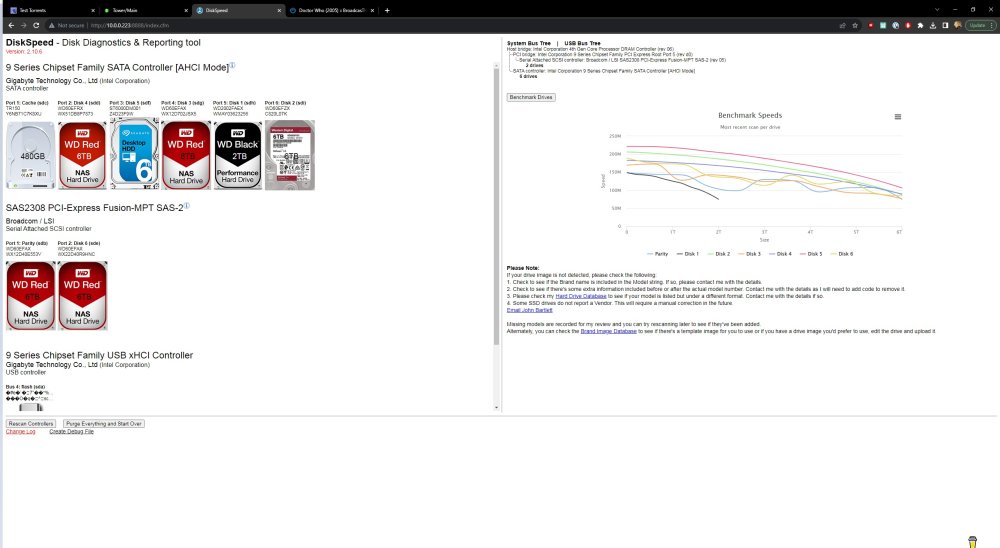
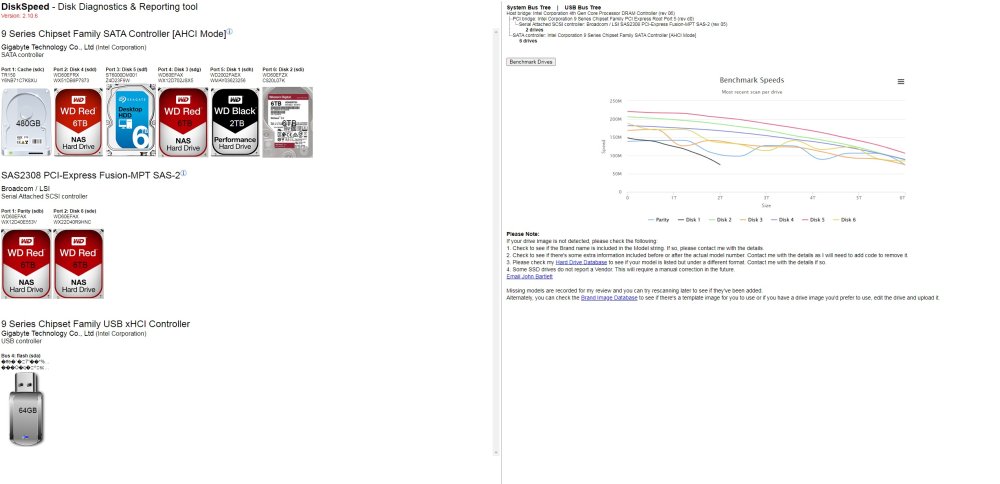
I'm in a bit over my head here. Recently I noticed my torrent speeds have lowered significantly. I've checked all my ports and everything seems good. I can connect to my trackers no problem and occasionally will peak at expected speeds (90 MiB/s) at the beginning of a download briefly (less than a minute) before dropping to back down to much lower speeds (fluctuating from sub 1 MiB/s to a max of around 6 MiB/s). I have my arr suite setup to download straight to the array (this has never caused any issues and speeds would normally be acceptable and near what I limited my torrent dockers at (48 MiB/s). I tried switching torrent dockers from rutorrent to Deluge and the same problem exists. I have tried testing with well seeded torrents and the problem persists. I've tried disabling every other docker except rutorrent/deluge, problem persists. The only thing that seems to have fixed the issue is setting up a test share that uses the cache. This gave me download speeds in the 60-70MiB/s with slight fluctuations. I have attached diags and screenshots of DiskSpeed results, but not sure how to interpret the results. One DiskSpeed result (_FULL) contains speed gap errors, in the other I disabled them. Could this be an issue with failing drives, or could my drives be slowing because they're starting to fill up? I also didn't notice this issue until I updated to 6.12.3, not sure if it could be related to that. Any help is greatly appreciated. tower-diagnostics-20230825-1118.zip

-
Running xfs_repair without the modifier allowed me to delete the directory. I feel real dumb.
-
I realized I didn't remove the -n modifier when I ran xfs_repair. Currently, I have my macbook backing up to the timemachine docker which is going to take some hours. I will try to run xfs_repair without the modifier when this finishes and report back.
-
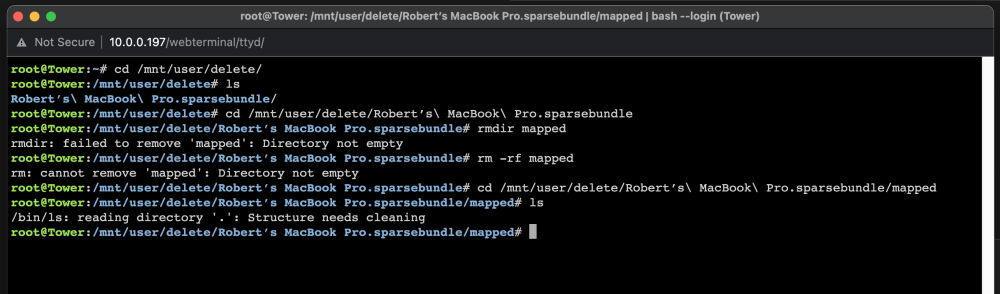
I updated to 6.12.3 and my time machine backup stopped working. After doing some research it seems this is pretty common and the easiest solution is to switch to the Timemachine docker. I want to delete my old timemachine share but inside the .sparsebundle there is a "mapped" folder that is causing some issues. When I try to delete the sparsebundle I get the directory not empty error. Fine, go into sparsebundle and find the mapped folder still there, use rm -r mapped and it returns the same directory not empty error. I try using the rmdir, and rm -rf commands but still the same issue. If i list the files inside the mapped folder I get this error "/bin/ls: reading directory '.': Structure needs cleaning." Start the array in maintenance mode and run xfs_repair and start up the array. Same issue. How do I delete this so I can delete this share? diagnostics attached. root@Tower:~# cd /mnt/user/delete/ root@Tower:/mnt/user/delete# ls Robert’s\ MacBook\ Pro.sparsebundle/ root@Tower:/mnt/user/delete# cd /mnt/user/delete/Robert’s\ MacBook\ Pro.sparsebundle root@Tower:/mnt/user/delete/Robert’s MacBook Pro.sparsebundle# rmdir mapped rmdir: failed to remove 'mapped': Directory not empty root@Tower:/mnt/user/delete/Robert’s MacBook Pro.sparsebundle# rm -rf mapped rm: cannot remove 'mapped': Directory not empty root@Tower:/mnt/user/delete/Robert’s MacBook Pro.sparsebundle# cd /mnt/user/delete/Robert’s\ MacBook\ Pro.sparsebundle/mapped root@Tower:/mnt/user/delete/Robert’s MacBook Pro.sparsebundle/mapped# ls /bin/ls: reading directory '.': Structure needs cleaning root@Tower:/mnt/user/delete/Robert’s MacBook Pro.sparsebundle/mapped# tower-diagnostics-20230817-2356.zip