WastedMoment
Members
-
Joined
-
Last visited
-
my processors are dual xeon e5-2630l and no messages at all, it felt like an autosave issue to me as well due to its frequency, and how it happens in almost the same interval. I was wrong, I went through the logs in the app data (I was looking at the docker logs originally, sorry noob mistake) . I am getting an overloaded error, and here are the latest two... [14:55:51] [Server thread/WARN]: Can't keep up! Is the server overloaded? Running 4287ms or 85 ticks behind [15:00:53] [Server thread/WARN]: Can't keep up! Is the server overloaded? Running 2090ms or 41 ticks behind My apologies, I guess it is an issue with my hardware.
-
Yeah, default settings vs my adjusted didn't make any change really, other than the world renders faster. The cache drive is SSD samsung 860 evos, non nvme, and the appdata folder is set use cache drive.
-
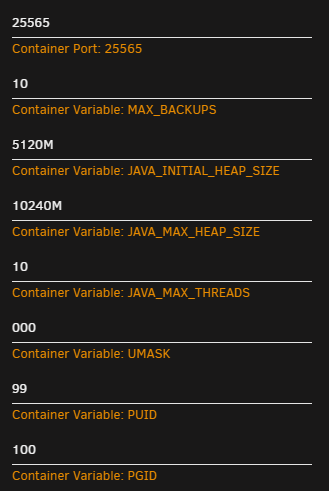
Thank you for this, it was really easy to setup, and get a minecraft server working. I do have a question, I'm not sure if its my server, or the docker since its fairly new. About every 10-15 minutes the server will "lag" and if you were walking, you'd teleport about 3-5 seconds prior to its "lag" or any activity during this event will reverse about 3-5 seconds prior to the incident. If it happened every couple of hours I wouldn't care, but its happening to me, and the other people playing on the server at the exact same time. Specs of server: dual core xeon, 64gb of memory, 500gb dual cache, dual (bonded) nic on 1gbps fiber. i've allocated a max of 10gb of memory and 10 threads to the server. I believe that is enough to run with only 3-4 people playing.